AI agent for event marketers
Event Landing Page Pre-Launch Check Agent
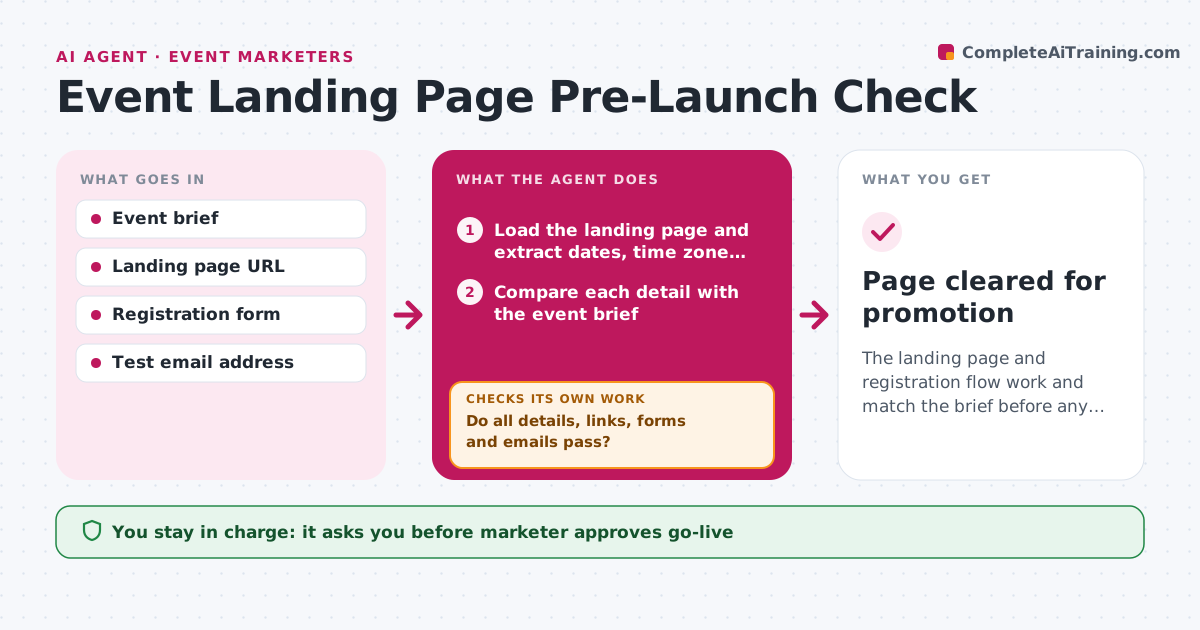
The landing page and registration flow work and match the brief before any promotion starts.
What it does
The first sign of a broken registration page is usually a customer email on launch day. This agent runs a full check before go-live. It loads the landing page and registration form, submits a test registration, and compares the dates, time zones, venue details and prices with the event brief. It clicks every link, checks the confirmation email arrives with the right content, and confirms the calendar invite has the correct time. Failed items go to the marketer as a list for fixing, and then the whole set is rechecked from the top, not just the fixed items. The marketer approves go-live. Edge case: the page shows 9 AM Eastern but the confirmation email says 9 AM Pacific.
How it works
Follow the arrows from top to bottom. The orange dashed arrow is the loop: when a check fails, the agent goes back and tries again.
Read the steps as a list
- Page marked ready for launch
- Load the landing page and extract dates, time zone, venue and price
- Compare each detail with the event brief
- Click every link and test mobile and desktop views
- Submit a test registration and check the confirmation email and calendar invite
- Do all details, links, forms and emails pass?If not: list each failure with a screenshot, send to the marketer and rerun the whole check after fixes. Back to step 2.
- Test edge cases: sold out, invalid email, discount code
- Do the edge cases behave as the brief says?If not: report the behavior, wait for the fix and retest. Back to step 5.
- Write the go-live report with pass and fail results
- Marketer approves go-liveThe agent waits here for your OK.
- Page cleared for promotion
How it decides
A check passes only when every item matches the brief. Any change restarts the whole check.
- Rerun the full check after any fix, not only the failed item.
- Treat a wrong date or time zone as a blocker.
- Treat a broken link on a call-to-action as a blocker.
- Allow a cosmetic issue to pass with a note.
Make it yours
Every agent is a starting point. You choose these settings for your own situation.
- Items in the checklist
- Test email address
- Screen sizes tested
- Blocker rules
What keeps you in control
It always asks you first
- Marketer approves go-live
Hard limits
- Use a test address, never real attendee data
- Do not change the live page itself
It stops when
- Done: all checks pass and go-live approved.
- Stop: three full reruns fail, so the marketer is asked to review the build.
Set it up
We guide you through the set-up, step by step
Members get the full set-up guide for this agent. No technical skills needed: you copy, paste and upload.
- One set of instructions to paste into your AI, with the clicks for ChatGPT, Claude, Microsoft 365 Copilot, Gemini and Grok
- The agent then walks you through connecting your own data, one source at a time
- A downloadable copy with the flow chart, the rules and the full guide