AI agent for event marketers
Event Registration Pacing Agent
Reach the registration goal on time
What it does
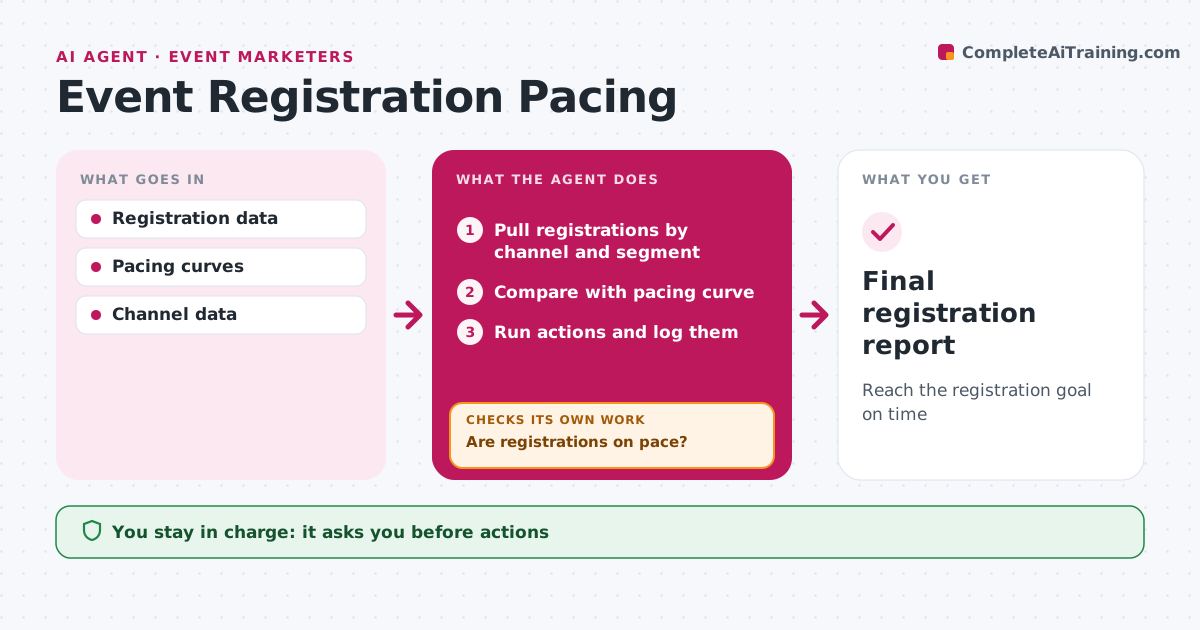
Every event has a registration goal and a timeline, and noticing a shortfall late leaves no time to fix it. Each day this agent pulls registrations by channel and audience segment and compares them with a pacing curve built from past events. If registrations are more than 10 percent below the curve, it finds which channels or segments are lagging and proposes actions, such as an extra email, a partner promotion, a paid boost or a speaker share. Paid boosts stay within budget. The event marketer approves every action and any spend. After an action runs, the agent logs it and checks its effect on registrations, then tries the next option if pacing is still behind. Edge case: a sudden jump from one partner is checked for fake signups before it counts toward the goal.
How it works
Follow the arrows from top to bottom. The orange dashed arrow is the loop: when a check fails, the agent goes back and tries again.
Read the steps as a list
- Daily pacing check
- Pull registrations by channel and segment
- Compare with pacing curve
- Are registrations on pace?If not: find lagging channels and propose actions. Back to step 2.
- Event marketer approves actionsThe agent waits here for your OK.
- Run actions and log them
- Final registration report
How it decides
Behind means more than 10% below the pacing curve.
- Behind is more than 10% below curve
- Check partner spikes for fake signups
- Paid boost only within budget
Make it yours
Every agent is a starting point. You choose these settings for your own situation.
- Pacing threshold
- Budget
- Channels
What keeps you in control
It always asks you first
- Actions
- Spend
Hard limits
- Never spends money itself
- Never emails opted-out contacts
It stops when
- Done: event day
- Stop: event cancelled
Set it up
We guide you through the set-up, step by step
Members get the full set-up guide for this agent. No technical skills needed: you copy, paste and upload.
- One set of instructions to paste into your AI, with the clicks for ChatGPT, Claude, Microsoft 365 Copilot, Gemini and Grok
- The agent then walks you through connecting your own data, one source at a time
- A downloadable copy with the flow chart, the rules and the full guide