AI agent for administrative assistants
Expense Report Assembly Agent
Complete, policy-compliant expense reports filed on time
What it does
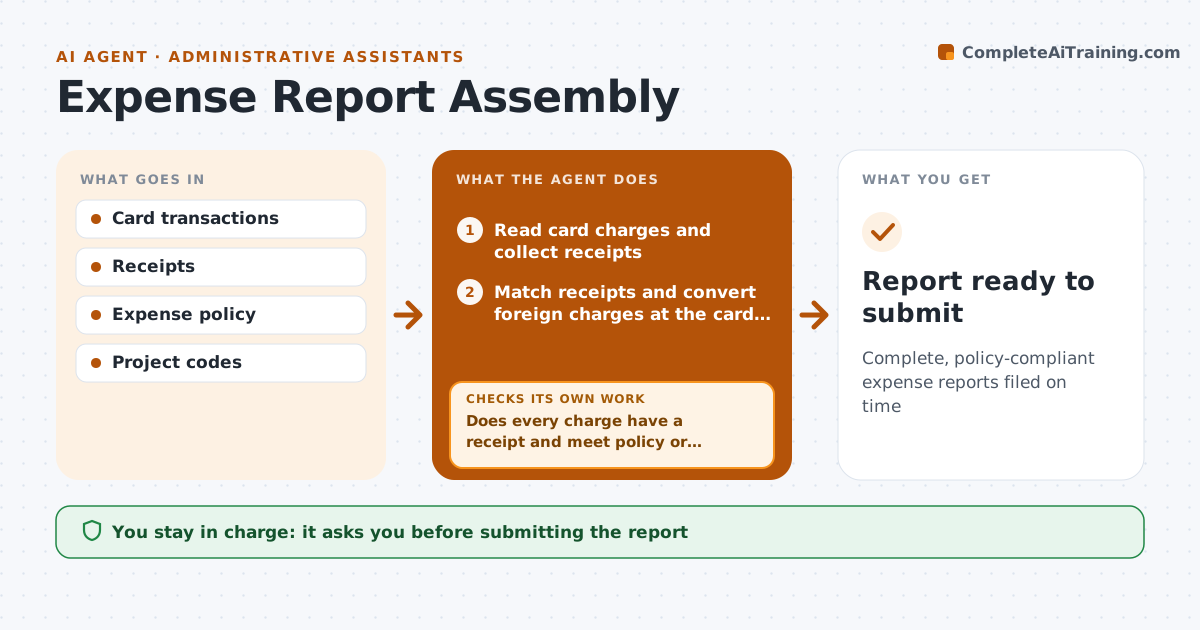
After trips and client meals, the assistant must match receipts to card charges and file the report under policy, which means chasing paper and the executive's memory. Each week, or when a trip ends, this agent reads card charges and collects receipts from email and photos. It matches them, using the receipt amount and the card's exchange rate for foreign charges, and assigns categories and project codes. It checks each item against the expense policy. Every charge needs a matched receipt and must meet policy limits or carry a written reason. If a receipt is missing or an item breaks policy, it drafts a request to the executive and checks again when the answer comes in. Missing receipts over the policy limit need an affidavit. The assistant approves before the report is submitted. Edge case: a split charge across two projects gets two lines with the same receipt.
How it works
Follow the arrows from top to bottom. The orange dashed arrow is the loop: when a check fails, the agent goes back and tries again.
Read the steps as a list
- Weekly run or trip end
- Read card charges and collect receipts
- Match receipts and convert foreign charges at the card rate
- Assign categories and project codes
- Check each item against expense policy
- Does every charge have a receipt and meet policy or have a reason?If not: draft a request for the missing receipt or reason and recheck. Back to step 3.
- Draft affidavits for lost receipts over the limit
- Assistant approves the reportThe agent waits here for your OK.
- Report ready to submit
How it decides
Each charge needs a matched receipt and must meet policy limits or carry a written reason.
- Missing receipts over the policy limit need an affidavit
- Over-limit items need a reason
- Foreign charges use the card rate
Make it yours
Every agent is a starting point. You choose these settings for your own situation.
- Policy limits
- Project codes
- Reminder timing
- Expense system
What keeps you in control
It always asks you first
- Submitting the report
Hard limits
- Never submits reports itself
- Never changes amounts
It stops when
- Done: report submitted
- Stop: executive has not answered after two reminders
Set it up
We guide you through the set-up, step by step
Members get the full set-up guide for this agent. No technical skills needed: you copy, paste and upload.
- One set of instructions to paste into your AI, with the clicks for ChatGPT, Claude, Microsoft 365 Copilot, Gemini and Grok
- The agent then walks you through connecting your own data, one source at a time
- A downloadable copy with the flow chart, the rules and the full guide