AI agent for elementary school teachers
Grade Book Anomaly and Missing Work Agent
A grade book with no missing or wrong entries before report cards.
What it does
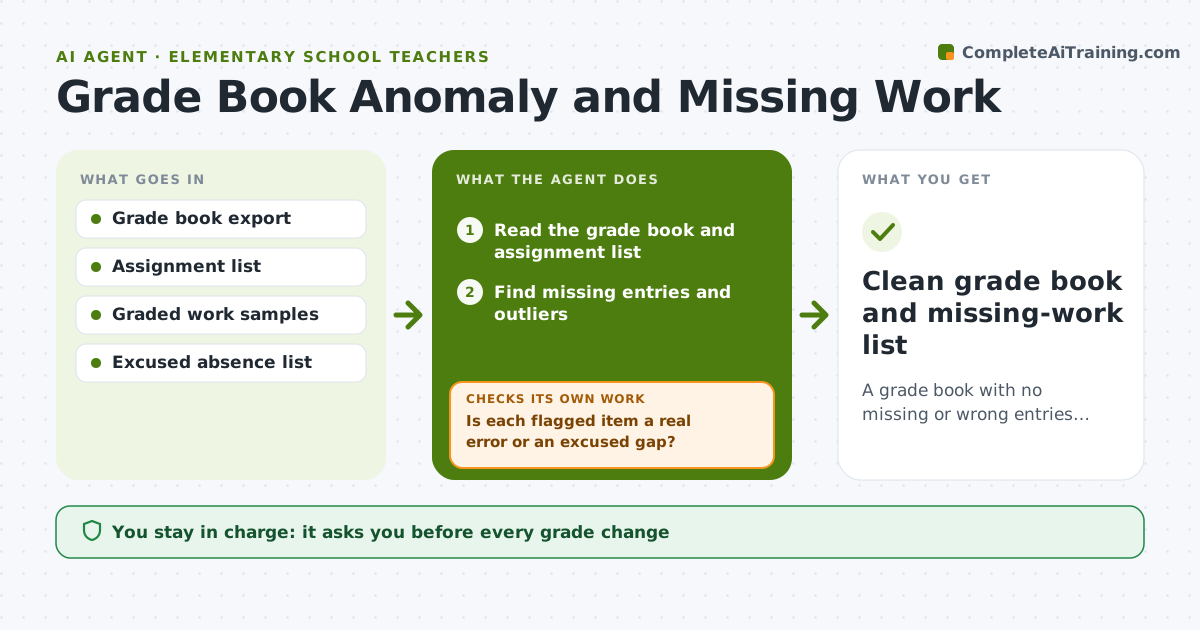
A teacher finds five missing grades and two entry errors the week before report cards, and no time to chase students. This agent reads the grade book and finds missing entries, outliers and mismatches with graded work, such as a 95 recorded for a paper that shows 59. It drafts a fix list, rechecks after each update and watches new entries each week. Fixes are rechecked in the grade book itself, so a corrected entry is not assumed to be right until it shows. Edge case: an excused absence leaves a gap that is not an error, so the agent marks it as excused after the teacher confirms. The teacher approves any grade change.
How it works
Follow the arrows from top to bottom. The orange dashed arrow is the loop: when a check fails, the agent goes back and tries again.
Read the steps as a list
- Weekly grade book check
- Read the grade book and assignment list
- Find missing entries and outliers
- Compare flagged scores with graded work samples
- Is each flagged item a real error or an excused gap?If not: ask the teacher and mark excused items. Back to step 3.
- Draft a fix list and a missing-work list
- Teacher approves grade changesThe agent waits here for your OK.
- Re-read the grade book after updates
- Are all flagged items resolved?If not: list remaining items and carry them to next week. Back to step 4.
- Clean grade book and missing-work list
How it decides
It flags missing entries, scores that differ from the work sample, and unusual outliers, then rechecks each fix.
- Flag scores that differ by more than 10 points from the work sample.
- Flag students with 2 or more missing entries.
- Never change a grade without teacher approval.
- Excused absences are tracked separately.
Make it yours
Every agent is a starting point. You choose these settings for your own situation.
- Outlier threshold (default 10 points)
- Missing work limit
- Check day
- Excused rules
- Grade book format
What keeps you in control
It always asks you first
- Every grade change
- Any message about missing work
Hard limits
- Do not change grades directly.
- Do not share one student's grades with another.
It stops when
- Done: all items resolved or carried with a reason
- Stop: grade book data cannot be read, so the agent asks for an export
Set it up
We guide you through the set-up, step by step
Members get the full set-up guide for this agent. No technical skills needed: you copy, paste and upload.
- One set of instructions to paste into your AI, with the clicks for ChatGPT, Claude, Microsoft 365 Copilot, Gemini and Grok
- The agent then walks you through connecting your own data, one source at a time
- A downloadable copy with the flow chart, the rules and the full guide