AI agent for chief information security officers
IT Policy Annual Review Agent
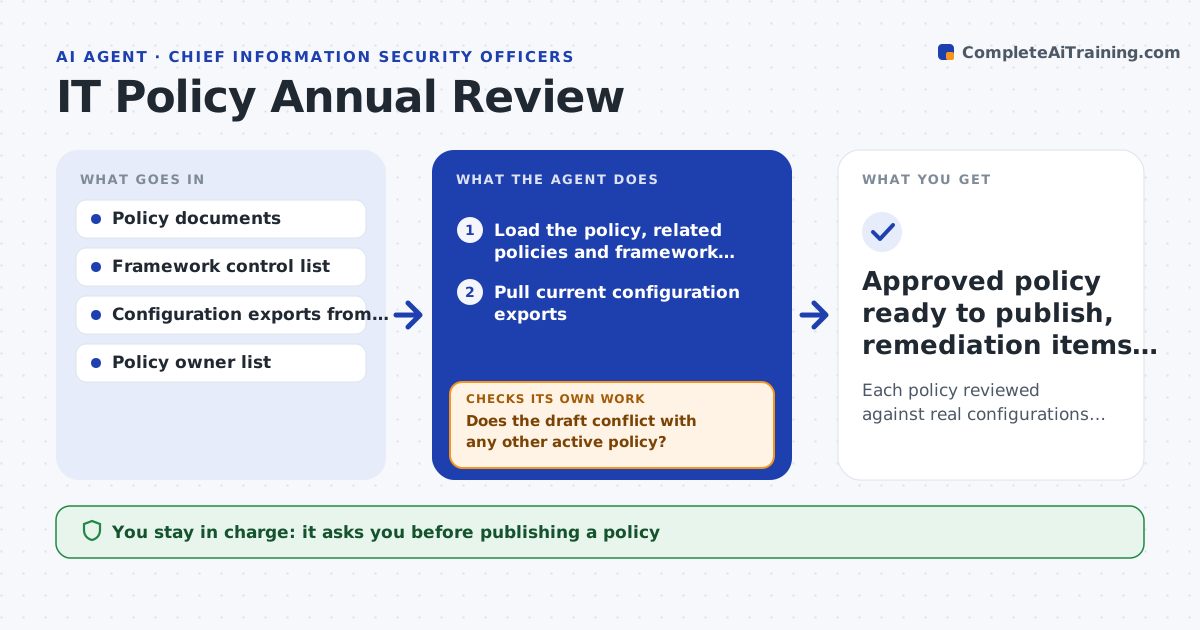
Each policy reviewed against real configurations and frameworks, with a clean draft ready for sign-off
What it does
IT and security policies must be reviewed every year, but many reviews only change the date while systems and rules drift apart. This agent reads each policy due for review and checks every statement against current reality: system settings, the framework you follow and other policies. It lists statements that no longer match, such as a password rule the identity system does not enforce, and conflicts between policies. It drafts tracked changes and a short change summary. After drafting, it rechecks each change against all other policies. If a change would contradict another policy, it flags both and adjusts the draft. When a setting is weaker than the policy, it does not lower the policy. It raises a remediation item instead. You and the policy owner approve every change before anything is published. Edge case: a framework update changes a required control between reviews.
How it works
Follow the arrows from top to bottom. The orange dashed arrow is the loop: when a check fails, the agent goes back and tries again.
Read the steps as a list
- Policy reaches its review date
- Load the policy, related policies and framework controls
- Pull current configuration exports
- List statements that do not match settings or controls
- Draft tracked changes and remediation items
- Does the draft conflict with any other active policy?If not: flag both policies and rewrite the conflicting clause. Back to step 5.
- Policy owner and IT leader approve the draftThe agent waits here for your OK.
- Approved policy ready to publish, remediation items logged
How it decides
A statement is flagged when it conflicts with a configuration, a framework control or another policy. Weaker settings become remediation items, not policy changes.
- Raise remediation when a setting is weaker than policy
- Update policy when the framework requirement changed
- Flag duplicate rules across policies for merging
Make it yours
Every agent is a starting point. You choose these settings for your own situation.
- Framework to check against
- Policies and owners in scope
- Review reminder lead time (default 30 days)
- Draft format (tracked changes or comparison table)
What keeps you in control
It always asks you first
- Publishing a policy
- Changing any system setting
Hard limits
- Never lowers a policy to match a weak setting
- Never publishes or changes systems
It stops when
- Done: draft approved and remediation logged
- Stop: configuration exports are unavailable
Set it up
We guide you through the set-up, step by step
Members get the full set-up guide for this agent. No technical skills needed: you copy, paste and upload.
- One set of instructions to paste into your AI, with the clicks for ChatGPT, Claude, Microsoft 365 Copilot, Gemini and Grok
- The agent then walks you through connecting your own data, one source at a time
- A downloadable copy with the flow chart, the rules and the full guide