AI agent for bloggers
Keyword-Based Editorial Calendar Agent
Build a monthly content calendar that targets real search demand without overlap
What it does
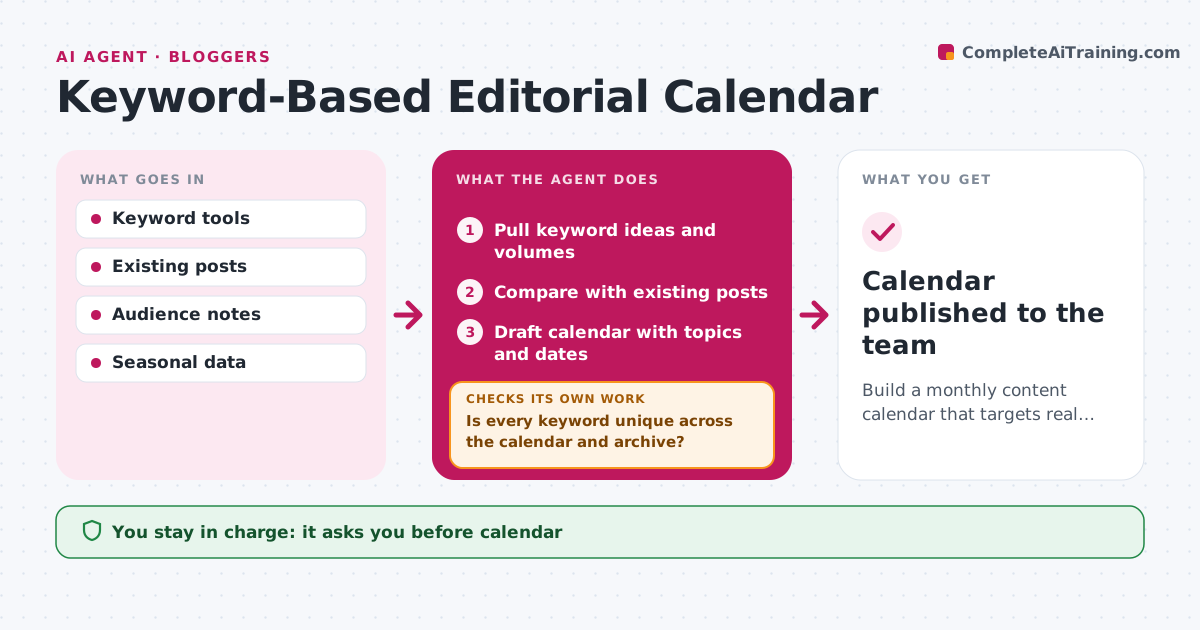
Planning a month of posts takes research, and without it posts compete with each other in search. At monthly planning, this agent pulls keyword ideas from search tools and checks search volume, difficulty and seasonal trends. It compares them with existing posts to avoid overlap. It drafts a calendar with topic, keyword, angle and due date for each post. It then checks that every keyword is unique across the calendar and the archive. If two posts target the same keyword, it merges them or changes one, and checks again. It also looks for gaps in key topics. Seasonal topics are planned six weeks early. The blogger or content lead approves the calendar before it goes to the team. Edge case: a topic that needs expert input, such as an interview, is flagged and given extra lead time.
How it works
Follow the arrows from top to bottom. The orange dashed arrow is the loop: when a check fails, the agent goes back and tries again.
Read the steps as a list
- Monthly planning
- Pull keyword ideas and volumes
- Compare with existing posts
- Draft calendar with topics and dates
- Is every keyword unique across the calendar and archive?If not: merge or change overlapping topics. Back to step 4.
- Content lead approves the calendarThe agent waits here for your OK.
- Calendar published to the team
How it decides
Topics are ranked by volume, difficulty and fit, and must not overlap existing posts.
- No two posts on the same keyword
- Expert topics get extra lead time
- Seasonal topics planned 6 weeks early
Make it yours
Every agent is a starting point. You choose these settings for your own situation.
- Posts per month
- Keyword tool
- Calendar format
What keeps you in control
It always asks you first
- Calendar
Hard limits
- Never publishes posts
- Never promises traffic numbers
It stops when
- Done: calendar approved
- Stop: keyword tool unavailable
Set it up
We guide you through the set-up, step by step
Members get the full set-up guide for this agent. No technical skills needed: you copy, paste and upload.
- One set of instructions to paste into your AI, with the clicks for ChatGPT, Claude, Microsoft 365 Copilot, Gemini and Grok
- The agent then walks you through connecting your own data, one source at a time
- A downloadable copy with the flow chart, the rules and the full guide