AI agent for manager of operations
Labor Productivity Variance Agent
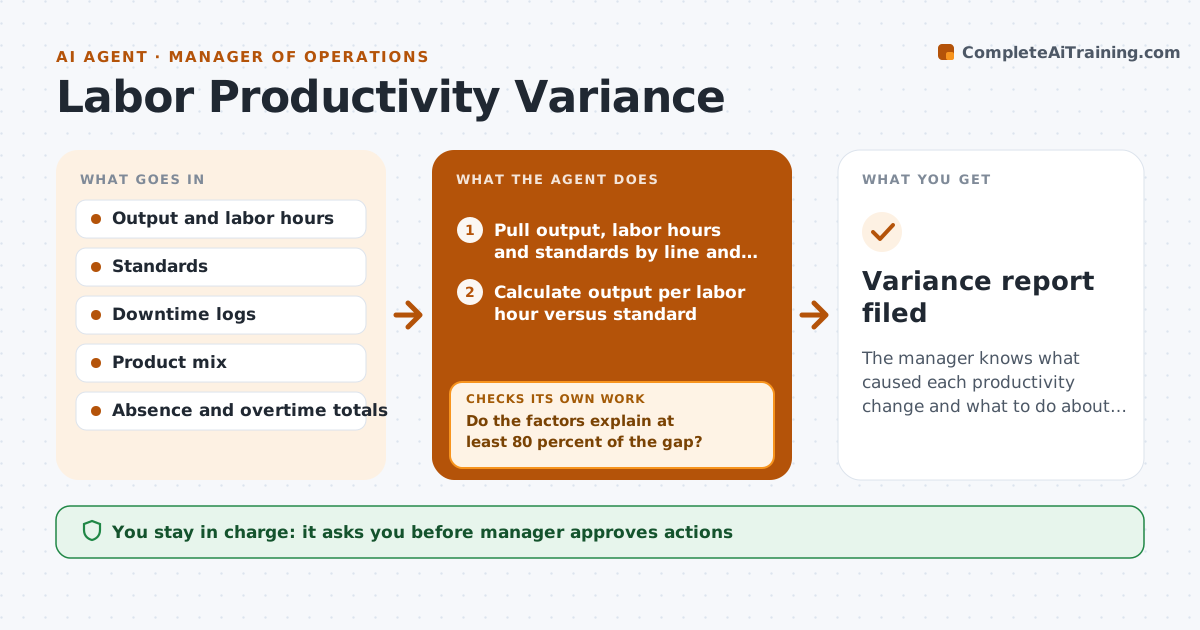
The manager knows what caused each productivity change and what to do about it.
What it does
Output per labor hour dropped 8 percent last week, and the explanation in the meeting is a guess. Each week this agent compares output per labor hour with the standard, then drills into the data in steps: downtime, product mix, absence, overtime, changeovers and new hires. It measures how much of the gap each factor explains. If the data explains less than 80 percent of the gap, it asks for missing records, such as downtime logs, and reruns the analysis. It writes the drivers in plain language and proposes actions at the process level. The manager approves actions. It never makes decisions about named people. Edge case: a product mix shift makes the standard hours unfair, so the agent adjusts the baseline.
How it works
Follow the arrows from top to bottom. The orange dashed arrow is the loop: when a check fails, the agent goes back and tries again.
Read the steps as a list
- Weekly productivity review
- Pull output, labor hours and standards by line and shift
- Calculate output per labor hour versus standard
- Pull downtime, product mix, absence, overtime and changeover data
- Measure how much of the gap each factor explains
- Do the factors explain at least 80 percent of the gap?If not: request the missing records, such as downtime logs, and rerun the breakdown. Back to step 4.
- Adjust the standard for product mix differences
- Does the adjusted view still show the same drivers?If not: recompute with the mix-adjusted standard. Back to step 5.
- Write the drivers and process-level options
- Manager approves actionsThe agent waits here for your OK.
- Variance report filed
How it decides
It calls the cause explained when the identified factors account for at least 80 percent of the gap, and keeps digging or asks for data otherwise.
- Require 80 percent of the gap to be explained.
- Report at line and shift level, not by person.
- Adjust standards when the product mix shifts over 10 percent.
- Prioritize actions by hours recovered.
Make it yours
Every agent is a starting point. You choose these settings for your own situation.
- Explanation threshold (default 80 percent)
- Factors analyzed
- Lines and shifts covered
- Review day
What keeps you in control
It always asks you first
- Manager approves actions
Hard limits
- Never evaluate or name individual workers
- Show the data behind each driver
It stops when
- Done: drivers explained and actions approved.
- Stop: data unavailable after a request, so the gap stays unexplained.
Set it up
We guide you through the set-up, step by step
Members get the full set-up guide for this agent. No technical skills needed: you copy, paste and upload.
- One set of instructions to paste into your AI, with the clicks for ChatGPT, Claude, Microsoft 365 Copilot, Gemini and Grok
- The agent then walks you through connecting your own data, one source at a time
- A downloadable copy with the flow chart, the rules and the full guide