AI agent for curriculum developers
Learner Feedback to Course Fix Agent
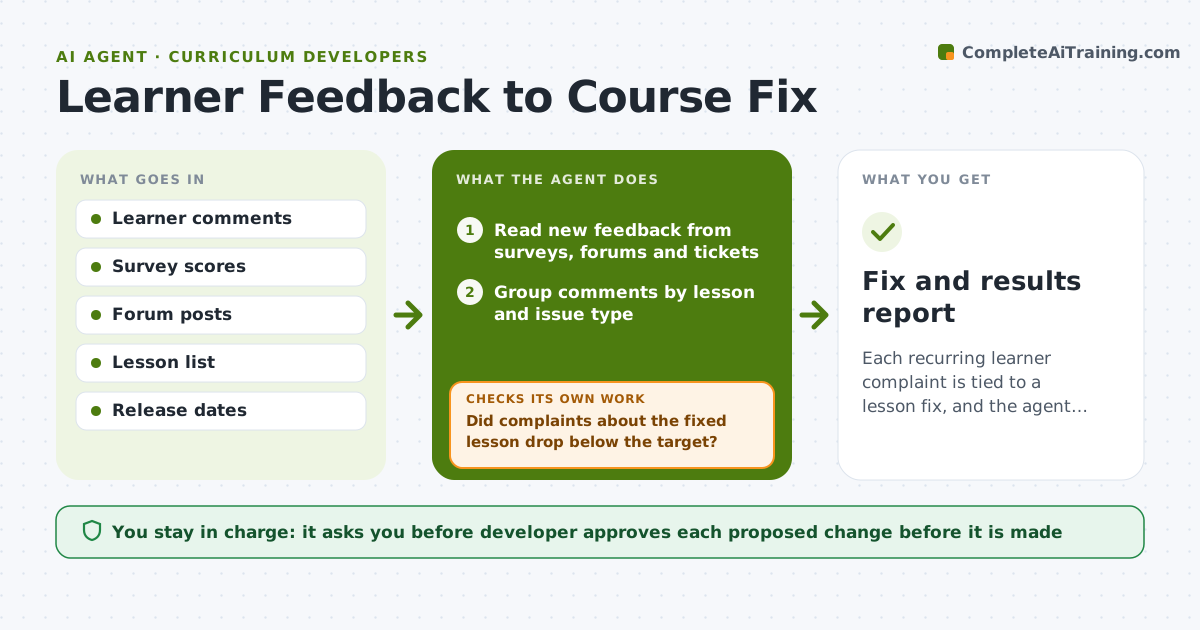
Each recurring learner complaint is tied to a lesson fix, and the agent verifies whether the complaint went away.
What it does
Learners leave comments in surveys, forums and support tickets, but those comments rarely lead to a named change in the course. The agent reads new feedback, groups it by lesson and by issue, such as unclear steps or broken links, and counts how many people raised each one. For the biggest groups it proposes a specific fix and who should make it. Later it reads new feedback after the fix is released and checks whether complaints about that lesson dropped. If they did not, it loops back and proposes another change. The developer approves every change. Edge case: a lesson with high complaints that are really about a tool update outside the course.
How it works
Follow the arrows from top to bottom. The orange dashed arrow is the loop: when a check fails, the agent goes back and tries again.
Read the steps as a list
- Weekly run
- Read new feedback from surveys, forums and tickets
- Group comments by lesson and issue type
- Rank groups by count and severity
- Propose a specific fix and owner for each top group
- Developer approves the fixes to makeThe agent waits here for your OK.
- Create tasks for the fixes
- Wait for release and read new feedback
- Did complaints about the fixed lesson drop below the target?If not: Regroup the new comments and propose a different fix. Back to step 4.
- Update the feedback record with results
- Fix and results report
How it decides
It ranks issues by how many learners raise them and how much of the lesson they affect, and judges a fix by the change in complaints after release.
- Raise an issue when 5 or more learners mention it in a month
- Count a fix as working when complaints drop by half
- Separate course problems from tool or platform problems
- Send safety or legal comments straight to the developer
Make it yours
Every agent is a starting point. You choose these settings for your own situation.
- Complaint count that triggers a fix (default 5)
- Feedback sources to read
- Review schedule
- Target drop in complaints (default 50%)
What keeps you in control
It always asks you first
- Developer approves each proposed change before it is made
Hard limits
- Never change course content itself
- Do not quote learners by name
It stops when
- Done: top issues fixed and complaint trend confirmed
- Stop: feedback volume is too small to judge a trend
Set it up
We guide you through the set-up, step by step
Members get the full set-up guide for this agent. No technical skills needed: you copy, paste and upload.
- One set of instructions to paste into your AI, with the clicks for ChatGPT, Claude, Microsoft 365 Copilot, Gemini and Grok
- The agent then walks you through connecting your own data, one source at a time
- A downloadable copy with the flow chart, the rules and the full guide