AI agent for instructional designers
Assessment Item Bank Quality Agent
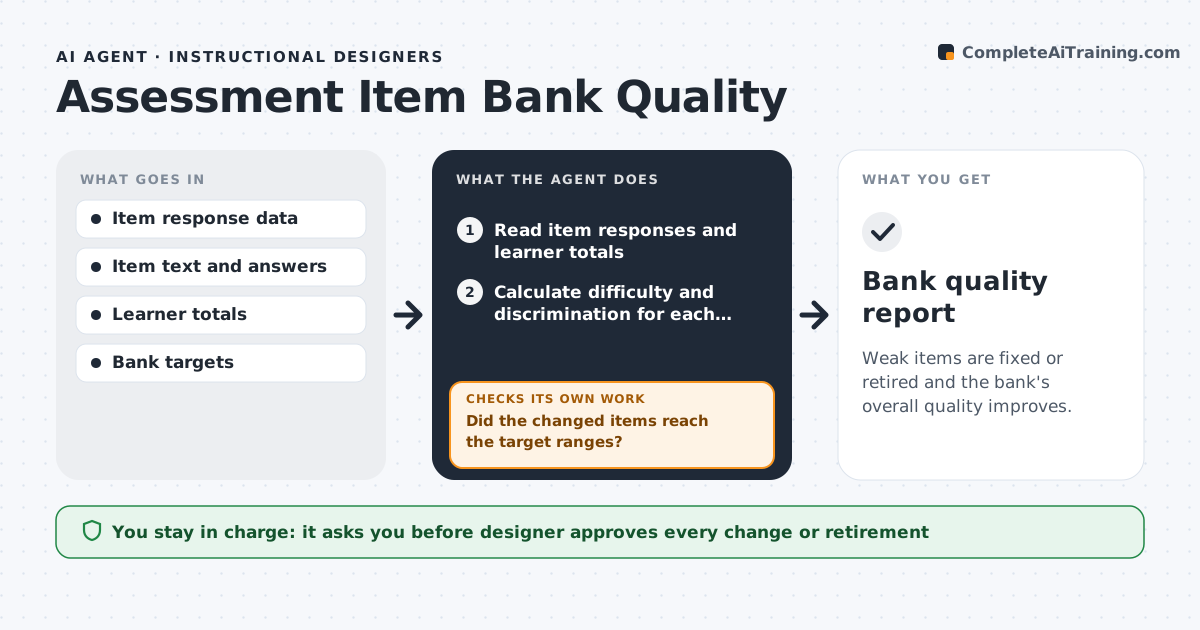
Weak items are fixed or retired and the bank's overall quality improves.
What it does
Quiz banks collect items nobody has reviewed: some are too easy, some are missed by strong learners and some have unclear wording. The agent reads the response data for each item and calculates difficulty and discrimination, which shows whether stronger learners do better on the item than weaker ones. It flags items that almost everyone passes, items that strong learners miss more than weak ones, and items where one wrong answer is chosen far more than the others. It reads the wording to find ambiguous phrases and proposes a fix or retirement. After the designer changes items and new data comes in, it recalculates and checks whether the item improved. The designer approves all changes. Edge case: an item with fewer than 30 responses is marked as not enough data.
How it works
Follow the arrows from top to bottom. The orange dashed arrow is the loop: when a check fails, the agent goes back and tries again.
Read the steps as a list
- Quarterly run
- Read item responses and learner totals
- Calculate difficulty and discrimination for each item
- Flag items outside the target ranges
- Review the wording of flagged items
- Propose a fix or retirement for each
- Designer approves item changesThe agent waits here for your OK.
- Update the bank and set a recheck date
- Read new response data after the recheck date
- Did the changed items reach the target ranges?If not: Revise the item again or retire it and add a replacement. Back to step 3.
- Bank quality report
How it decides
It flags items by difficulty and discrimination and checks the wording of any flagged item.
- Pass rate above 95% or below 20% is flagged
- Discrimination below 0.2 is flagged
- An item with under 30 responses is skipped
- Keep at least 3 items per learning objective
Make it yours
Every agent is a starting point. You choose these settings for your own situation.
- Pass rate range
- Discrimination threshold (default 0.2)
- Minimum responses
- Review frequency
- Objectives coverage rule
What keeps you in control
It always asks you first
- Designer approves every change or retirement
- Designer approves new replacement items
Hard limits
- Never change an item without approval
- Never use learner names in reports
- Never retire the last item for an objective
It stops when
- Done: flagged items are fixed or retired and rechecked
- Stop: not enough response data
Set it up
We guide you through the set-up, step by step
Members get the full set-up guide for this agent. No technical skills needed: you copy, paste and upload.
- One set of instructions to paste into your AI, with the clicks for ChatGPT, Claude, Microsoft 365 Copilot, Gemini and Grok
- The agent then walks you through connecting your own data, one source at a time
- A downloadable copy with the flow chart, the rules and the full guide