AI agent for lawyers
Local Law IT Policy Conflict Agent
Global policy clauses reconciled with local rules through reviewed addenda, with no gaps between them
What it does
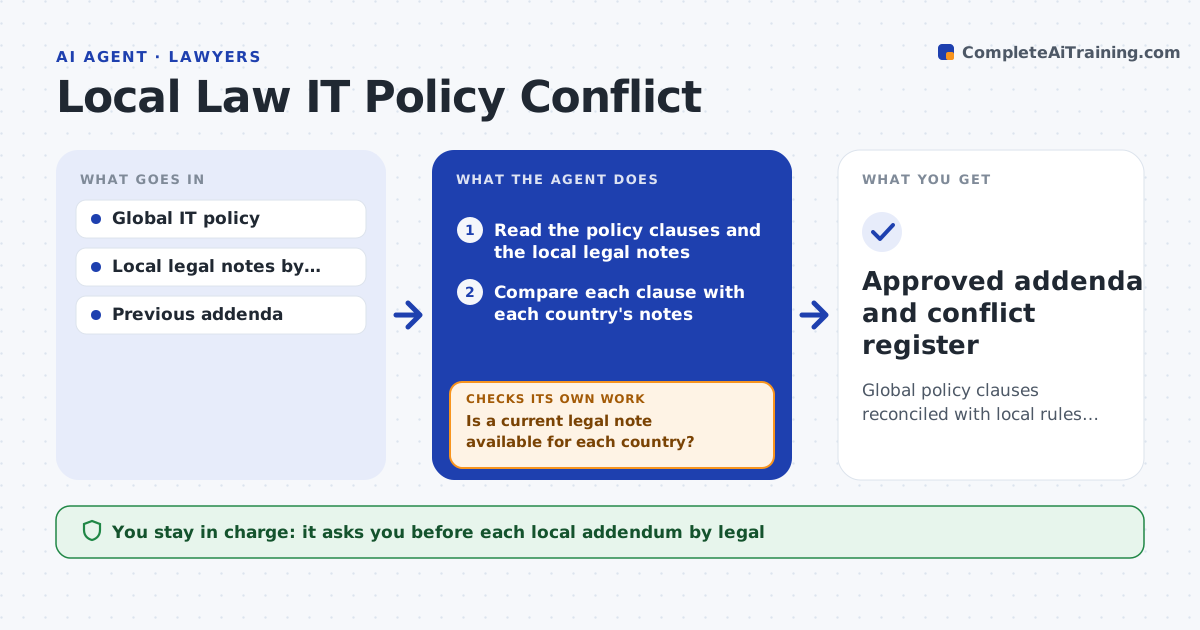
A global rule to log all employee activity can break the law in a country with strict privacy rules. This agent takes each clause of the global IT policy, such as monitoring, retention and data export, and compares it with the local legal notes for each country that the legal team has provided. It flags clauses that conflict or that need a local condition. For each conflict, it drafts a local addendum that explains what changes in that country, such as shorter retention or a works council notice. It then reads the addendum against the global policy again to check that nothing important is left uncovered. Legal approves each addendum. Edge case: when the legal note for a country is missing or older than a year, the agent asks for it and does not guess.
How it works
Follow the arrows from top to bottom. The orange dashed arrow is the loop: when a check fails, the agent goes back and tries again.
Read the steps as a list
- Global policy updated or annual review
- Read the policy clauses and the local legal notes
- Is a current legal note available for each country?If not: ask legal for the missing or outdated note and wait. Back to step 2.
- Compare each clause with each country's notes
- List conflicts and conditions with the reasons
- Draft a local addendum for each conflicting country
- Re-read each addendum against the global policy
- Does the combined text leave any control uncovered?If not: add replacement wording and recheck. Back to step 5.
- Legal approves each addendumThe agent waits here for your OK.
- Approved addenda and conflict register
How it decides
A clause conflicts when the local note forbids or conditions what the clause requires. Only the legal notes provided count as authority.
- Treat a legal note over 12 months old as stale
- Flag clauses on monitoring, retention and export for every country
- Never draft wording that weakens a control without a stated replacement
- Escalate any clause the legal note marks as prohibited
Make it yours
Every agent is a starting point. You choose these settings for your own situation.
- Countries in scope
- Policy areas to compare
- Age at which a legal note is stale (default 12 months)
- Addendum template
What keeps you in control
It always asks you first
- Each local addendum by legal
- Publication of the addendum to employees
Hard limits
- Gives no legal advice beyond the notes provided
- Never publishes an addendum without legal approval
It stops when
- Done: all conflicts have an approved addendum
- Stop: no legal note exists for a country in scope
Set it up
We guide you through the set-up, step by step
Members get the full set-up guide for this agent. No technical skills needed: you copy, paste and upload.
- One set of instructions to paste into your AI, with the clicks for ChatGPT, Claude, Microsoft 365 Copilot, Gemini and Grok
- The agent then walks you through connecting your own data, one source at a time
- A downloadable copy with the flow chart, the rules and the full guide