AI agent for devops engineers
Major Incident Status Update Agent
Accurate, timely updates throughout an incident, and a clean timeline afterward
What it does
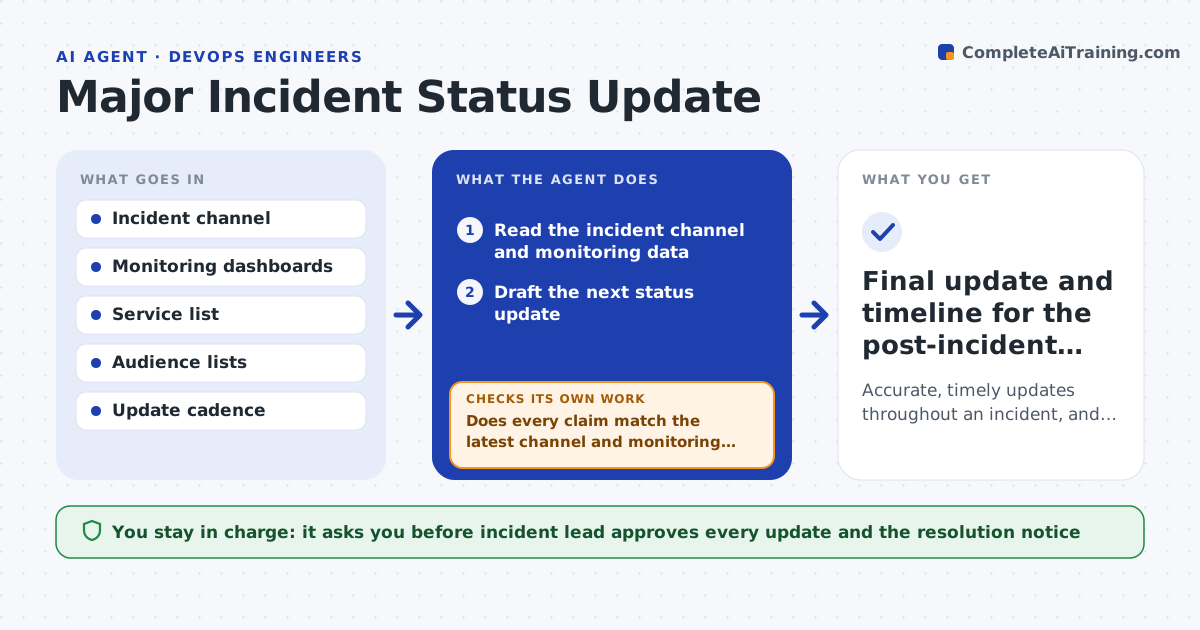
During outages, updates are late, inconsistent or wrong. This agent reads the incident channel and monitoring data and drafts the next status update on the cadence you set. Before each draft is shown, it checks every claim, such as which services are affected and the next update time, against the latest facts. If something changed since the last update, it rewrites the draft. It keeps a running timeline so the final report is easy to build. The incident lead approves each update before it goes out. Edge case: the channel says a fix was deployed but monitoring still shows errors, so the agent states that recovery is not yet confirmed.
How it works
Follow the arrows from top to bottom. The orange dashed arrow is the loop: when a check fails, the agent goes back and tries again.
Read the steps as a list
- Major incident is declared
- Read the incident channel and monitoring data
- Draft the next status update
- Does every claim match the latest channel and monitoring facts?If not: rewrite the claim as unconfirmed or with the updated facts. Back to step 2.
- Incident lead approves the updateThe agent waits here for your OK.
- Publish to the approved channels
- Add the update to the timeline
- Is the incident resolved and confirmed by monitoring?If not: wait for the next interval and draft the next update. Back to step 2.
- Draft the resolution notice and timeline
- Incident lead approves the final noticeThe agent waits here for your OK.
- Final update and timeline for the post-incident review
How it decides
A claim is stated only when the channel and monitoring agree. Conflicts are described as unconfirmed.
- State recovery only when monitoring confirms it
- Use the same wording for the same status
- Update at the set interval even if nothing changed
- Never guess a time to resolution
Make it yours
Every agent is a starting point. You choose these settings for your own situation.
- Update interval (default: 30 minutes)
- Audiences and channels
- Status wording
- Who approves updates
What keeps you in control
It always asks you first
- Incident lead approves every update and the resolution notice
Hard limits
- Never publishes without the incident lead
- Never states a cause that is not confirmed
It stops when
- Done: monitoring confirms recovery and the final notice is sent
- Stop: the incident is downgraded and handed to normal support
Set it up
We guide you through the set-up, step by step
Members get the full set-up guide for this agent. No technical skills needed: you copy, paste and upload.
- One set of instructions to paste into your AI, with the clicks for ChatGPT, Claude, Microsoft 365 Copilot, Gemini and Grok
- The agent then walks you through connecting your own data, one source at a time
- A downloadable copy with the flow chart, the rules and the full guide