AI agent for video editors
Music and Stock License Tracker Agent
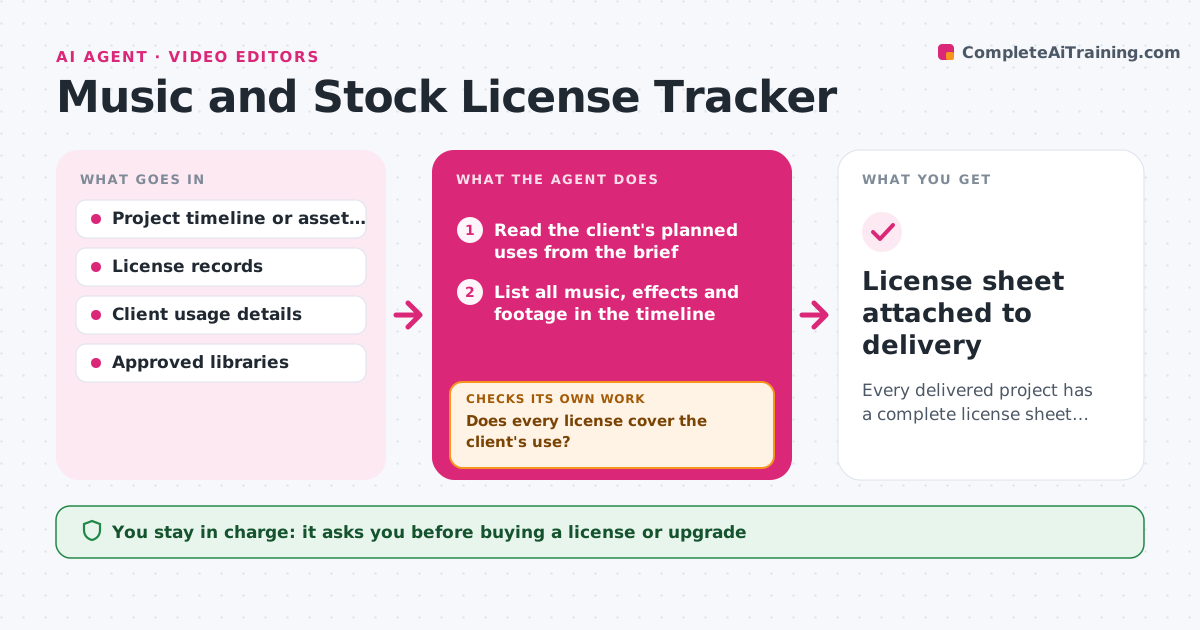
Every delivered project has a complete license sheet with no uncovered assets
What it does
Stock music, sound effects and footage each come with their own license, and it is easy to lose track of which covers which project. When a project is marked ready for delivery, this agent reads the timeline or episode file and lists every third-party asset. It matches each asset to a license record and checks that the license covers the client's use: platform, paid ads, territory and duration. Assets with no record are treated as uncovered. For a gap, it searches your approved libraries for a similar replacement or prices an upgrade. You approve any replacement or purchase. After changes, it checks again that every asset is now covered. It then builds a license sheet for the client. Edge case: a track licensed for organic social use but now cut into a paid ad is flagged, even though it was fine last month.
How it works
Follow the arrows from top to bottom. The orange dashed arrow is the loop: when a check fails, the agent goes back and tries again.
Read the steps as a list
- Project is marked ready for delivery
- Read the client's planned uses from the brief
- List all music, effects and footage in the timeline
- Match each asset to a license record
- Does every license cover the client's use?If not: search approved libraries for alternatives or price an upgrade. Back to step 4.
- Person approves replacements or license purchasesThe agent waits here for your OK.
- Is every asset covered after changes?If not: recheck the changed assets against the license records. Back to step 4.
- Build license sheet for the client
- License sheet attached to delivery
How it decides
An asset passes only if a license record exists and its terms cover the stated platforms, paid use, territory and dates.
- Flag paid ad use when the license is organic only
- Prefer a replacement from the same library and mood
- Treat missing records as uncovered
Make it yours
Every agent is a starting point. You choose these settings for your own situation.
- Approved stock libraries
- Default usage assumptions per client type
- License sheet format
- Whether to check before every export or only final delivery
What keeps you in control
It always asks you first
- Buying a license or upgrade
- Swapping a track in the final cut
Hard limits
- Never buys anything without approval
- Never marks an asset as covered without a record
It stops when
- Done: all assets covered and sheet produced
- Stop: client usage unclear; ask before delivery
Set it up
We guide you through the set-up, step by step
Members get the full set-up guide for this agent. No technical skills needed: you copy, paste and upload.
- One set of instructions to paste into your AI, with the clicks for ChatGPT, Claude, Microsoft 365 Copilot, Gemini and Grok
- The agent then walks you through connecting your own data, one source at a time
- A downloadable copy with the flow chart, the rules and the full guide