AI agent for administrative assistants
Out-of-Office Coverage Agent
Keep decisions and meetings moving during an absence with clear owners and no surprises
What it does
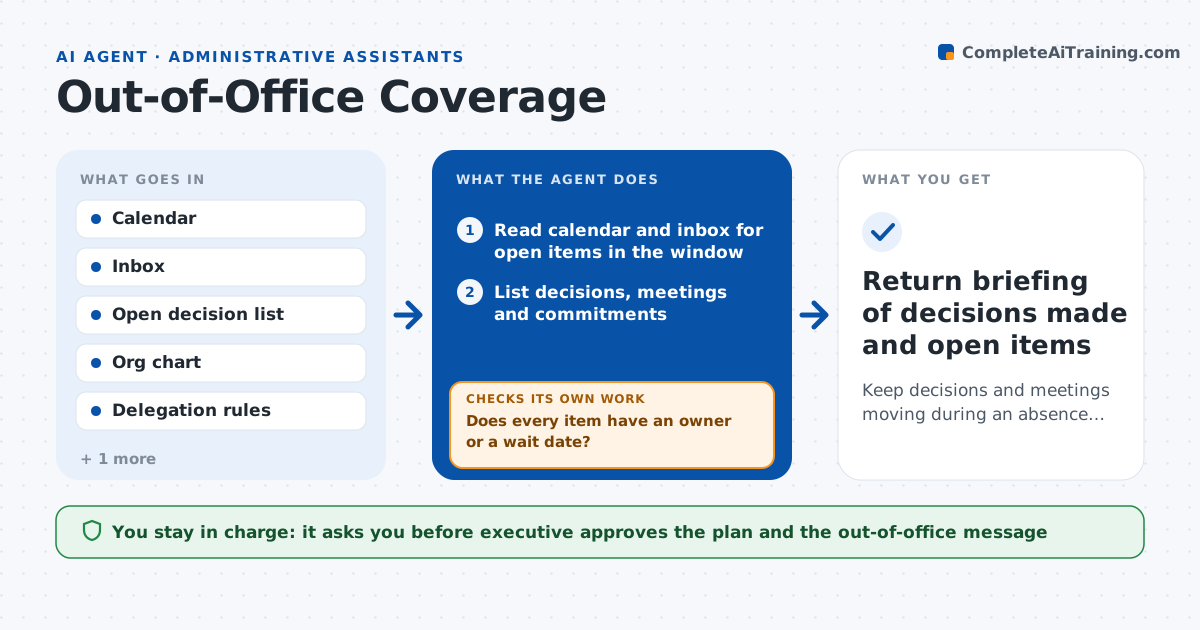
An executive leaves for two weeks and the assistant tries to remember what is pending. This agent reads the calendar and inbox before the absence and lists the open decisions, meetings and commitments that fall in the window. It finds the right delegate for each item based on past patterns and the org chart, then drafts a coverage plan with who handles what, and what can wait. During the absence it checks the inbox for urgent items and routes them by rules, such as sending contract questions to the finance lead. It checks that every routed item gets an acknowledgment within a day and chases if not. The executive approves the plan and the out-of-office message. Edge case: a decision only the executive can make is flagged with a date and a backup option.
How it works
Follow the arrows from top to bottom. The orange dashed arrow is the loop: when a check fails, the agent goes back and tries again.
Read the steps as a list
- Absence is scheduled
- Read calendar and inbox for open items in the window
- List decisions, meetings and commitments
- Match each item to a delegate or mark it as waiting
- Does every item have an owner or a wait date?If not: Ask the executive to assign the item or choose a backup. Back to step 3.
- Draft the coverage plan and out-of-office message
- Executive approves the plan and messageThe agent waits here for your OK.
- During the absence, scan the inbox daily and route urgent items
- Was each routed item acknowledged within a day?If not: Remind the delegate and escalate to the assistant. Back to step 8.
- Return briefing of decisions made and open items
How it decides
It routes an item to a delegate by topic and authority limit, and flags what only the executive can decide.
- Route by topic and the delegate's authority limit
- Mark decisions only the executive can make as waiting with a date
- Treat items from the board or the CEO as urgent
- Expect acknowledgment within 1 business day
Make it yours
Every agent is a starting point. You choose these settings for your own situation.
- Delegation rules (default by topic and amount limit)
- Urgent senders list (default CEO, board, key clients)
- Acknowledgment time (default 1 business day)
- Return briefing format (default one page)
What keeps you in control
It always asks you first
- Executive approves the plan and the out-of-office message
- Executive approves any new delegation
Hard limits
- Never make a decision for the executive
- Never send messages as the executive without approval
- Respect confidential items
It stops when
- Done: Executive returns and receives the briefing
- Stop: Executive cancels the absence
Set it up
We guide you through the set-up, step by step
Members get the full set-up guide for this agent. No technical skills needed: you copy, paste and upload.
- One set of instructions to paste into your AI, with the clicks for ChatGPT, Claude, Microsoft 365 Copilot, Gemini and Grok
- The agent then walks you through connecting your own data, one source at a time
- A downloadable copy with the flow chart, the rules and the full guide