AI agent for internal communications managers
Post-Speech Reaction Review Agent
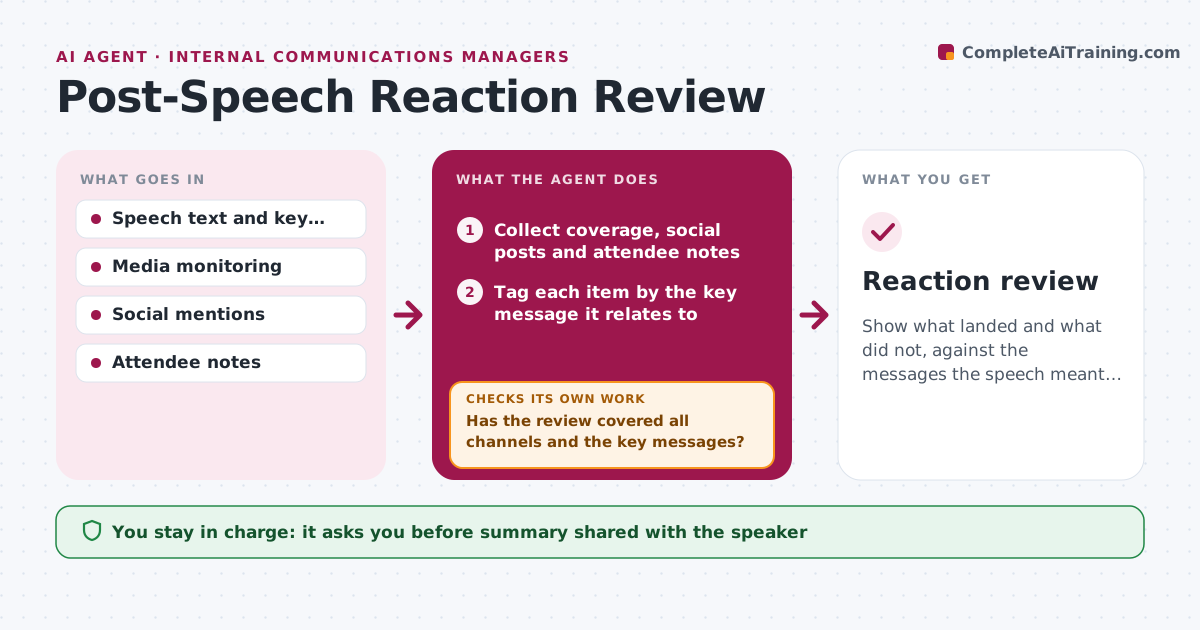
Show what landed and what did not, against the messages the speech meant to deliver.
What it does
After a speech, feedback sits in news articles, social posts, attendee emails and the speaker's own notes. This agent collects it from each channel within a set window, tags every comment by the message it relates to, and marks whether it was quoted, praised, or criticized. It then compares what people picked up with the key messages the speech was meant to deliver. If an intended message is missing from coverage, it checks for a cause, such as it being buried in the middle. It writes lessons for the next speech and flags the criticism that needs an answer. You approve the summary before it goes to the speaker. Edge case: one line is quoted widely but out of context, and the agent flags it.
How it works
Follow the arrows from top to bottom. The orange dashed arrow is the loop: when a check fails, the agent goes back and tries again.
Read the steps as a list
- Speech has been delivered
- Collect coverage, social posts and attendee notes
- Tag each item by the key message it relates to
- Mark each item as quoted, praised, criticized or neutral
- Has the review covered all channels and the key messages?If not: Search the missing channel and tag the new items. Back to step 3.
- Compare intended messages with what was picked up
- Check where missing messages sat in the speech and why
- Draft lessons and open issues for the next speech
- Speechwriter approves the summary for the speakerThe agent waits here for your OK.
- Reaction review
How it decides
It compares intended messages with what was quoted. A message is missing if it appears in under 10% of mentions.
- A message below 10% of mentions is called missed (default)
- Out-of-context quotes are flagged with the full passage
- Criticism with more than 5 mentions gets an action note
- Every claim in the summary links to a source
Make it yours
Every agent is a starting point. You choose these settings for your own situation.
- Collection window (default 7 days)
- Channels monitored
- Key messages list
- Missed message threshold (default 10%)
- Who receives the summary
What keeps you in control
It always asks you first
- Summary shared with the speaker
Hard limits
- Never contacts commenters
- Excludes private accounts
- Does not rate the speaker
It stops when
- Done: summary approved
- Stop: too little coverage to judge; the agent reports that
Set it up
We guide you through the set-up, step by step
Members get the full set-up guide for this agent. No technical skills needed: you copy, paste and upload.
- One set of instructions to paste into your AI, with the clicks for ChatGPT, Claude, Microsoft 365 Copilot, Gemini and Grok
- The agent then walks you through connecting your own data, one source at a time
- A downloadable copy with the flow chart, the rules and the full guide