AI agent for ai engineers
Prompt Regression Monitoring Agent
Early notice when a production prompt degrades, with the likely cause
What it does
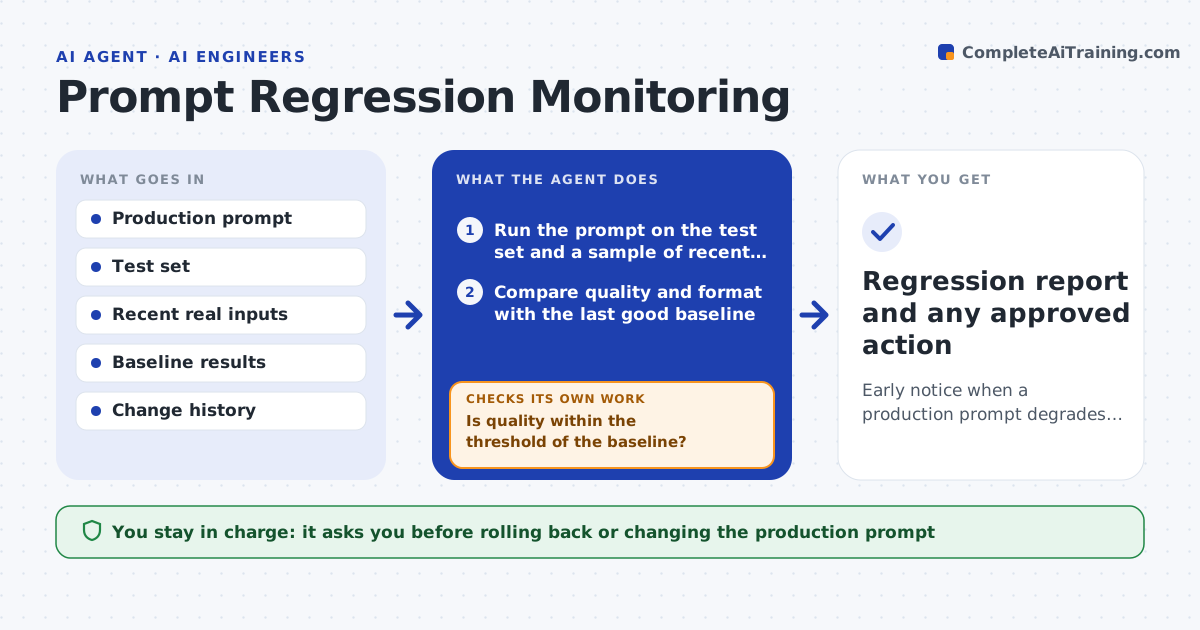
A prompt in production can quietly get worse when the model is updated or the kind of inputs changes, and nobody notices until users complain. On a schedule this agent runs the production prompt against its test set and a sample of recent real inputs, and compares quality and format with the last good baseline. When the pass rate drops beyond your threshold, it looks at what changed since the last good run: model version, input mix or prompt edits. It also checks the test data itself, because a bad test case can look like a regression. It drafts an alert with the failing cases and the likely cause. If it cannot tell the cause, it says so instead of guessing. You approve any rollback or prompt change. Edge case: a drop caused by bad test data leads to fixing the data, not the prompt.
How it works
Follow the arrows from top to bottom. The orange dashed arrow is the loop: when a check fails, the agent goes back and tries again.
Read the steps as a list
- Scheduled regression check
- Run the prompt on the test set and a sample of recent inputs
- Compare quality and format with the last good baseline
- Is quality within the threshold of the baseline?If not: find the likely cause from the change history, then rerun after any approved fix. Back to step 2.
- Review model version, input mix and prompt edits since the last good run
- Are the failing test cases themselves valid?If not: fix the test data and rerun instead of changing the prompt. Back to step 5.
- Draft an alert with failing cases and the likely cause
- Engineer approves a rollback or prompt changeThe agent waits here for your OK.
- Regression report and any approved action
How it decides
It flags a regression when quality drops beyond the threshold and attributes the cause from what changed since the last good run.
- Flag a drop beyond the threshold
- Attribute cause from the change history
- Rule out bad test data before blaming the prompt
Make it yours
Every agent is a starting point. You choose these settings for your own situation.
- Check schedule
- Regression threshold
- Real input sample size
- Baseline to compare against
What keeps you in control
It always asks you first
- Rolling back or changing the production prompt
Hard limits
- Does not change the production prompt without approval
- Separates data issues from real regressions
It stops when
- Done: quality confirmed or regression flagged
- Stop: no baseline exists to compare
Set it up
We guide you through the set-up, step by step
Members get the full set-up guide for this agent. No technical skills needed: you copy, paste and upload.
- One set of instructions to paste into your AI, with the clicks for ChatGPT, Claude, Microsoft 365 Copilot, Gemini and Grok
- The agent then walks you through connecting your own data, one source at a time
- A downloadable copy with the flow chart, the rules and the full guide