AI agent for interior designers
Punch List Completion Agent
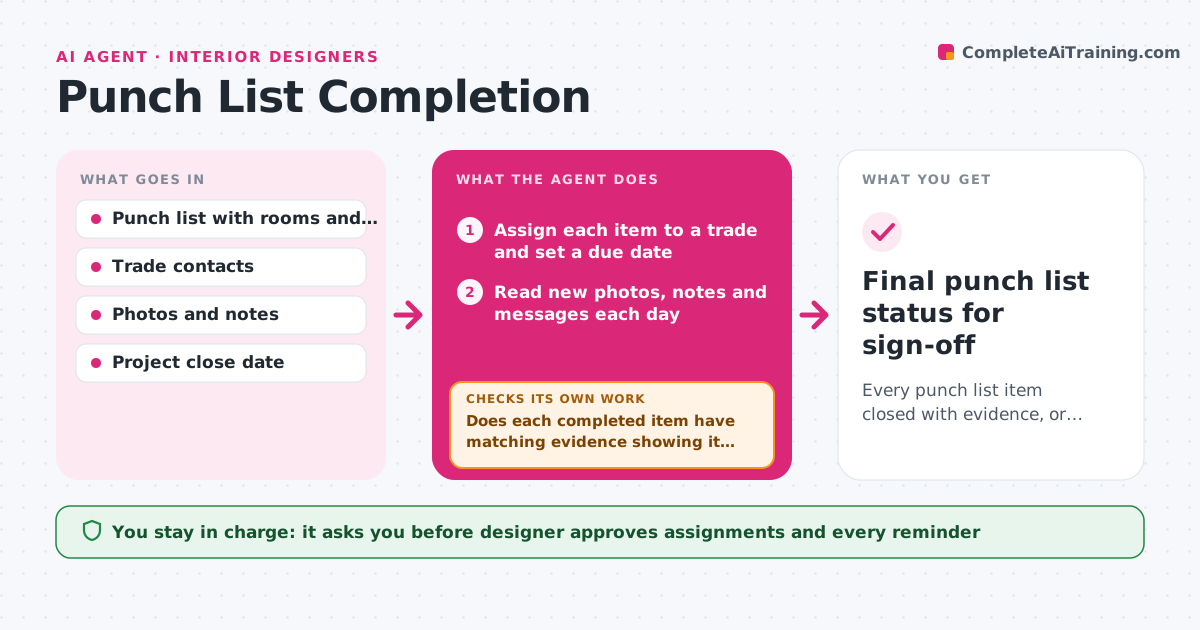
Every punch list item closed with evidence, or clearly assigned with a date and owner
What it does
At the end of a project, the punch list has 60 items, and the painter says the scuffs are fixed while the client says they are not. This agent reads the punch list, assigns each item to a trade, and tracks the evidence of completion from photos, notes and sign-offs. Items without a photo or a note are flagged as not done. It reminds the right party for each overdue item and rechecks the status when new photos or messages arrive. If a completed item fails the check, it reopens it with the new evidence and a note. It keeps a running count by trade and by room. The designer approves the final sign-off. Edge case: an item marked done by the contractor but marked wrong by the client in a photo is reopened and sent back to the trade.
How it works
Follow the arrows from top to bottom. The orange dashed arrow is the loop: when a check fails, the agent goes back and tries again.
Read the steps as a list
- Punch list created
- Assign each item to a trade and set a due date
- Designer approves assignments and the first remindersThe agent waits here for your OK.
- Read new photos, notes and messages each day
- Match evidence to each item and mark it done or not done
- Does each completed item have matching evidence showing it fixed?If not: Reopen the item and ask the trade for a new photo. Back to step 4.
- List overdue items by trade and room
- Designer approves reminders to tradesThe agent waits here for your OK.
- Send approved reminders and log replies
- Are all items closed or scheduled with a date?If not: Continue the daily check and escalate items overdue more than 5 days. Back to step 4.
- Final punch list status for sign-off
How it decides
An item is closed only with a completion photo or note that matches the item. Client disputes reopen it regardless of the trade's status.
- Close an item only with evidence that matches it
- Reopen any item the client disputes
- Escalate items overdue by more than 5 days to the designer
- Send reminders at most once a day per trade
Make it yours
Every agent is a starting point. You choose these settings for your own situation.
- Trades and contacts
- Escalation time (default 5 days)
- Reminder frequency
- Evidence required per item type
- Sign-off format
What keeps you in control
It always asks you first
- Designer approves assignments and every reminder
- Designer gives the final sign-off
Hard limits
- Never send reminders or sign off on the designer's behalf
- Never close an item without evidence
It stops when
- Done: All items are closed with evidence and the designer signs off
- Stop: A trade does not respond after escalation, so the agent flags the items for the designer to handle
Set it up
We guide you through the set-up, step by step
Members get the full set-up guide for this agent. No technical skills needed: you copy, paste and upload.
- One set of instructions to paste into your AI, with the clicks for ChatGPT, Claude, Microsoft 365 Copilot, Gemini and Grok
- The agent then walks you through connecting your own data, one source at a time
- A downloadable copy with the flow chart, the rules and the full guide