
Learning path
Learning AI as an Industrial Designer
AI helps industrial designers move from rough idea to clear decisions faster. This path shows you how to set up AI, use job prompts, and pick video courses that fit your product work.

Your path
Everything in the Industrial Designer AI kit, in the order that makes sense. Members tick off each step and see their progress.
Set up your AI
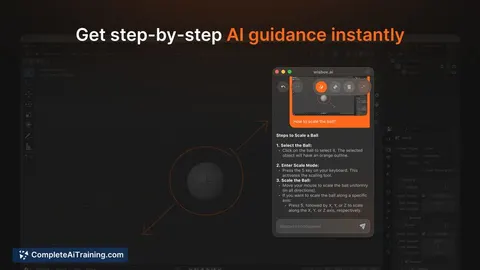
We guide you through each click.
Let skills do your everyday tasks
Connect your apps and pick your AI apps
Hand whole tasks to AI agents
Build your own tools
Everything for industrial designers
All the courses, certifications, AI tools, MCP servers and apps for industrial designers, most relevant first. Open any list to see more.
Take the prompt courses
A short framework course to learn how to ask, then 8 lessons with ready-to-use prompts for industrial designers.
Start with this framework: how to talk to AI
Because it explores options and variants, CRISPE helps industrial designers generate several chair concepts to compare before refining one.
Then your prompt course for industrial designers- 1Concept Sketch Development3 prompts
- 2User Research Synthesis3 prompts
- 3Ergonomic Design Checks3 prompts
- 4Material And Process Selection3 prompts
- 5CAD And Engineer Coordination3 prompts
- 6Prototype Testing And Troubleshooting3 prompts
- 7Production Sample Review3 prompts
- 8Documentation And Client Handoff3 prompts
Watch the video courses or add them to your Favorites for later
72 video courses our AI picked for industrial designers, most useful first. Save the ones you want to watch later with the heart.
Favorites are saved to your account: sign in or get your AI kit first.
Show all 72 video courses
Get certified, or add certifications to your Favorites
Every course ends in an exam and a certificate you can add to LinkedIn. Save the certifications you are aiming for with the heart.
Favorites are saved to your account: sign in or get your AI kit first.
More certifications for industrial designersShow all 24 certifications
Try the AI tools for industrial designers
15 AI tools our AI matched to the work of industrial designers, best fit first. Each review shows what it does, its alternatives and the jobs it suits.
Favorites are saved to your account: sign in or get your AI kit first.
Show all 15 AI tools
Connect your AI to the apps industrial designers use
MCP servers let ChatGPT, Claude or Copilot look things up and get work done in other apps, like your email, calendar or bookkeeping software. These 12 fit the work of industrial designers best, well-known apps first.

JANCTION Render MCP server
by JasmyLab-JANCTIONRender Blender scenes, 3D models and turntables on cloud GPUs, straight from your AI chat.
Design toolsNo install
Google Drive MCP server
by A1-x-TechLet your AI search, organize, upload, download, export and share your Google Drive files for you.

Google Images MCP server
by HasDataLets your AI search Google Images and bring back picture links, source pages and sizes.
ResearchNo install
JupyterCAD MCP server
by asmith26Let your AI build and edit 3D CAD shapes in JupyterCAD just by describing them in plain words.

Bing Search MCP server
by leehanchungLets your AI search the web, news, and images through Microsoft Bing while you chat.

Tripo 3D model MCP server
by mordor-forgeLet your AI turn text or pictures into 3D models, then convert and clean them up for you.
Show all 12 MCP servers
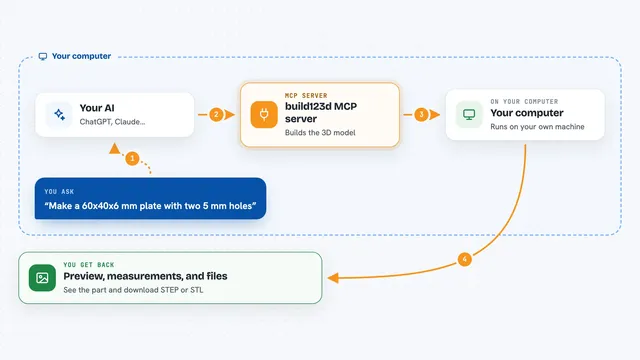
build123d MCP server
by pzfreoLet your AI build and check 3D CAD models, render previews, and export STEP or STL files.
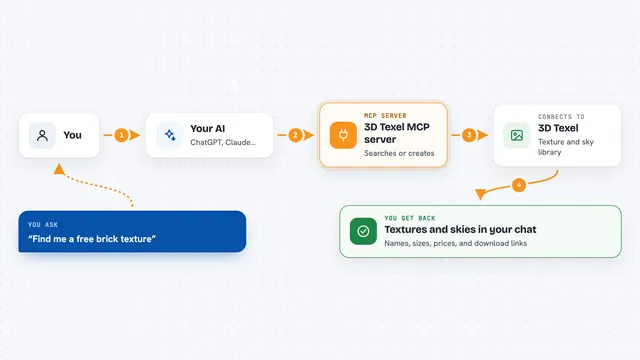
3D Texel MCP server
by GatyhLet your AI search, download, and generate 3D textures, HDRIs, and materials from 3D Texel for you.
Design tools Official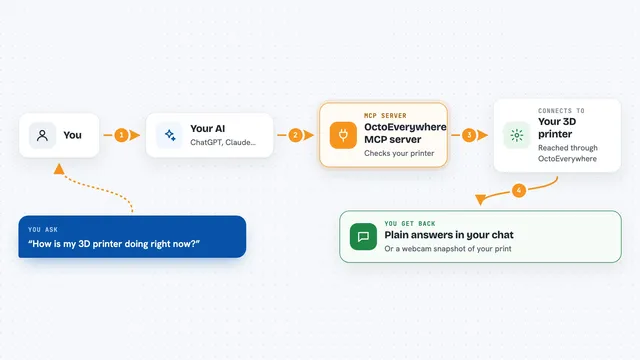
OctoEverywhere MCP server
by OctoEverywhereAsk your AI about your 3D printer and control prints from chat.

Human For AI MCP server
by humanforaiLet your AI hire a real human to check, test, or verify things in the real world.
Productivity Official
3D Print Oracle MCP server
by gregarioLets your AI look up 3D printing filaments, compare materials, and help fix print problems.

RNV Color MCP server
by RNVizionMix, convert, and match colors, build palettes, and save them by name, right from your chat.
Design toolsNo installBuild your own AI apps for industrial designers
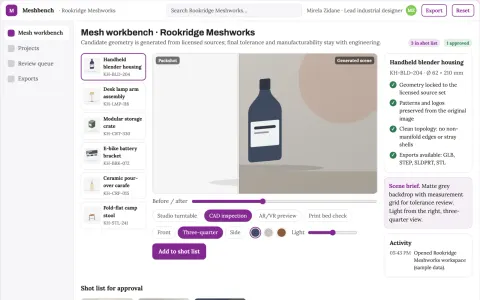
Apps you build yourself with your own AI, no coding needed and no monthly fee. Our AI picked the one that fits the work of industrial designers.









































































About this learning path
6 topicsAI for Industrial Designers: From Sketch to Handoff
Industrial design work asks you to hold many threads at once: user needs, form, fit, materials, manufacturing, and clear communication with engineers and suppliers. AI can help you sort notes, test ideas, and prepare better questions before decisions get expensive.
This path starts with setup questions and connecting your AI tools. Then you add skills for the job inside your AI, work through this prompt course, and choose video courses picked for industrial design, including the certifications those courses offer.
Why AI Matters Now
Product timelines are tight and teams are small. AI helps you turn messy inputs into clear options, so you can spend more time on form, feel, and making.
What The Path Includes
You begin with setup questions and connecting your AI. You then learn job skills inside your AI, complete this prompt course, and choose video courses and certifications that match industrial design work.
How It Saves Time
AI drafts first passes of research summaries, ergonomic checks, material comparisons, and review notes. You still decide, but you start from a useful draft instead of a blank page.
How It Protects Your Career
Designers who can guide AI, check its output, and explain decisions become more valuable to teams. The path keeps your judgment central, so AI supports your craft rather than replacing it.
How To Start
Set aside a short block this week. Answer the setup questions, connect one AI tool, and run one prompt from the course on a live project. Small practice beats a big plan you never begin.
Frequently asked questions
Do I need to be technical to use this path?
No. The path is written for working designers who use everyday tools and want practical help with design tasks. You will not need to code or learn data science.Will AI replace the designer's judgment?
No. AI can draft, compare, and summarize, but it cannot feel a prototype or own a design decision. The course teaches you to review and improve AI output at each step.What video courses and certifications are included?
The path points you to video courses chosen for industrial design work, such as CAD coordination, materials, and client handoff. Each course listing shows the certification it offers, so you can choose what fits your goals.How much time should I plan each week?
A few short sessions are enough to make progress. Many designers start with one prompt on a real project, then add a video lesson when they have a specific need.