AI agent for restaurant managers
Receiving Inspection Log Agent
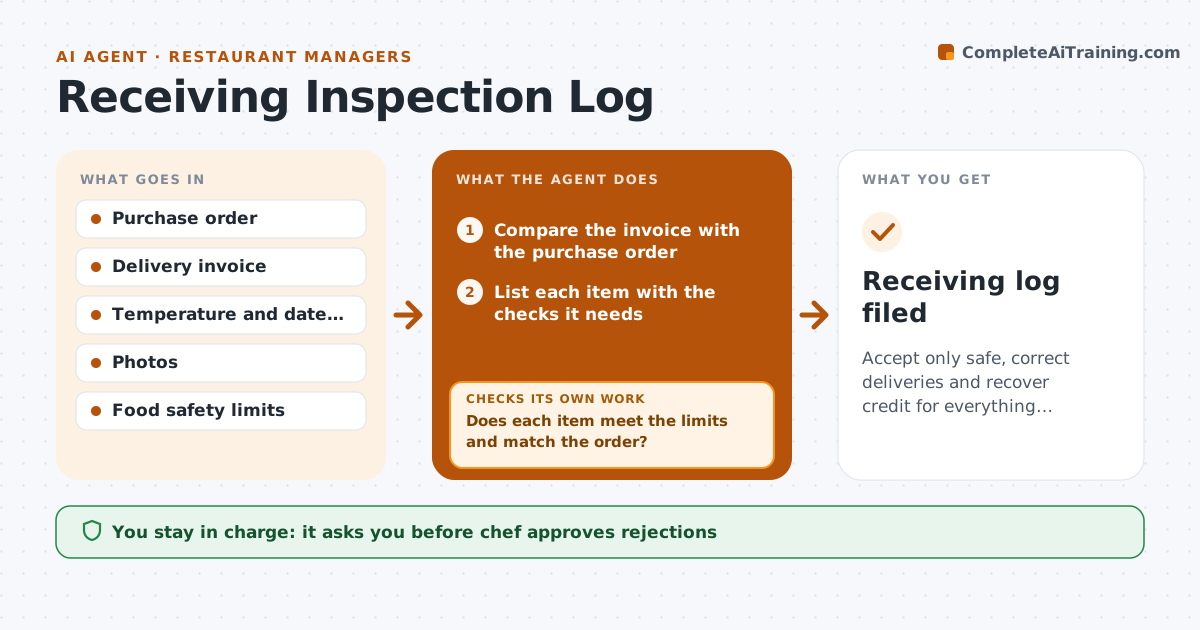
Accept only safe, correct deliveries and recover credit for everything rejected.
What it does
A delivery of fish arrives at 48 F and the driver is waiting, so it gets signed for and put away. The agent walks the receiver through each delivery. It compares the invoice with the order and expected items, then asks for the checks needed for each product: temperature for chilled and frozen, use-by dates, quantity and condition. It records each reading and decides pass or reject using the safety limits. For a failed item, it drafts a credit request with the reading and photo, tells the receiver to refuse or hold it, and updates inventory to the accepted quantities. It follows up until the credit appears on the supplier's statement. Edge case: a delivery where the invoice lists items that were never on the order. The chef approves rejections and supplier notes.
How it works
Follow the arrows from top to bottom. The orange dashed arrow is the loop: when a check fails, the agent goes back and tries again.
Read the steps as a list
- A delivery arrives
- Compare the invoice with the purchase order
- List each item with the checks it needs
- Record temperature, date, quantity and condition readings
- Does each item meet the limits and match the order?If not: mark the item reject or hold, and ask for a re-check if a reading looks wrong. Back to step 3.
- Draft credit requests for rejected or short items with readings and photos
- Chef approves rejections and supplier notesThe agent waits here for your OK.
- Update inventory with accepted quantities
- Check the next supplier statement for credits
- Has each credit been applied?If not: send the supplier a reminder with the log reference. Back to step 6.
- Receiving log filed
How it decides
Chilled food must be 41 F or lower, frozen 0 F or lower, dates must be valid, and quantities must match. Any item that fails is rejected or held.
- Reject chilled items above 41 F and frozen items above 0 F
- Reject items with short dates under the agreed minimum
- Reject items not on the order unless the chef accepts
- Re-take a reading if it is within 2 degrees of the limit
Make it yours
Every agent is a starting point. You choose these settings for your own situation.
- Temperature limits
- Minimum shelf life
- Items needing checks
- Supplier contacts
- Credit follow-up timing (default 14 days)
What keeps you in control
It always asks you first
- Chef approves rejections
- Chef approves supplier notes and credit claims
Hard limits
- Never accept food above the safety limit
- Keep every reading on file
It stops when
- Done: delivery logged and credits confirmed
- Stop: a safety concern such as pest signs, stop receiving and alert the chef
Set it up
We guide you through the set-up, step by step
Members get the full set-up guide for this agent. No technical skills needed: you copy, paste and upload.
- One set of instructions to paste into your AI, with the clicks for ChatGPT, Claude, Microsoft 365 Copilot, Gemini and Grok
- The agent then walks you through connecting your own data, one source at a time
- A downloadable copy with the flow chart, the rules and the full guide