AI agent for receptionists
Reception Calendar Double-Booking Agent
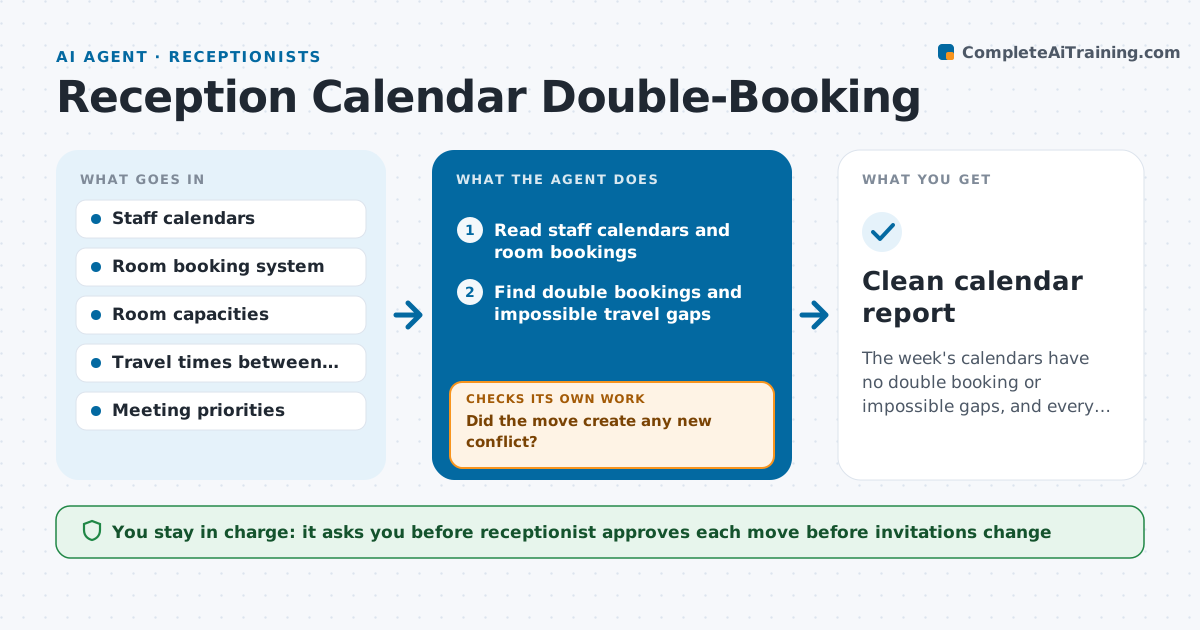
The week's calendars have no double booking or impossible gaps, and every change was approved.
What it does
Rooms and people are double-booked because bookings come from many calendars. The agent reads staff calendars and room bookings, finds overlapping rooms and people, and also finds impossible gaps, such as a meeting in another building 5 minutes after the last one ended. For each conflict it proposes an alternative room or time that fits everyone's availability and the room's capacity. After a proposed move, it rechecks every affected calendar and room to make sure the change did not create a new conflict. If it did, it loops back and tries another option. The receptionist approves every move before invitations change. Edge case: a recurring weekly meeting that clashes only in the third week.
How it works
Follow the arrows from top to bottom. The orange dashed arrow is the loop: when a check fails, the agent goes back and tries again.
Read the steps as a list
- Morning run or a booking changes
- Read staff calendars and room bookings
- Find double bookings and impossible travel gaps
- Propose alternative rooms or times for each conflict
- Receptionist approves each moveThe agent waits here for your OK.
- Update the booking and invitations
- Reread all affected calendars and rooms
- Did the move create any new conflict?If not: Reject that option and try the next alternative. Back to step 7.
- Check recurring series for future clashes
- Are all conflicts in the next two weeks resolved?If not: Return to the list and rerun with a wider time window. Back to step 3.
- Clean calendar report
How it decides
It ranks conflicts by how soon they happen, then picks the alternative that moves the fewest people and fits capacity.
- Move the meeting with the fewest attendees first
- A room must meet capacity and equipment needs
- Allow 15 minutes between buildings
- External meetings are never moved without the host
Make it yours
Every agent is a starting point. You choose these settings for your own situation.
- Time window to scan (default 2 weeks)
- Minimum travel gap between buildings
- Which meetings may be moved
- Rooms that are off limits
What keeps you in control
It always asks you first
- Receptionist approves each move before invitations change
Hard limits
- Never change invitations without approval
- Do not move external meetings
It stops when
- Done: no conflicts remain in the window
- Stop: only a decision by the owner of a meeting can fix a conflict
Set it up
We guide you through the set-up, step by step
Members get the full set-up guide for this agent. No technical skills needed: you copy, paste and upload.
- One set of instructions to paste into your AI, with the clicks for ChatGPT, Claude, Microsoft 365 Copilot, Gemini and Grok
- The agent then walks you through connecting your own data, one source at a time
- A downloadable copy with the flow chart, the rules and the full guide