AI agent for vp of sales
Regional Performance Review Prep Agent
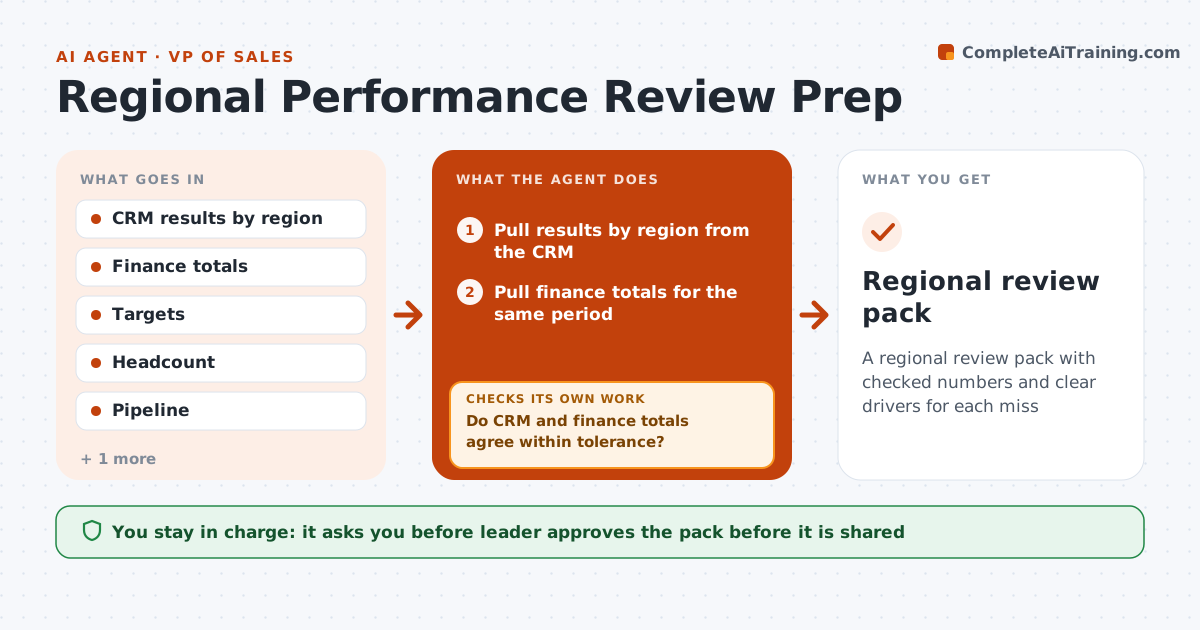
A regional review pack with checked numbers and clear drivers for each miss
What it does
Regional reviews take days because numbers come from the CRM, finance and marketing, and they do not always agree. This agent pulls results by region and compares them with the finance totals for the same period. It investigates each difference until it is explained, such as a late booking, a currency effect or a deal in the wrong region. It then finds the drivers of misses: pipeline, conversion, deal size or headcount, and drafts the review pack with charts and a short story for each region. After corrections it reruns the whole pack. The leader approves it. Edge case: a region looks weak only because a large deal was booked in the next quarter, so the agent shows it as timing.
How it works
Follow the arrows from top to bottom. The orange dashed arrow is the loop: when a check fails, the agent goes back and tries again.
Read the steps as a list
- Review date approaches
- Pull results by region from the CRM
- Pull finance totals for the same period
- Do CRM and finance totals agree within tolerance?If not: investigate each gap and record the cause such as timing, currency or region mapping. Back to step 2.
- Find the drivers of each miss from pipeline, conversion, deal size and headcount
- Draft the regional pages with charts and a short story
- Do all figures on the pages match the checked totals?If not: correct the figure and rerun the page. Back to step 4.
- Draft questions for regional leads
- Leader approves the packThe agent waits here for your OK.
- Regional review pack
How it decides
A difference is explained when a documented item accounts for it. Drivers are chosen by which measure moved most against target.
- Tolerance for matching totals is 1 percent
- Explain every gap with a document or a reason
- Pick the driver with the largest gap to target
- Show timing effects separately
Make it yours
Every agent is a starting point. You choose these settings for your own situation.
- Matching tolerance (default 1%)
- Measures to include
- Regions
- Pack format
What keeps you in control
It always asks you first
- Leader approves the pack before it is shared
Hard limits
- Never share the pack before approval
- Do not alter source data
- Label estimates
It stops when
- Done: pack approved
- Stop: totals cannot be matched and finance must resolve it
Set it up
We guide you through the set-up, step by step
Members get the full set-up guide for this agent. No technical skills needed: you copy, paste and upload.
- One set of instructions to paste into your AI, with the clicks for ChatGPT, Claude, Microsoft 365 Copilot, Gemini and Grok
- The agent then walks you through connecting your own data, one source at a time
- A downloadable copy with the flow chart, the rules and the full guide