AI agent for insurance claims processors
Repair Invoice Audit Agent
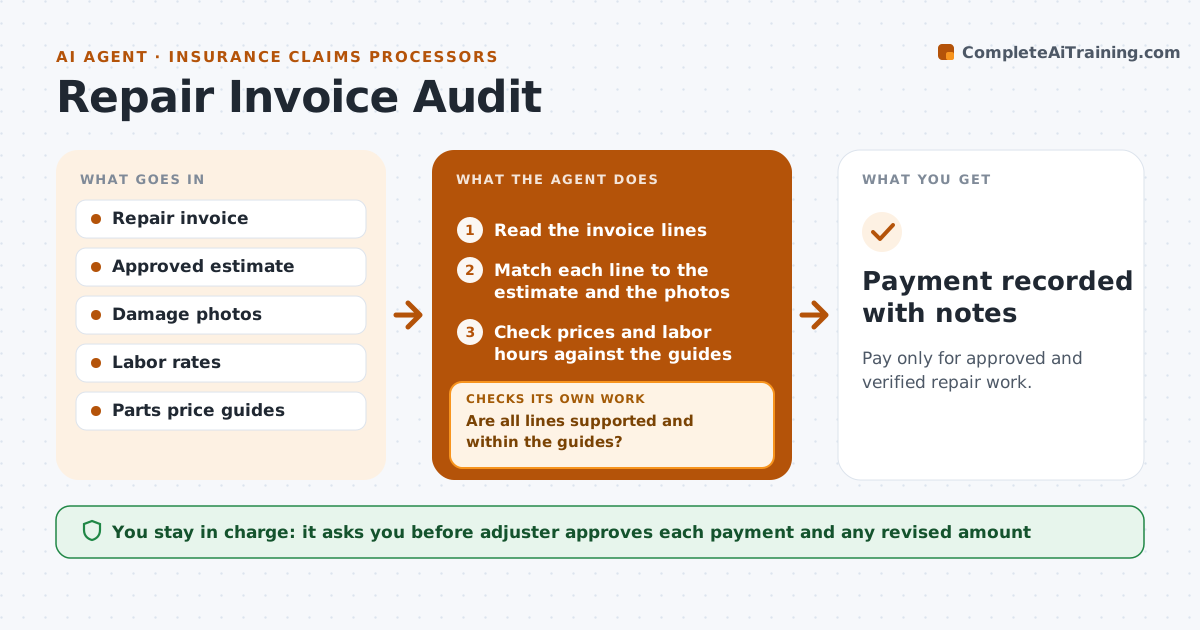
Pay only for approved and verified repair work.
What it does
Repair invoices sometimes include work that was never agreed, or prices that are higher than the estimate. This agent compares each invoice with the approved estimate and the photos of the damage. It flags items not on the estimate, labor hours above the standard and price differences. It asks the repair shop to explain each one, reads the answer and recalculates what should be paid. If the explanation is not accepted, it recalculates the payment and sends a revised amount for approval. The adjuster approves every payment. Edge case: a hidden damage supplement that comes with photos is flagged as likely valid and routed for quick review.
How it works
Follow the arrows from top to bottom. The orange dashed arrow is the loop: when a check fails, the agent goes back and tries again.
Read the steps as a list
- Repair invoice arrives
- Read the invoice lines
- Match each line to the estimate and the photos
- Check prices and labor hours against the guides
- Are all lines supported and within the guides?If not: List the unsupported lines and requests for explanation. Back to step 2.
- Ask the shop to explain each flagged line
- Read the explanation and check it against the file
- Is the explanation accepted?If not: Recalculate the payment without those lines. Back to step 6.
- Calculate the payment amount
- Adjuster approves the paymentThe agent waits here for your OK.
- Payment recorded with notes
How it decides
It matches each line to the estimate or the photos and flags lines that lack a match or exceed price and labor guides.
- Flag any line above the estimate by 10 percent or $100
- Accept supplements only with photos and a note
- Check labor hours against the standard guide
- Pay undisputed lines promptly
Make it yours
Every agent is a starting point. You choose these settings for your own situation.
- Price flag threshold (default 10 percent or $100)
- Labor guide source
- Shop reply time
- Who may approve payments
What keeps you in control
It always asks you first
- Adjuster approves each payment and any revised amount
Hard limits
- Never pay without the adjuster
- Never reject a supported supplement
It stops when
- Done: payment amount approved
- Stop: the shop disputes the revised amount and the adjuster negotiates
Set it up
We guide you through the set-up, step by step
Members get the full set-up guide for this agent. No technical skills needed: you copy, paste and upload.
- One set of instructions to paste into your AI, with the clicks for ChatGPT, Claude, Microsoft 365 Copilot, Gemini and Grok
- The agent then walks you through connecting your own data, one source at a time
- A downloadable copy with the flow chart, the rules and the full guide