AI agent for video editors
Rough Cut Assembly From Script Agent
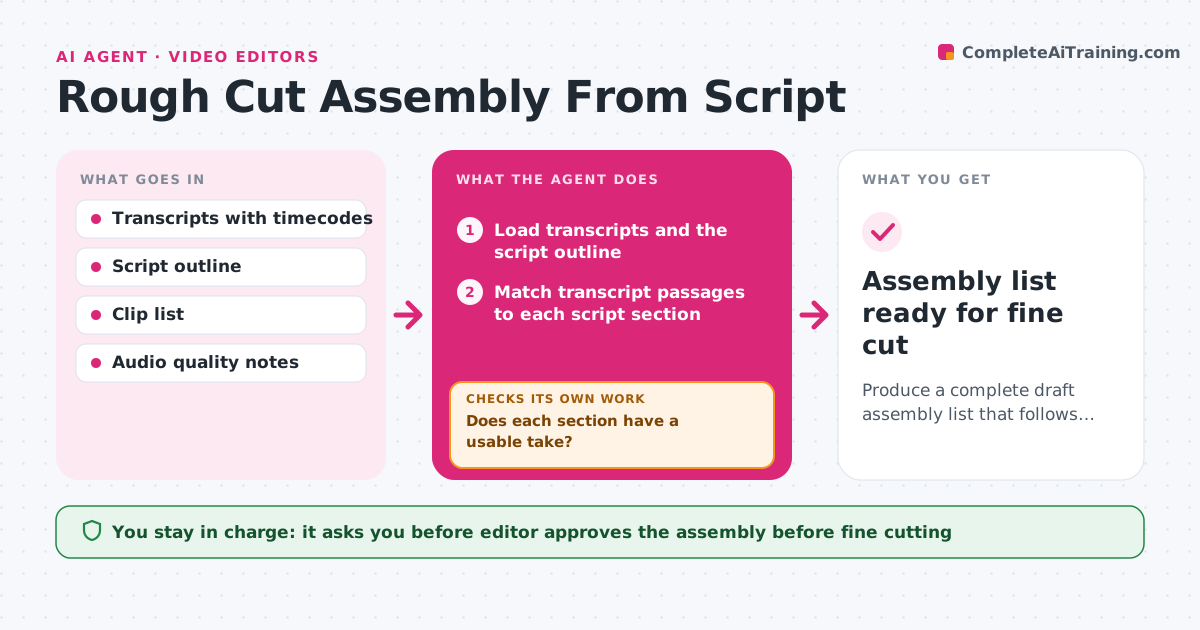
Produce a complete draft assembly list that follows the script outline with no gaps or repeats.
What it does
You have ten hours of interviews and a script outline, and the first assembly means scrubbing through everything. This agent takes the transcripts with timecodes and matches them to each section of the script outline. For each section it ranks the candidate takes by clarity, completeness of the thought and audio quality, then picks the best. It builds a draft timeline list with clip names and in and out points. It checks the list for gaps, such as a section with no usable take, and for repeated lines used twice. When a hole appears, it fills it with the next best take and checks again. The editor reviews and approves the assembly before fine cutting starts. Edge case: the best take has a cough over the key sentence, so the agent chooses the second take and notes the first.
How it works
Follow the arrows from top to bottom. The orange dashed arrow is the loop: when a check fails, the agent goes back and tries again.
Read the steps as a list
- Transcripts and outline ready
- Load transcripts and the script outline
- Match transcript passages to each script section
- Rank candidate takes by completeness and audio quality
- Build the draft timeline list with in and out points
- Does each section have a usable take?If not: choose the next best take or flag the section as missing footage. Back to step 4.
- Is any line or take used twice?If not: keep the stronger use and replace the other with the next best take. Back to step 4.
- Add a notes column for alternatives and issues
- Editor reviews and approves the assemblyThe agent waits here for your OK.
- Assembly list ready for fine cut
How it decides
For each section it prefers takes that say the key point in full, with clean audio and no stumbles. When two are equal it picks the shorter one.
- Prefer a take that includes the full sentence over a stronger but cut-off one
- Reject takes with overlapping speech or noise over the key words
- Use the same line only once unless the outline repeats it on purpose
- Flag a section as a footage gap when no take scores above the minimum
Make it yours
Every agent is a starting point. You choose these settings for your own situation.
- Section length targets
- How audio quality is weighed against content
- Export format for the timeline list
- Number of alternate takes to list (default 2)
- Speakers to prefer
What keeps you in control
It always asks you first
- Editor approves the assembly before fine cutting
Hard limits
- Never delete or change the original footage
- Never invent words or reorder a quote to change its meaning
It stops when
- Done: every section has a take and no repeats
- Stop: more than a quarter of sections have no usable take
Set it up
We guide you through the set-up, step by step
Members get the full set-up guide for this agent. No technical skills needed: you copy, paste and upload.
- One set of instructions to paste into your AI, with the clicks for ChatGPT, Claude, Microsoft 365 Copilot, Gemini and Grok
- The agent then walks you through connecting your own data, one source at a time
- A downloadable copy with the flow chart, the rules and the full guide