AI agent for crisis communications managers
Rumor Tracking and Fact Sheet Agent
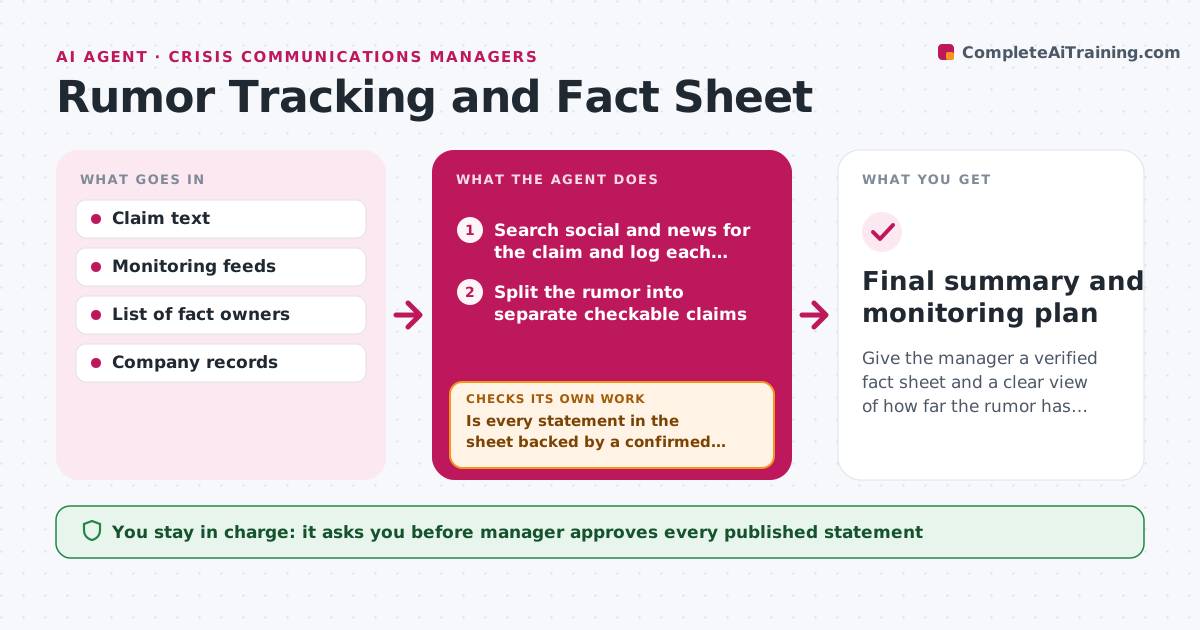
Give the manager a verified fact sheet and a clear view of how far the rumor has spread.
What it does
When a false claim starts to spread, the facts sit in finance, legal and operations while the claim travels faster. The agent tracks where the rumor appears, which accounts amplify it and how quickly it is growing. At the same time it asks the right owners for verified facts and drafts a fact sheet that answers each claim in plain words with a source. It then checks every statement in the sheet against the evidence it received. Anything unverified is held back, and the agent asks the owner for proof. It keeps watching spread after each update to suggest whether to publish, respond to one outlet or keep monitoring. Edge case: half of a claim is true. The sheet must say which half. The manager approves what is published and where.
How it works
Follow the arrows from top to bottom. The orange dashed arrow is the loop: when a check fails, the agent goes back and tries again.
Read the steps as a list
- A rumor is flagged
- Search social and news for the claim and log each source and its reach
- Split the rumor into separate checkable claims
- Ask the fact owners to confirm each claim with a record
- Draft a fact sheet answering each claim with its source
- Is every statement in the sheet backed by a confirmed record?If not: hold back the statement and ask the owner again for proof. Back to step 3.
- Manager approves what is published and whereThe agent waits here for your OK.
- Publish through the approved channels
- Re-check spread and sentiment after 2 hours
- Is the rumor still growing?If not: re-run the search, update the claim list and the sheet, and send to the manager again. Back to step 2.
- Final summary and monitoring plan
How it decides
A claim is answered only when a named owner has confirmed the fact with a document or record. Spread is rated by reach and growth per hour.
- Publish a fact only when an owner has confirmed it in writing
- Hold back any unverified point rather than guess
- Rate spread high when reach doubles within 3 hours
- Say clearly which part of a claim is true if it is partly true
Make it yours
Every agent is a starting point. You choose these settings for your own situation.
- Monitoring sources and keywords
- Fact owners per topic
- Spread alert threshold
- Re-check interval (default 2 hours)
- Channels for publishing
What keeps you in control
It always asks you first
- Manager approves every published statement
- Manager approves contacting outlets
Hard limits
- Never publish unverified facts
- Do not engage with accounts spreading the claim without approval
It stops when
- Done: spread has stopped growing for 24 hours
- Stop: legal puts a hold on the facts, pause and inform the manager
Set it up
We guide you through the set-up, step by step
Members get the full set-up guide for this agent. No technical skills needed: you copy, paste and upload.
- One set of instructions to paste into your AI, with the clicks for ChatGPT, Claude, Microsoft 365 Copilot, Gemini and Grok
- The agent then walks you through connecting your own data, one source at a time
- A downloadable copy with the flow chart, the rules and the full guide