AI agent for salesforce administrators
Sales Cybersecurity and Data Handling Check Agent
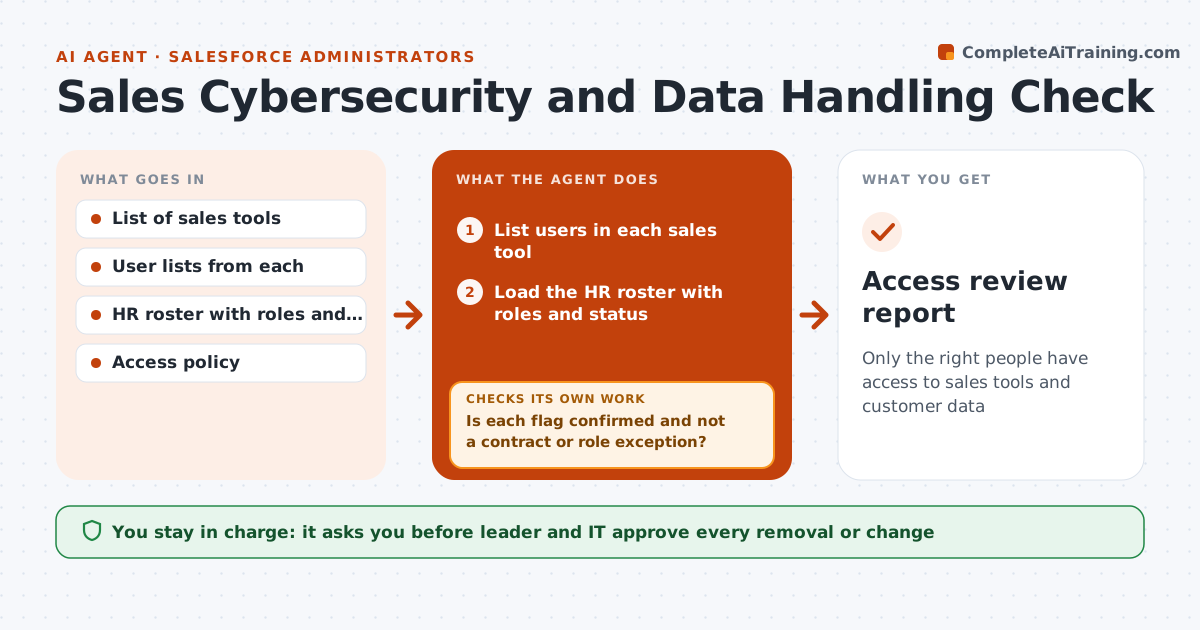
Only the right people have access to sales tools and customer data
What it does
Sales tools hold customer lists, contracts and notes, and access builds up over time. People change roles, leave, or get access they never need. This agent lists the sales tools and who can use each one, then compares access with each person's role and employment status from the HR list. It flags leavers who still have access, shared accounts, admin rights that are not needed and tools nobody can account for. It drafts a change request for each issue and tracks the result. After the changes it rechecks the access lists. The leader and IT approve removals. Edge case: a contractor's access ended last month but the contract was extended, so the agent asks before flagging.
How it works
Follow the arrows from top to bottom. The orange dashed arrow is the loop: when a check fails, the agent goes back and tries again.
Read the steps as a list
- Quarterly review or an exit
- List users in each sales tool
- Load the HR roster with roles and status
- Compare each user with the role access policy
- List leavers, excess rights, shared accounts and unknown tools
- Is each flag confirmed and not a contract or role exception?If not: ask the manager or HR and update the list. Back to step 3.
- Draft change requests with the reason
- Leader and IT approve removalsThe agent waits here for your OK.
- Track completion in IT tickets
- Do the new access lists match the approved changes?If not: recheck and reopen the ticket. Back to step 8.
- Access review report
How it decides
A user is flagged when the user is not on the roster, or holds access beyond their role in the policy. Flags go to IT after the leader reviews them.
- Flag leavers within one day of their exit
- Flag admin rights for non-admin roles
- Flag shared logins as high priority
- Ask before flagging when a contract is under extension
Make it yours
Every agent is a starting point. You choose these settings for your own situation.
- Role access policy
- Review cycle
- Tools in scope
- Priority levels
What keeps you in control
It always asks you first
- Leader and IT approve every removal or change
- Leader approves any new tool
Hard limits
- Never change access directly
- Do not share personal data beyond the leader and IT
- Follow the company access policy
It stops when
- Done: access matches roles and is recorded
- Stop: a possible data leak goes to security
Set it up
We guide you through the set-up, step by step
Members get the full set-up guide for this agent. No technical skills needed: you copy, paste and upload.
- One set of instructions to paste into your AI, with the clicks for ChatGPT, Claude, Microsoft 365 Copilot, Gemini and Grok
- The agent then walks you through connecting your own data, one source at a time
- A downloadable copy with the flow chart, the rules and the full guide