AI agent for vice president of sales
Sales Enablement Gap and Rollout Agent
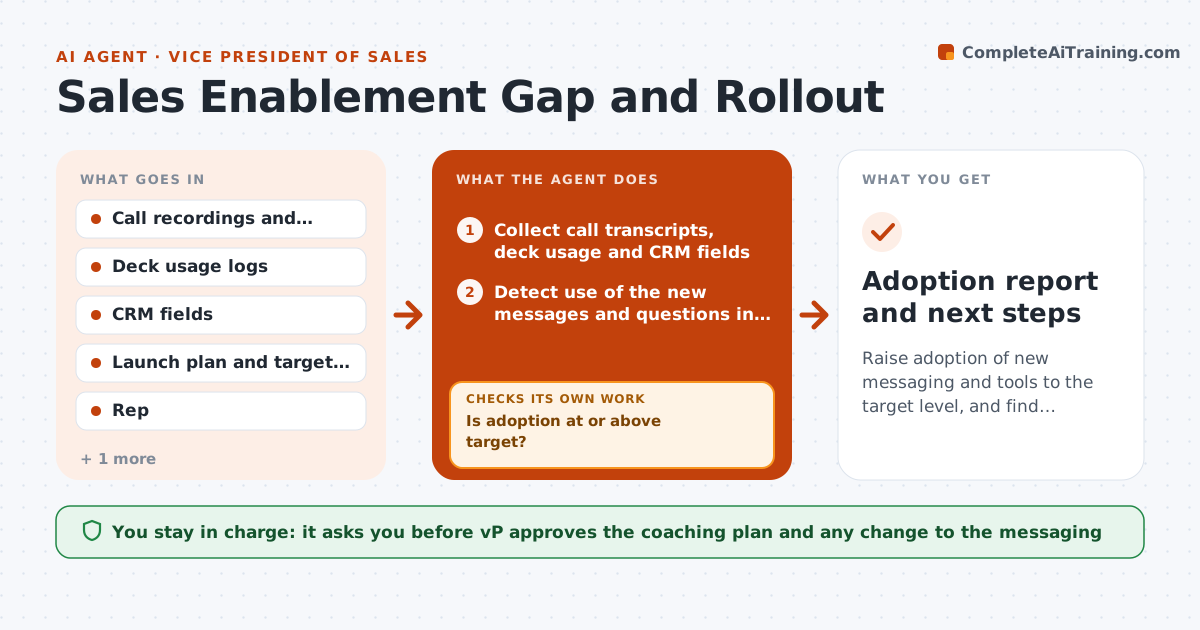
Raise adoption of new messaging and tools to the target level, and find where it does not fit
What it does
The team launches new messaging with a kickoff and a deck, and three months later most reps are still using the old pitch. The VP finds out when win rates do not move. This agent measures adoption after a launch. It checks call recordings and transcripts for the new key phrases, deck usage, and CRM fields such as the new qualification questions. It finds which reps lag, by team and segment, and proposes coaching such as a short practice or a manager listen-in. It rechecks after the coaching to see whether the usage changed. The VP approves the plan. Edge case: a segment where the new pitch does not fit. The agent separates low adoption from low relevance and reports it.
How it works
Follow the arrows from top to bottom. The orange dashed arrow is the loop: when a check fails, the agent goes back and tries again.
Read the steps as a list
- Two weeks after launch
- Collect call transcripts, deck usage and CRM fields
- Detect use of the new messages and questions in each call
- Calculate adoption per rep, team and segment
- Is adoption at or above target?If not: List lagging reps and teams and the missing elements. Back to step 3.
- Separate low adoption from low relevance by segment
- Propose coaching actions and content fixes
- VP approves the planThe agent waits here for your OK.
- Assign coaching to managers with dates
- Did adoption rise two weeks after coaching?If not: Change the coaching approach or revise the content and recheck. Back to step 6.
- Adoption report and next steps
How it decides
A rep lags when use of the new elements is below target after training. Where many reps in a segment skip an element, it is treated as a relevance issue.
- Target adoption is 70 percent of calls by week 6
- A rep is lagging if below 40 percent after 4 weeks
- If over half the reps in a segment skip an element, review its relevance
- Use only calls long enough to include the pitch
Make it yours
Every agent is a starting point. You choose these settings for your own situation.
- Target adoption rate and date
- Elements to detect
- Lagging threshold (default 40 percent)
- Check frequency
- Segments to compare
What keeps you in control
It always asks you first
- VP approves the coaching plan and any change to the messaging
Hard limits
- Does not rank reps publicly
- Uses call data only within company policy
It stops when
- Done: adoption at target for 4 weeks
- Stop: tools cannot access calls, request access
Set it up
We guide you through the set-up, step by step
Members get the full set-up guide for this agent. No technical skills needed: you copy, paste and upload.
- One set of instructions to paste into your AI, with the clicks for ChatGPT, Claude, Microsoft 365 Copilot, Gemini and Grok
- The agent then walks you through connecting your own data, one source at a time
- A downloadable copy with the flow chart, the rules and the full guide