AI agent for field service technicians
Service Call Pre-Visit Preparation Agent
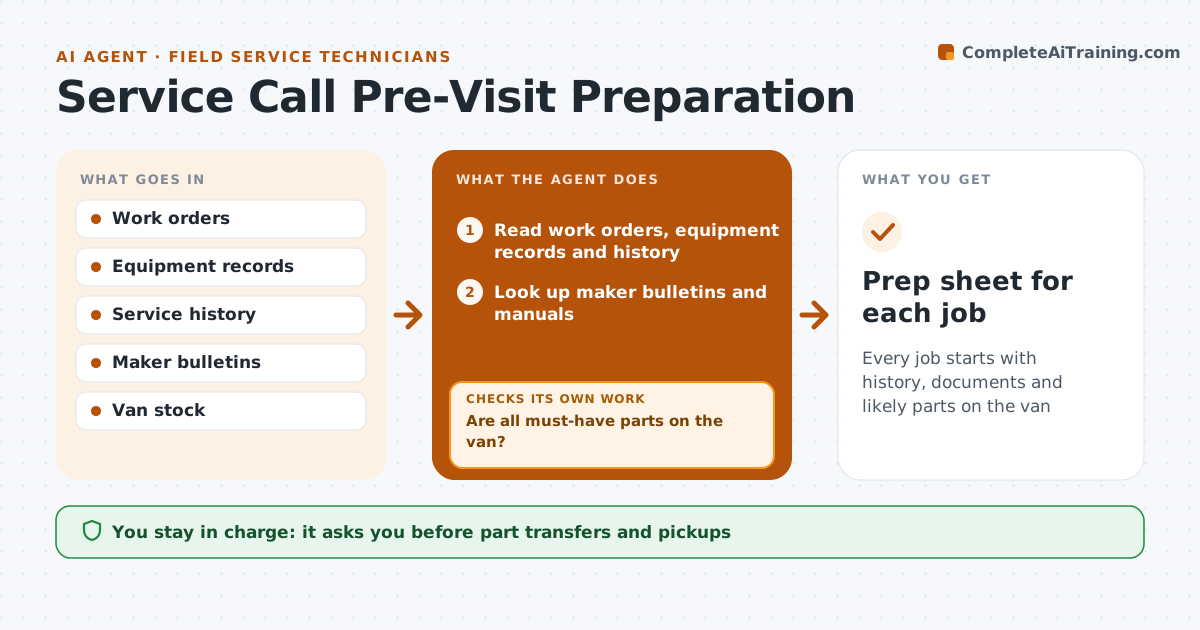
Every job starts with history, documents and likely parts on the van
What it does
A first-time fix depends on preparation, and a technician who arrives without the right part has to come back another day. When the next day's route is set, this agent reads each job's complaint, equipment model and serial number, and past service history. It looks up maker bulletins and manuals. It lists likely causes and the parts that fixed this complaint on this model most often, treating the top three as must-have on the van. It flags repeat visits within 30 days. It compares the parts list with the technician's van stock. If a must-have part is missing, it drafts a pickup or transfer request and checks again. The coordinator approves part transfers, and the technician reviews the prep sheet the evening before. Edge case: equipment under warranty gets the warranty procedure attached so parts are claimed correctly.
How it works
Follow the arrows from top to bottom. The orange dashed arrow is the loop: when a check fails, the agent goes back and tries again.
Read the steps as a list
- Next day's route is set
- Read work orders, equipment records and history
- Look up maker bulletins and manuals
- List likely causes and must-have parts
- Compare parts with van stock
- Are all must-have parts on the van?If not: draft a pickup or transfer request and recheck. Back to step 5.
- Coordinator approves part transfersThe agent waits here for your OK.
- Prep sheet for each job
How it decides
It lists parts that fixed this complaint on this model in past jobs and treats the top three as must-have on the van.
- Top three likely parts are must-have
- Warranty jobs attach the warranty procedure
- Repeat visits within 30 days are flagged
Make it yours
Every agent is a starting point. You choose these settings for your own situation.
- Must-have part count (default 3)
- Sources for history and bulletins
- Prep sheet format
- Delivery time for prep sheets
What keeps you in control
It always asks you first
- Part transfers and pickups
Hard limits
- Never orders parts from suppliers
- Never changes the schedule
It stops when
- Done: prep sheets ready for all jobs
- Stop: equipment model unknown, ask the customer for a nameplate photo
Set it up
We guide you through the set-up, step by step
Members get the full set-up guide for this agent. No technical skills needed: you copy, paste and upload.
- One set of instructions to paste into your AI, with the clicks for ChatGPT, Claude, Microsoft 365 Copilot, Gemini and Grok
- The agent then walks you through connecting your own data, one source at a time
- A downloadable copy with the flow chart, the rules and the full guide