AI agent for structural engineers
Shop Drawing and Submittal Review Agent
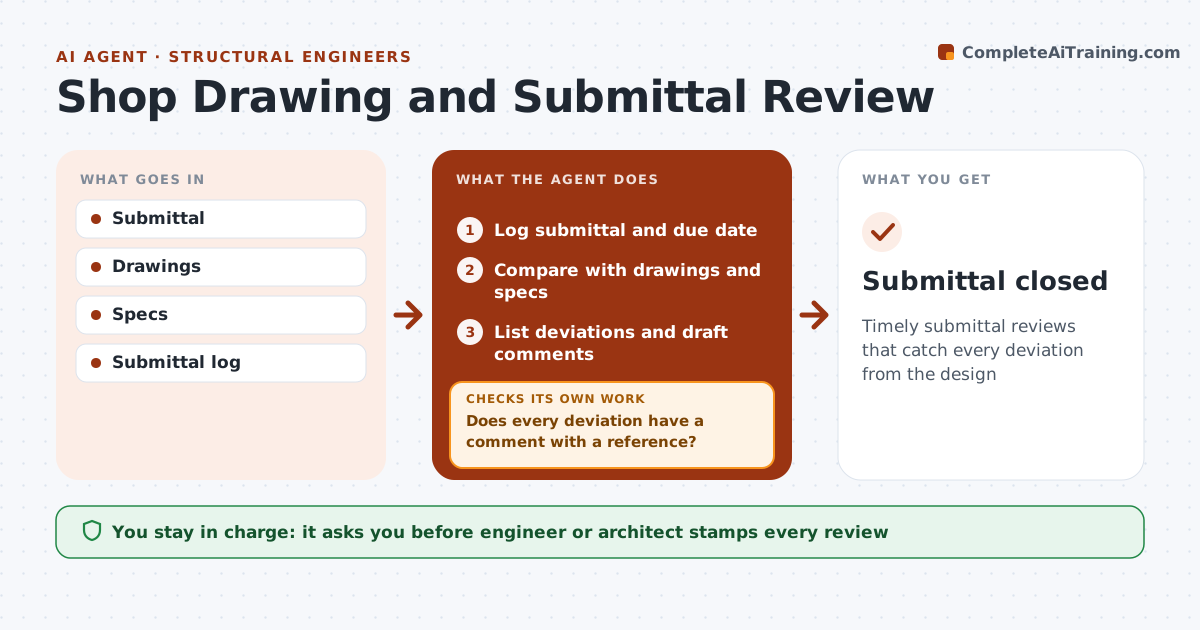
Timely submittal reviews that catch every deviation from the design
What it does
Contractors send shop drawings and product data that must match the design, and reviews have contract deadlines. This agent logs each submittal with its due date, then compares it with the relevant drawings and specification sections. It lists deviations, such as different member sizes, connection types or products, with drawing and spec references. Products swapped without a formal request are flagged as unapproved substitutions. It drafts review comments and a suggested action: approved, approved as noted, or revise and resubmit. It checks that every deviation has a comment before the reviewer sees it. The engineer or architect decides and stamps. On resubmittal, it checks that each comment was addressed and lists any that were not. Edge case: a review nearing its contract deadline is flagged to the reviewer two days ahead.
How it works
Follow the arrows from top to bottom. The orange dashed arrow is the loop: when a check fails, the agent goes back and tries again.
Read the steps as a list
- Submittal received
- Log submittal and due date
- Compare with drawings and specs
- List deviations and draft comments
- Does every deviation have a comment with a reference?If not: add the missing comments and references. Back to step 4.
- Engineer or architect decides and stampsThe agent waits here for your OK.
- Compare the resubmittal with open comments
- On resubmittal, are all comments addressed?If not: list unaddressed comments for the next review. Back to step 3.
- Submittal closed
How it decides
Deviations from documents are listed. Resubmittals are checked comment by comment.
- Unrequested substitutions flagged
- Review due dates tracked
- Deviations listed with references
Make it yours
Every agent is a starting point. You choose these settings for your own situation.
- Review period
- Action codes
- Spec sections
- Log format
What keeps you in control
It always asks you first
- Engineer or architect stamps every review
Hard limits
- Never stamps submittals
- Never approves substitutions
It stops when
- Done: submittal approved
- Stop: submittal withdrawn
Set it up
We guide you through the set-up, step by step
Members get the full set-up guide for this agent. No technical skills needed: you copy, paste and upload.
- One set of instructions to paste into your AI, with the clicks for ChatGPT, Claude, Microsoft 365 Copilot, Gemini and Grok
- The agent then walks you through connecting your own data, one source at a time
- A downloadable copy with the flow chart, the rules and the full guide