AI agent for research and development engineers
Simulation Model Validation Against Test Agent
Bring the model within tolerance of test data with documented, justified changes
What it does
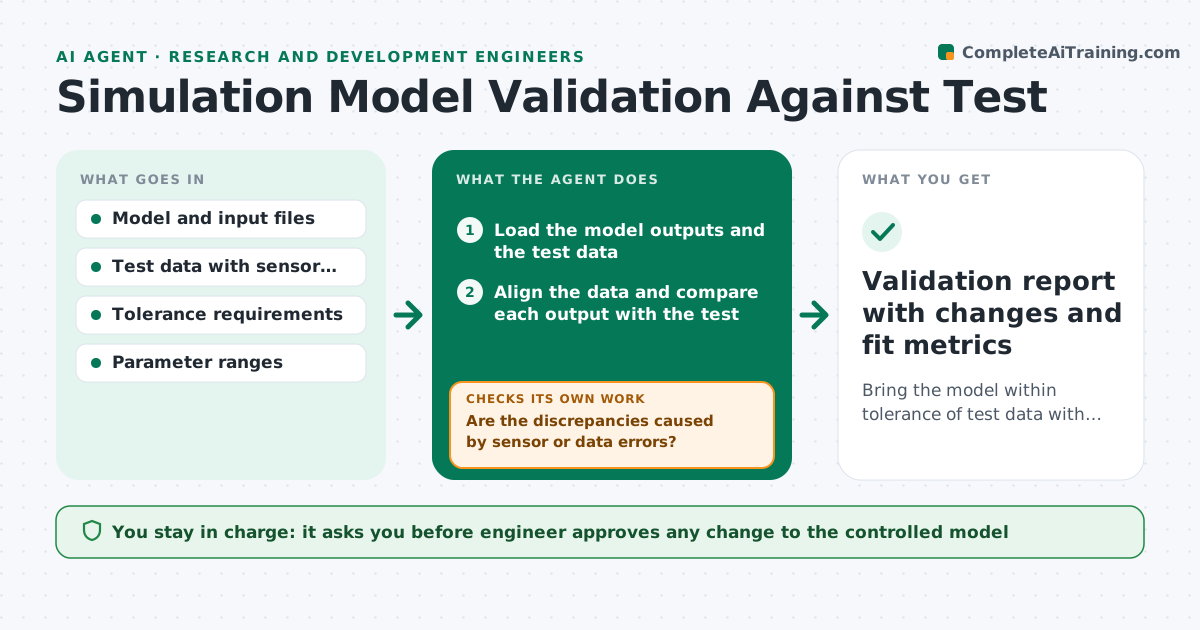
An analysis model is built, validated once and then used for years while the design and test data evolve. Nobody checks whether it still matches reality. This agent keeps the model honest. It compares model outputs with the latest test data, finds the largest discrepancies and tries parameter changes in a sandbox copy of the model, such as stiffness, damping or boundary conditions, checking the fit after each try. It stops when the fit is within tolerance, and reports which changes helped. The engineer approves any update to the real model. Edge case: a discrepancy comes from a faulty sensor. The agent flags the data channel instead of changing the model.
How it works
Follow the arrows from top to bottom. The orange dashed arrow is the loop: when a check fails, the agent goes back and tries again.
Read the steps as a list
- New test data received
- Load the model outputs and the test data
- Align the data and compare each output with the test
- Are the discrepancies caused by sensor or data errors?If not: Flag the channel and re-run the comparison without it. Back to step 2.
- Rank discrepancies by size and importance
- Copy the model to a sandbox and apply a parameter change within its physical range
- Run the sandbox model and compare with the test
- Is the fit within tolerance for all key outputs?If not: Try the next parameter change and note effects on other outputs. Back to step 6.
- Engineer approves updating the real modelThe agent waits here for your OK.
- Validation report with changes and fit metrics
How it decides
It ranks discrepancies by size and importance, and tests parameter changes within physical ranges one at a time. It prefers changes that improve several outputs without worsening others.
- Parameters stay within physical ranges
- One parameter changes at a time unless the engineer agrees
- A change that worsens another key output by more than 5 percent is rejected
- Stop after 10 tries and report the best result
Make it yours
Every agent is a starting point. You choose these settings for your own situation.
- Fit tolerance
- Parameters allowed to change
- Maximum number of tries (default 10)
- Outputs treated as key
- Report format
What keeps you in control
It always asks you first
- Engineer approves any change to the controlled model
Hard limits
- Works only on a sandbox copy
- Never changes the controlled model without approval
It stops when
- Done: fit within tolerance and documented
- Stop: no parameter set meets tolerance, suggest a model form change to the engineer
Set it up
We guide you through the set-up, step by step
Members get the full set-up guide for this agent. No technical skills needed: you copy, paste and upload.
- One set of instructions to paste into your AI, with the clicks for ChatGPT, Claude, Microsoft 365 Copilot, Gemini and Grok
- The agent then walks you through connecting your own data, one source at a time
- A downloadable copy with the flow chart, the rules and the full guide