AI agent for team leads
SLA Breach Early Warning Agent
Fewer SLA breaches through early reassignments and honest customer updates
What it does
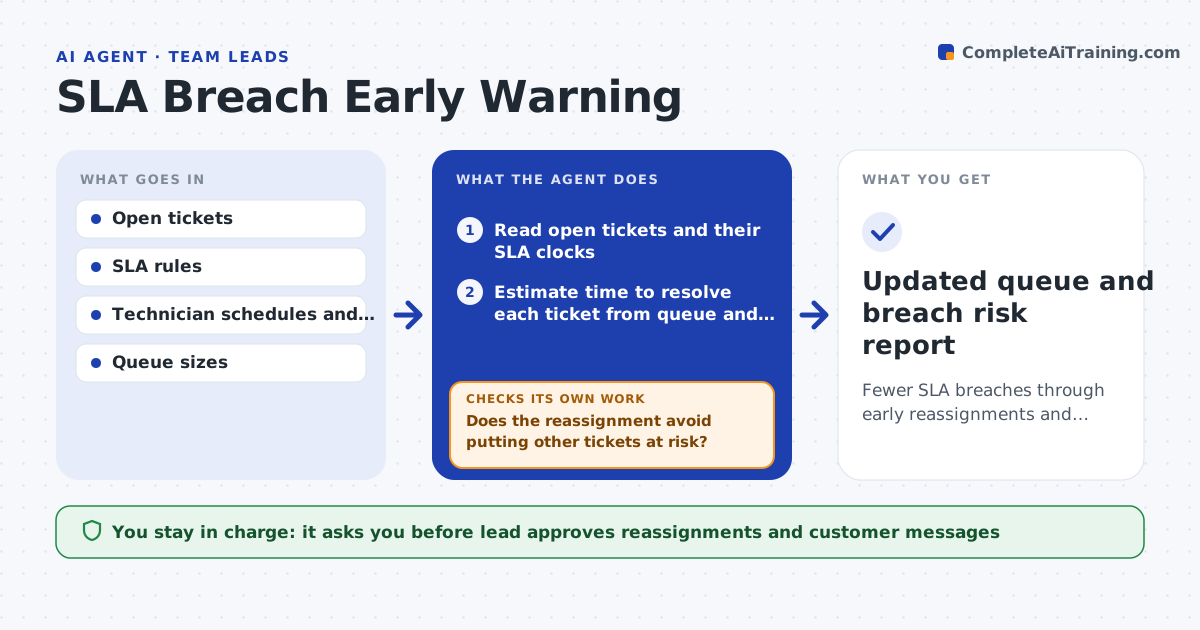
Tickets breach their SLA before anyone sees it coming. Every hour this agent reads open tickets and works out how much time is left on each one. It predicts which tickets will breach using the current queue and staffing. For those at risk, it proposes reassignments and then checks the effect on other tickets, so it does not fix one problem by creating another. It drafts customer messages for tickets that will miss the target. The lead approves reassignments and any customer message. Edge case: the only technician with a skill is off shift, so the agent flags the ticket for the on-call.
How it works
Follow the arrows from top to bottom. The orange dashed arrow is the loop: when a check fails, the agent goes back and tries again.
Read the steps as a list
- Hourly queue check
- Read open tickets and their SLA clocks
- Estimate time to resolve each ticket from queue and staffing
- List the tickets predicted to breach
- Propose reassignments by skill and workload
- Does the reassignment avoid putting other tickets at risk?If not: try another technician or sequence and test again. Back to step 4.
- Draft customer messages for tickets that will still miss
- Lead approves reassignments and messagesThe agent waits here for your OK.
- Apply approved changes in the ticket system
- Updated queue and breach risk report
How it decides
A ticket is at risk when predicted resolution time is longer than the time left. A reassignment is accepted only if no other ticket becomes at risk.
- Mark at risk when predicted time exceeds time left
- Match tickets to skills before workload
- Never move more than a set number of tickets per person
- Escalate to on-call when no one is available
Make it yours
Every agent is a starting point. You choose these settings for your own situation.
- Check frequency (default: hourly)
- Risk threshold (default: 80% of SLA used)
- Maximum moves per technician
- Customer message template
What keeps you in control
It always asks you first
- Lead approves reassignments and customer messages
Hard limits
- Never reassigns without the lead
- Never promises times to customers
It stops when
- Done: no ticket is predicted to breach or all risks are handled
- Stop: SLA data is missing for the queue
Set it up
We guide you through the set-up, step by step
Members get the full set-up guide for this agent. No technical skills needed: you copy, paste and upload.
- One set of instructions to paste into your AI, with the clicks for ChatGPT, Claude, Microsoft 365 Copilot, Gemini and Grok
- The agent then walks you through connecting your own data, one source at a time
- A downloadable copy with the flow chart, the rules and the full guide