AI agent for customer support representatives
Social Inbox Triage Agent
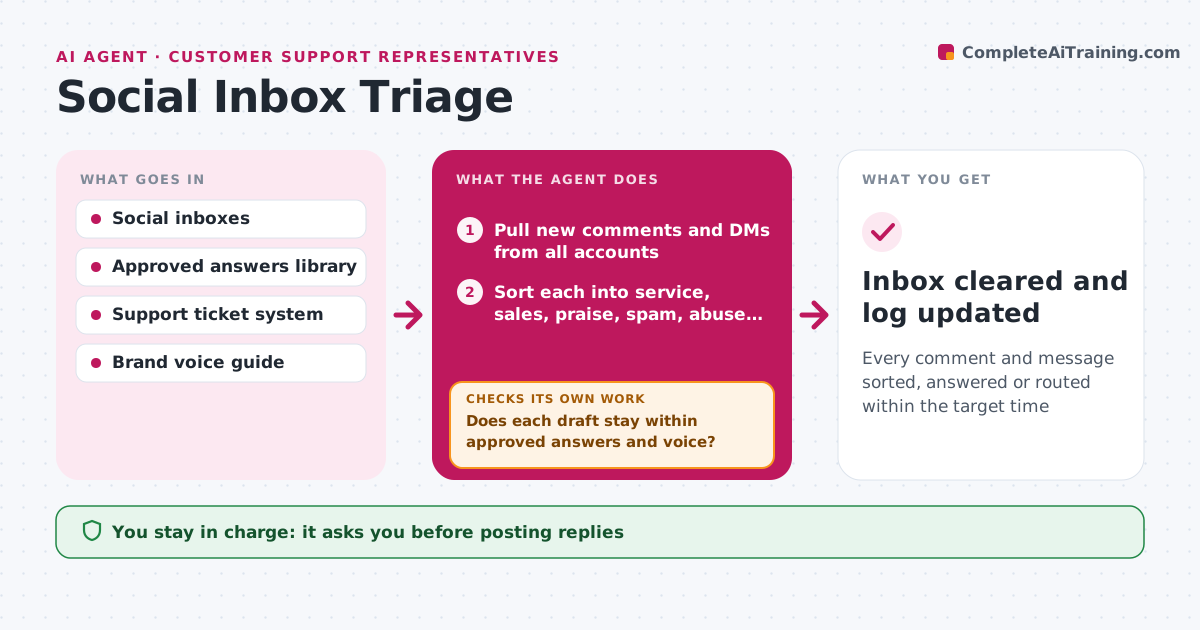
Every comment and message sorted, answered or routed within the target time
What it does
Comments and messages pile up across a brand's accounts, and slow or off-script replies cause real trouble. Several times a day this agent reads everything new and sorts each item into customer service, sales question, praise, spam, abuse or possible crisis. It drafts replies for routine items using approved answers, and creates support tickets with the customer's details for service issues. Then it checks every draft against the brand voice and the approved answers list. If a draft promises something not on the list, it rewrites it or marks it for human review. Possible crisis items, such as mentions of injury or legal action, go straight to the manager. The coordinator approves every reply before it posts. Edge case: a customer who posts the same complaint on three platforms is linked into one case so they get one consistent reply.
How it works
Follow the arrows from top to bottom. The orange dashed arrow is the loop: when a check fails, the agent goes back and tries again.
Read the steps as a list
- Inbox check runs
- Pull new comments and DMs from all accounts
- Sort each into service, sales, praise, spam, abuse or possible crisis
- Draft replies and create support tickets for service issues
- Does each draft stay within approved answers and voice?If not: rewrite the reply or mark it for human review. Back to step 4.
- Coordinator approves replies before postingThe agent waits here for your OK.
- Escalate possible crisis items to the manager
- Inbox cleared and log updated
How it decides
It sorts by intent and urgency words, and only drafts replies for categories covered by approved answers.
- Hide spam only, never hide complaints
- Link repeat posts from the same person into one case
- Anything mentioning injury, legal action or media goes to the manager
Make it yours
Every agent is a starting point. You choose these settings for your own situation.
- Check frequency
- Target response time
- Categories routed to support
- Words that trigger escalation
What keeps you in control
It always asks you first
- Posting replies
- Hiding or deleting comments
Hard limits
- Never posts or deletes without approval
- Never offers refunds or discounts on its own
It stops when
- Done: all items handled for this run
- Stop: volume spike over three times normal, alert manager
Set it up
We guide you through the set-up, step by step
Members get the full set-up guide for this agent. No technical skills needed: you copy, paste and upload.
- One set of instructions to paste into your AI, with the clicks for ChatGPT, Claude, Microsoft 365 Copilot, Gemini and Grok
- The agent then walks you through connecting your own data, one source at a time
- A downloadable copy with the flow chart, the rules and the full guide