AI agent for video editors
Subtitle and Translation Timing Agent
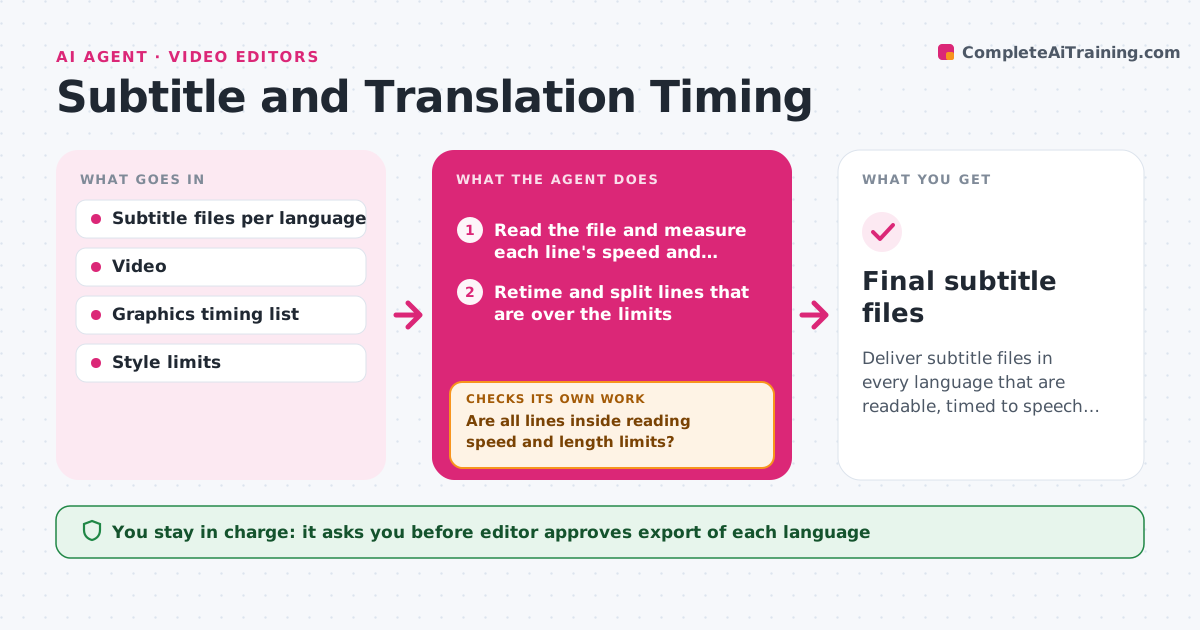
Deliver subtitle files in every language that are readable, timed to speech and clear of graphics.
What it does
The French subtitles arrive and half the lines are too long to read before the next one appears, and some sit on top of the lower third. This agent takes each translation file and checks every subtitle for reading speed, line length and line count. It adjusts timing within the limits of the spoken line, and splits long lines where it can. It then tests each subtitle against the on-screen graphics, using the safe areas and marked graphic times, to find collisions. Lines that cannot be fixed by timing or splitting go back to the translator with the limit and the suggested length. It checks the file again after each return. The editor approves export for each language. Edge case: a name on screen at the same time as a subtitle, so the agent moves the subtitle position.
How it works
Follow the arrows from top to bottom. The orange dashed arrow is the loop: when a check fails, the agent goes back and tries again.
Read the steps as a list
- Translated subtitle file arrives
- Read the file and measure each line's speed and length
- Retime and split lines that are over the limits
- Compare subtitle times with the on-screen graphics list
- Move positions to avoid graphics
- Are all lines inside reading speed and length limits?If not: send the failing lines to the translator with the limit and a shorter suggestion. Back to step 3.
- Is any subtitle still overlapping a graphic?If not: change its position or timing and test again. Back to step 4.
- Generate a preview with the subtitles burned in
- Editor approves exportThe agent waits here for your OK.
- Final subtitle files
How it decides
A line passes if its reading speed and length are within limits and it does not overlap a graphic. Otherwise it is retimed, split or sent back.
- Limit reading speed to 17 characters per second
- Allow two lines of at most 42 characters
- Never extend a subtitle past the next speech or a cut by more than 4 frames
- Move a subtitle to the top only if no graphic is there
Make it yours
Every agent is a starting point. You choose these settings for your own situation.
- Reading speed limit (default 17 characters per second)
- Maximum line length and count
- Languages and file formats
- Safe area and graphic positions
- Translator contact for returns
What keeps you in control
It always asks you first
- Editor approves export of each language
Hard limits
- Never change the meaning of a translation
- Never export a file without approval
It stops when
- Done: every language passes and is approved
- Stop: a translator does not return failed lines
Set it up
We guide you through the set-up, step by step
Members get the full set-up guide for this agent. No technical skills needed: you copy, paste and upload.
- One set of instructions to paste into your AI, with the clicks for ChatGPT, Claude, Microsoft 365 Copilot, Gemini and Grok
- The agent then walks you through connecting your own data, one source at a time
- A downloadable copy with the flow chart, the rules and the full guide