AI agent for software engineers
Third-Party API Change Monitor Agent
No integration breaks because of an unnoticed API change
What it does
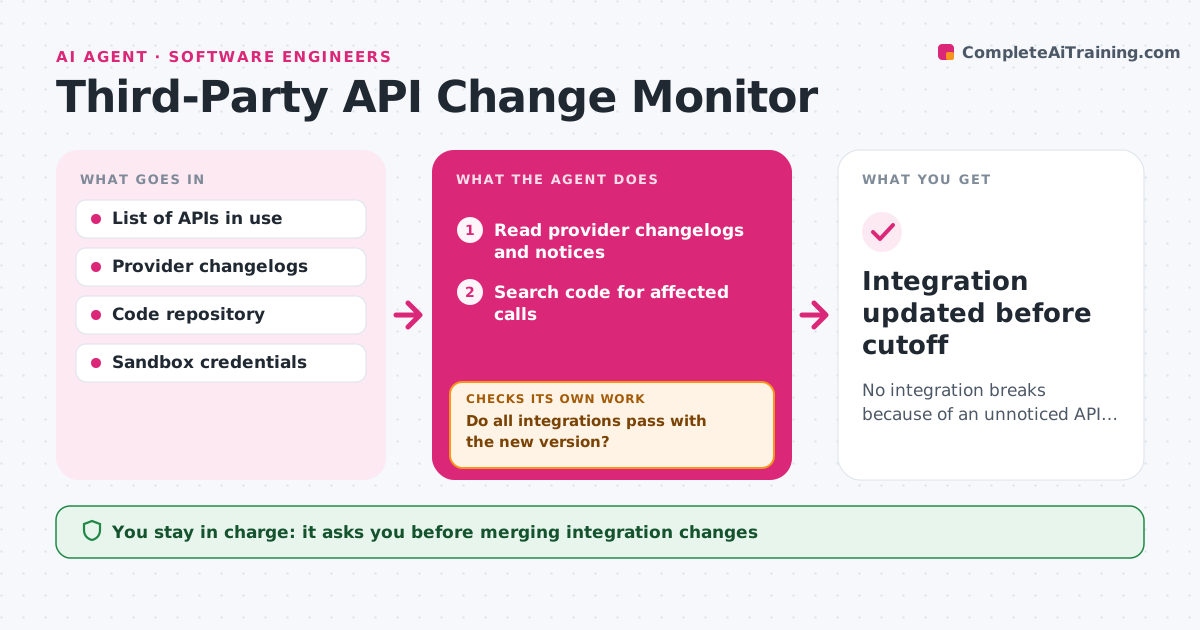
Payment, maps, email and social APIs change their versions and rules, and a missed deadline can break checkout overnight. Each week this agent reads provider changelogs and deprecation notices for the APIs your site uses. It searches your code for the affected calls and skips changes to features you do not use, with a note. It runs integration tests against the provider's sandbox using the new version. When something will break, it drafts the code change and tests again until all integrations pass. It then plans the rollout well before the cutoff date and checks that the plan leaves enough buffer. A developer approves every change. Edge case: a change that only affects a feature the site never calls is recorded and closed.
How it works
Follow the arrows from top to bottom. The orange dashed arrow is the loop: when a check fails, the agent goes back and tries again.
Read the steps as a list
- Weekly scan
- Read provider changelogs and notices
- Search code for affected calls
- Draft the code change for the new version
- Run integration tests against sandbox
- Do all integrations pass with the new version?If not: revise the code change and test again. Back to step 4.
- Does the release date leave enough buffer before cutoff?If not: move the release earlier and flag it. Back to step 4.
- Developer approves the changeThe agent waits here for your OK.
- Integration updated before cutoff
How it decides
It flags changes that touch calls found in your code and sets priority by the cutoff date.
- Prioritize by cutoff date
- Ignore changes to unused features
- Plan changes at least the set weeks before cutoff
Make it yours
Every agent is a starting point. You choose these settings for your own situation.
- APIs to watch
- Lead time before cutoff (default 4 weeks)
- Alert channel
- Test coverage required
What keeps you in control
It always asks you first
- Merging integration changes
Hard limits
- Uses sandbox, never live keys
- Never merges without approval
It stops when
- Done: changes merged
- Stop: no sandbox available; report risk
Set it up
We guide you through the set-up, step by step
Members get the full set-up guide for this agent. No technical skills needed: you copy, paste and upload.
- One set of instructions to paste into your AI, with the clicks for ChatGPT, Claude, Microsoft 365 Copilot, Gemini and Grok
- The agent then walks you through connecting your own data, one source at a time
- A downloadable copy with the flow chart, the rules and the full guide