AI agent for mechanical engineers
Tolerance Stack-Up Review Agent
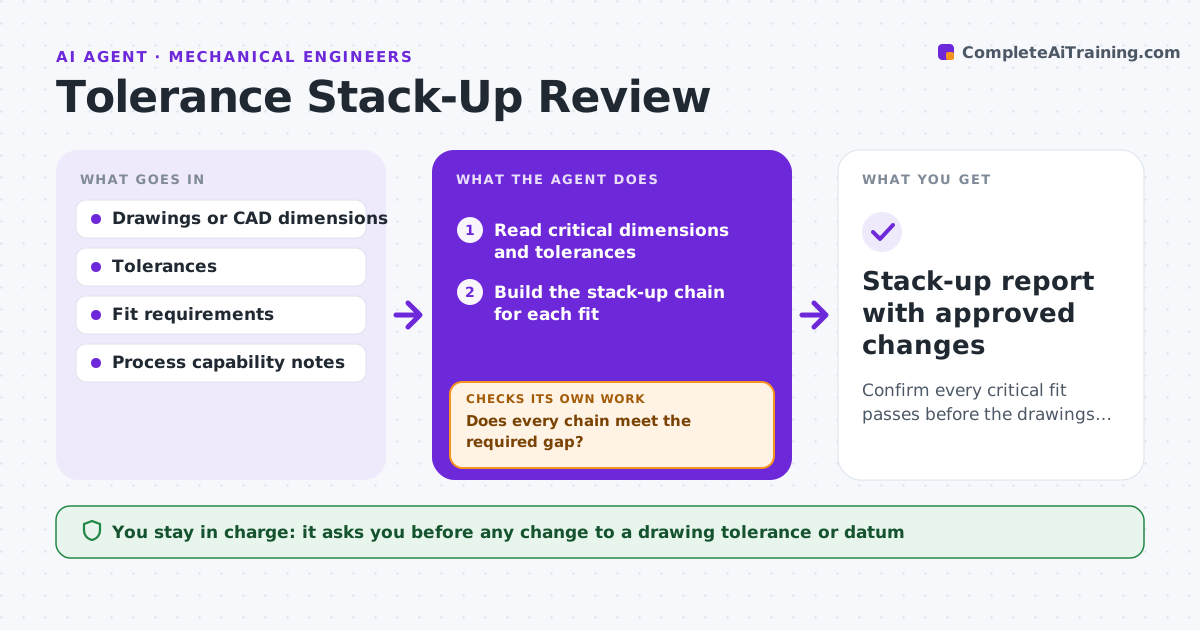
Confirm every critical fit passes before the drawings are released.
What it does
If tolerances are wrong, you find out when the prototype does not fit. This agent reads the critical dimensions and tolerances from the drawing or model for an assembly and builds the stack-up chains for each fit. It calculates worst-case and statistical results, and compares them with the gap or clearance required. For any chain that fails, it tests options such as a tighter tolerance on one part, a different datum, or a change in nominal size, and recalculates each. It stops at the cheapest option that passes. You approve any drawing change. Edge case: a shaft and bore pass worst case but only at a tolerance the shop cannot hold, and the agent flags the cost.
How it works
Follow the arrows from top to bottom. The orange dashed arrow is the loop: when a check fails, the agent goes back and tries again.
Read the steps as a list
- Assembly design is ready for review
- Read critical dimensions and tolerances
- Build the stack-up chain for each fit
- Calculate worst-case and statistical results
- Does every chain meet the required gap?If not: List failing chains and the size of the shortfall. Back to step 4.
- Propose changes to a tolerance, datum or nominal
- Recalculate each option
- Does any option pass without exceeding the process limit?If not: Try a combination of changes or ask for a different fit. Back to step 4.
- Engineer approves the drawing changeThe agent waits here for your OK.
- Stack-up report with approved changes
How it decides
It prefers the fewest changes and the loosest tolerance that still passes. Statistical results are used only when worst case fails.
- Worst case must pass first; statistical is used only with approval
- Tolerances tighter than the shop's capability are rejected
- Choose the option that changes the fewest parts
- Keep a 10% margin on required clearance (default)
Make it yours
Every agent is a starting point. You choose these settings for your own situation.
- Margin on required clearance (default 10%)
- Worst case or statistical method
- Process capability limits
- Units and decimal places
- Which fits are critical
What keeps you in control
It always asks you first
- Any change to a drawing tolerance or datum
Hard limits
- Never edits the drawing itself
- Shows all assumptions
- Never relies on statistics without approval
It stops when
- Done: all fits pass with a margin
- Stop: no feasible change; the engineer decides on redesign
Set it up
We guide you through the set-up, step by step
Members get the full set-up guide for this agent. No technical skills needed: you copy, paste and upload.
- One set of instructions to paste into your AI, with the clicks for ChatGPT, Claude, Microsoft 365 Copilot, Gemini and Grok
- The agent then walks you through connecting your own data, one source at a time
- A downloadable copy with the flow chart, the rules and the full guide