AI agent for site reliability engineers
Uptime and Incident Response Agent
Detect and confirm outages quickly, find the likely cause and verify recovery.
What it does
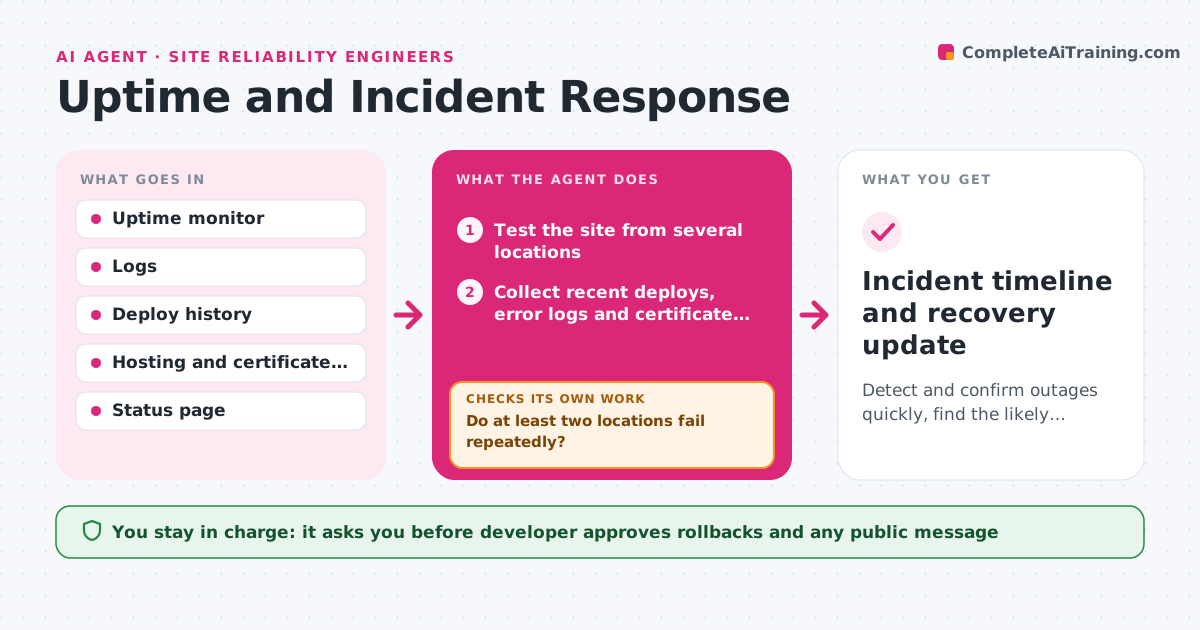
A customer emails to say the site is down, and you find out because they told you. This agent watches uptime checks and logs all day. When a check fails, it confirms the outage from several locations to rule out a single network problem. Once confirmed, it collects what changed: recent deploys, error spikes in the logs, certificate dates and the hosting status page. It proposes the most likely cause and a fix, such as rolling back the last deploy. It drafts a status update for customers. After a fix is applied, it checks that the site responds from all locations and that errors have returned to normal. If it has not recovered, it goes back to find the next likely cause. The developer approves any rollback and any public message. Edge case: only one region fails, so the agent says so in the message.
How it works
Follow the arrows from top to bottom. The orange dashed arrow is the loop: when a check fails, the agent goes back and tries again.
Read the steps as a list
- Uptime check fails
- Test the site from several locations
- Do at least two locations fail repeatedly?If not: retest in two minutes and log it as a possible local fault. Back to step 2.
- Collect recent deploys, error logs and certificate dates
- Rank the likely causes and propose a fix
- Draft the internal alert and the public status message
- Developer approves the fix and the public messageThe agent waits here for your OK.
- Test the site again from all locations
- Has the site recovered and are errors back to normal?If not: rank the next likely cause and propose the next fix. Back to step 5.
- Incident timeline and recovery update
How it decides
An outage is confirmed when at least two of three locations fail twice in a row. The most likely cause is the most recent change that matches the time of the first error.
- Confirm an outage when two of three locations fail twice in a row
- Propose a rollback first when a deploy happened in the last 60 minutes
- Check the certificate and domain expiry before looking at code
- Draft a customer message after 10 minutes of confirmed downtime
Make it yours
Every agent is a starting point. You choose these settings for your own situation.
- Uptime check addresses and locations
- Number of failures before an alert (default 2 of 3)
- Who is alerted and how
- Status page and message tone
- Delay before a public message (default 10 minutes)
What keeps you in control
It always asks you first
- Developer approves rollbacks and any public message
Hard limits
- Never roll back or restart a service without approval
- Never post a public message without approval
It stops when
- Done: recovery is verified and the timeline is saved
- Stop: no likely cause is found after three attempts, so wake the developer
Set it up
We guide you through the set-up, step by step
Members get the full set-up guide for this agent. No technical skills needed: you copy, paste and upload.
- One set of instructions to paste into your AI, with the clicks for ChatGPT, Claude, Microsoft 365 Copilot, Gemini and Grok
- The agent then walks you through connecting your own data, one source at a time
- A downloadable copy with the flow chart, the rules and the full guide