AI agent for customer experience managers
Voice of Customer Theme Agent
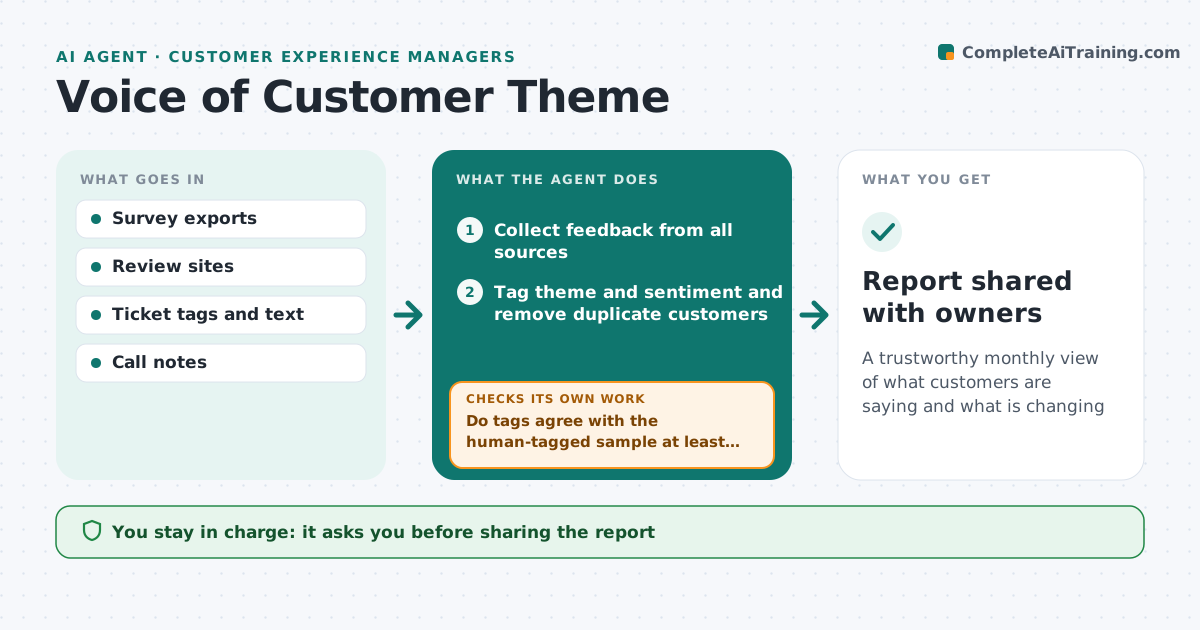
A trustworthy monthly view of what customers are saying and what is changing
What it does
Customer feedback is spread across surveys, reviews, tickets and call notes, so no one sees the full picture. Each month this agent collects all of it, tags each comment by theme and sentiment, and counts themes by segment, store or product. Before trusting the tags, it checks a sample against a person's earlier tagging. If agreement is low, it refines the theme list, for example splitting a broad theme, and re-tags. It compares this month with last and highlights new and growing themes with real example quotes. It drafts a report with the top five themes and suggested owners. The manager decides which themes get action. Edge case: one customer posting the same complaint in several places is counted once, so a single loud voice does not look like a trend.
How it works
Follow the arrows from top to bottom. The orange dashed arrow is the loop: when a check fails, the agent goes back and tries again.
Read the steps as a list
- Monthly feedback review
- Collect feedback from all sources
- Tag theme and sentiment and remove duplicate customers
- Do tags agree with the human-tagged sample at least 85%?If not: refine theme definitions and re-tag. Back to step 3.
- Compare themes with last month and by segment
- Draft report with top themes and quotes
- Manager chooses themes to act onThe agent waits here for your OK.
- Report shared with owners
How it decides
It ranks themes by volume, growth and link to churn or low scores, and counts each customer once per theme.
- Count each customer once per theme
- Highlight themes growing more than 25%
- Quote real comments, never paraphrase as quotes
Make it yours
Every agent is a starting point. You choose these settings for your own situation.
- Feedback sources
- Theme list
- Growth threshold
- Segments to compare
What keeps you in control
It always asks you first
- Sharing the report
- Assigning owners
Hard limits
- Removes personal details from quotes
- Never replies to customers
It stops when
- Done: report shared
- Stop: under 100 comments, combine with next month
Set it up
We guide you through the set-up, step by step
Members get the full set-up guide for this agent. No technical skills needed: you copy, paste and upload.
- One set of instructions to paste into your AI, with the clicks for ChatGPT, Claude, Microsoft 365 Copilot, Gemini and Grok
- The agent then walks you through connecting your own data, one source at a time
- A downloadable copy with the flow chart, the rules and the full guide