AI agent for sales
Weekly Forecast Commit Review Agent
Give the sales leader a defensible weekly commit and best-case number with a list of deals that need a conversation
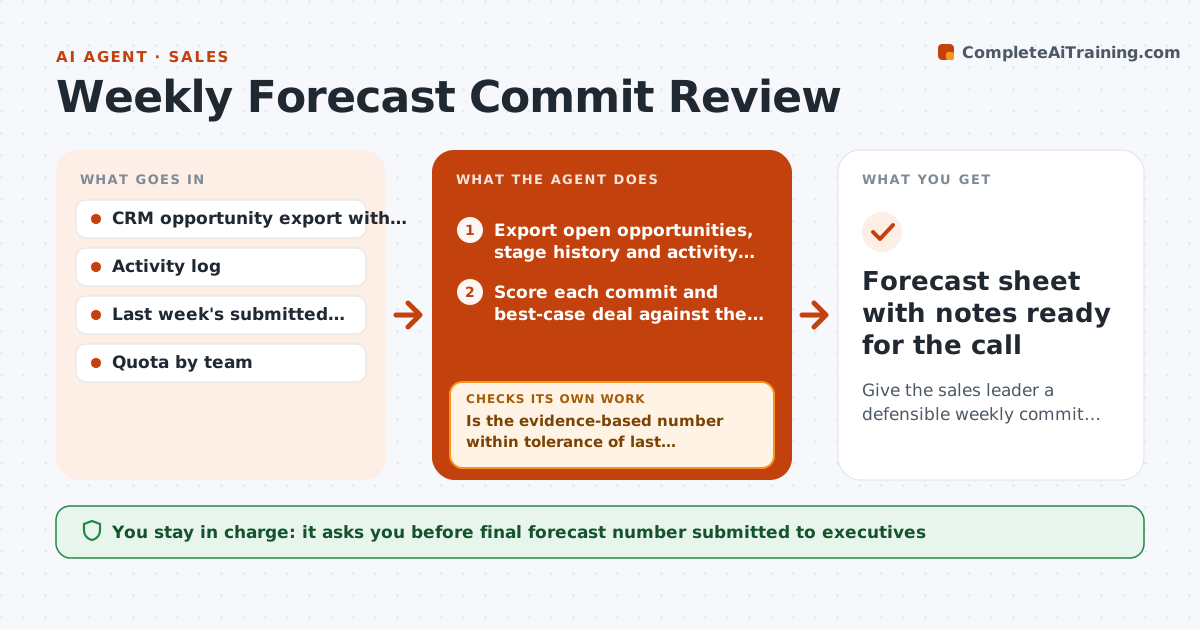
What it does
Every week sales leaders must give a forecast number they can stand behind, but rep categories are often hopeful. This agent exports the open pipeline from the CRM with stage history and activity. It scores each commit and best-case deal against evidence rules: a booked next step within 14 days, no more than one close date push, and a stage that fits the close month. Deals missing two of these are flagged. It rebuilds the roll-up with and without flagged deals and compares it with last week's submission. If the gap is above tolerance, it rechecks activity for missed updates, rescores, and lists the deals that explain what is left. It drafts one question per flagged deal for each rep. The leader sets the final number and any category changes. Edge case: a signed but unbooked order stays in commit, marked for finance to confirm.
How it works
Follow the arrows from top to bottom. The orange dashed arrow is the loop: when a check fails, the agent goes back and tries again.
Read the steps as a list
- Thursday forecast prep window opens
- Export open opportunities, stage history and activity from the CRM
- Score each commit and best-case deal against the evidence rules
- Rebuild the team roll-up with and without flagged deals
- Is the evidence-based number within tolerance of last week's submission?If not: list the deals that explain the gap, recheck their activity for missed updates, then rescore. Back to step 3.
- Draft one question per flagged deal for each rep
- Sales leader sets the final commit and approves category changesThe agent waits here for your OK.
- Forecast sheet with notes ready for the call
How it decides
A committed deal needs a booked next step within 14 days, no more than one close date push, and a stage that matches the close month. Deals that miss two of these are flagged.
- Flag a commit deal with no meeting booked in the next 14 days
- Flag a deal whose close date moved more than once this quarter
- Treat a signed but unbooked order as commit with a finance check
- Escalate any single deal above 15% of the team quota for leader review
Make it yours
Every agent is a starting point. You choose these settings for your own situation.
- Gap tolerance that triggers a deal list (default 10%)
- Days without a booked next step before a deal is flagged (default 14)
- Which forecast categories to review (commit only, or commit and best case)
- Day and time the review runs
What keeps you in control
It always asks you first
- Final forecast number submitted to executives
- Changing a rep's forecast category
Hard limits
- Never changes forecast categories in the CRM by itself
- Never shares one rep's deal notes with another rep
It stops when
- Done: forecast sheet and rep questions delivered
- Stop: CRM export is incomplete or older than 24 hours
Set it up
We guide you through the set-up, step by step
Members get the full set-up guide for this agent. No technical skills needed: you copy, paste and upload.
- One set of instructions to paste into your AI, with the clicks for ChatGPT, Claude, Microsoft 365 Copilot, Gemini and Grok
- The agent then walks you through connecting your own data, one source at a time
- A downloadable copy with the flow chart, the rules and the full guide