AI agent for primary school teachers
Weekly Parent Update Agent
An accurate weekly family update ready for the teacher to send
What it does
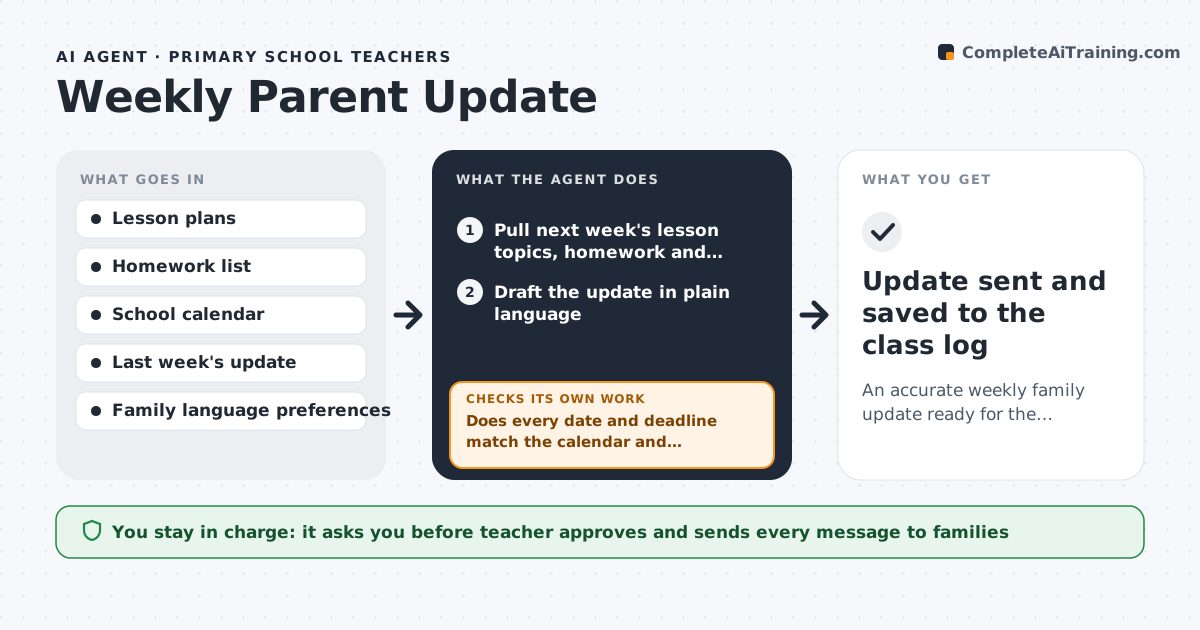
Families expect a weekly note about what the class is learning, upcoming dates and homework, and writing it eats into Thursday planning time. This agent pulls next week's lesson plans, the school calendar and the homework list, then drafts a short update in plain language. It checks every date and deadline against the calendar. If a date does not match or a homework item has no due date, it corrects the line from the source or marks it for the teacher to confirm. It then compares the draft with last week's note to catch canceled or moved events, and makes translated versions for families who asked for another language. The teacher always reviews and sends the note. Edge case: if an event from last week's note was canceled since, the agent adds a clear correction line at the top.
How it works
Follow the arrows from top to bottom. The orange dashed arrow is the loop: when a check fails, the agent goes back and tries again.
Read the steps as a list
- Thursday afternoon schedule fires
- Pull next week's lesson topics, homework and calendar events
- Draft the update in plain language
- Does every date and deadline match the calendar and homework list?If not: correct from the source, or mark the line for the teacher to confirm. Back to step 3.
- Compare with last week's note for canceled or moved events
- Create translated versions for requested languages
- Teacher reviews and sends the updateThe agent waits here for your OK.
- Update sent and saved to the class log
How it decides
Every date or deadline in the draft must match a calendar or homework entry. Changes since last week's note are listed as corrections.
- Dates come only from the calendar, never from memory of past notes
- Changes since last week go at the top as corrections
- Notes stay under 250 words
Make it yours
Every agent is a starting point. You choose these settings for your own situation.
- Day and time to draft (default Thursday 3 pm)
- Languages to translate into
- Maximum length (default 250 words)
- Messaging app used (email, ClassDojo, school app)
What keeps you in control
It always asks you first
- Teacher approves and sends every message to families
Hard limits
- Never sends messages to families on its own
- Does not name individual students in a class-wide note
It stops when
- Done: draft verified and handed to the teacher
- Stop: the calendar cannot be read
Set it up
We guide you through the set-up, step by step
Members get the full set-up guide for this agent. No technical skills needed: you copy, paste and upload.
- One set of instructions to paste into your AI, with the clicks for ChatGPT, Claude, Microsoft 365 Copilot, Gemini and Grok
- The agent then walks you through connecting your own data, one source at a time
- A downloadable copy with the flow chart, the rules and the full guide