About Assistly
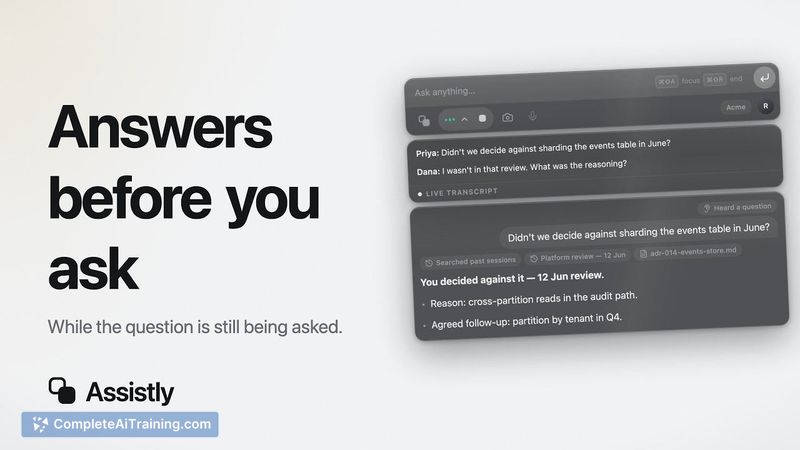
Assistly is a live meeting assistant for macOS and Windows that captures system audio locally instead of joining calls as a visible participant. It displays real-time guidance in a private overlay that doesn't appear in screen shares or recordings. The tool tracks every speaker, supports dozens of languages, and generates notes with action items after each session.
Review
Assistly launched this week, so this assessment is based on the maker's launch materials and early user feedback. The product targets the common pain point of AI meeting bots appearing as unwanted participants on calls, and it attempts to answer the question about consent and recording law.
Key Features
- No Meeting Bots: captures system audio locally without an AI bot joining Zoom, Google Meet, or Teams calls.
- Real-Time Assistance: detects questions and important moments as they happen, surfacing relevant context on the user's screen.
- Private Overlay: the Assistly workspace remains on-screen without appearing in screen shares or recordings.
- MCP integration, both ways: connects to other MCP tools to pull external sources and lets existing AI tools query meeting transcripts.
- Post-meeting notes with action items across dozens of languages.
Pricing and Value
The launch page lists free options and a 15% discount for launch-team members. Specific pricing tiers are not disclosed in the reference content. A free trial link is available at tryassistly.com. Assistly stores transcripts but not call audio, and the company places responsibility for consent on the meeting host.
Pros
- No bot participant means it can't be blocked by waiting room approvals or appear on the call grid.
- The overlay doesn't show up in screen shares, so the assistant can be used live without the other party seeing it.
- MCP connections allow pull for external context during meetings and post-meeting integration with existing tools.
- Works from system audio on both macOS and Windows.
Cons
- Consent ambiguity: the maker acknowledges that all-party consent laws may apply even though no visible bot joins, and the interface doesn't automatically handle disclosure.
- Transcripts are stored in the user's account, meaning meeting content is retained in the product's infrastructure; casual users may not expect this.
- The tool isn't suited for people in strict two-party-consent jurisdictions who need automated monitoring of others' calls without their knowledge or for teams that need a third-party archive of audio recordings rather than text notes.
Assistly is best for individual meeting participants who want live context and post-meeting notes without a visible bot on the call. Freelancers, sales reps, and customer-success staff will likely find the local audio capture useful, but procurement through meetings they must log in and consent. Organizations subject to strict recording regulations should have policies in place before use.
Open 'Assistly' Website
Your membership also unlocks: