About Unity AI
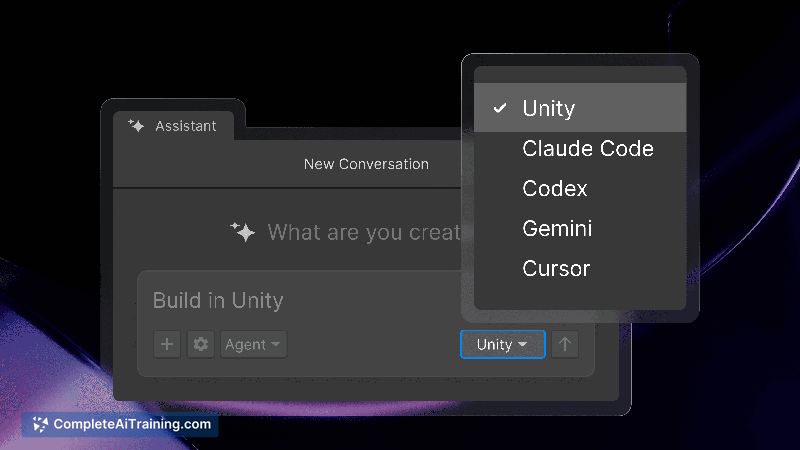
Unity AI is a beta suite for Unity 6+ that embeds AI agents directly into the Editor to assist with project tasks. It offers a project-aware assistant, an AI Gateway for connecting third-party agents, and an MCP Server to link the Editor with IDEs and external tools.
Review
Unity AI brings agent-based assistance into the Editor so suggestions and actions can be informed by project context such as scenes, GameObjects, components, and assets. The suite supports Unity's built-in assistant or external providers through AI Gateway and includes control surfaces for undo, asset tagging, permissions, and generator controls. As a beta release, it shows clear potential to reduce context switching during development while some features and stability remain in progress.
Key Features
- Project-aware assistant that works with scenes, GameObjects, components, assets, and Editor actions
- AI Gateway to connect supported third-party AI subscriptions and services
- MCP Server to bridge the Editor with IDEs and external tools for tighter workflows
- Control surfaces for undo, AI-generated asset tagging, permission handling, and generator controls
- Built-in and extensible options - use the bundled agent or route work to external models
Pricing and Value
The launch includes free options for early access and evaluation. Connecting external agents typically requires the third-party provider's subscription or API usage fees, while the core suite is available during the beta. The main value proposition is reducing context switching and speeding routine tasks by keeping assistance inside the Editor; teams should weigh the cost of any external model subscriptions against time saved in iteration and asset handling. Documentation and a Guiding Principles page are available for questions about model behavior and policies.
Pros
- Works directly inside the Editor, using real project context for relevant suggestions
- Flexibility to use the built-in assistant or link external AI providers via AI Gateway
- Control surfaces (undo, tagging, permissions) help manage AI actions safely
- Free access in beta makes it straightforward to try without upfront licensing
- Bridges to IDEs and external tools through MCP Server for smoother toolchains
Cons
- Beta status means features, stability, and integrations may change over time
- Requires Unity 6+ so projects on older engine versions cannot adopt it immediately
- May inherit Editor performance constraints on lower-spec machines; teams should test impact on their projects
Unity AI is best suited for developers and small teams who want in-Editor assistance for interactive and game-focused projects and who are running recent engine versions. It is a good fit for those who prefer to keep AI-driven workflows inside the Editor or who need the option to route tasks to external models; teams seeking mature, production-grade AI features should plan for ongoing updates as the beta evolves.
Open 'Unity AI' Website
Your membership also unlocks: