
MCP server · Finance and crypto
NOVAI MCP server
by 0x-devc
Lets your AI look up blocks, transactions, balances and AI entity records on the NOVAI blockchain.
This is a small helper that connects your AI assistant to the NOVAI blockchain, a network built around AI agents. Once it is set up, you can ask your AI plain questions about what is happening on that chain and it will go and check for you. It is handy if you follow crypto or AI agent projects and want quick answers without opening a block explorer.
What is an MCP server? The 30-second version
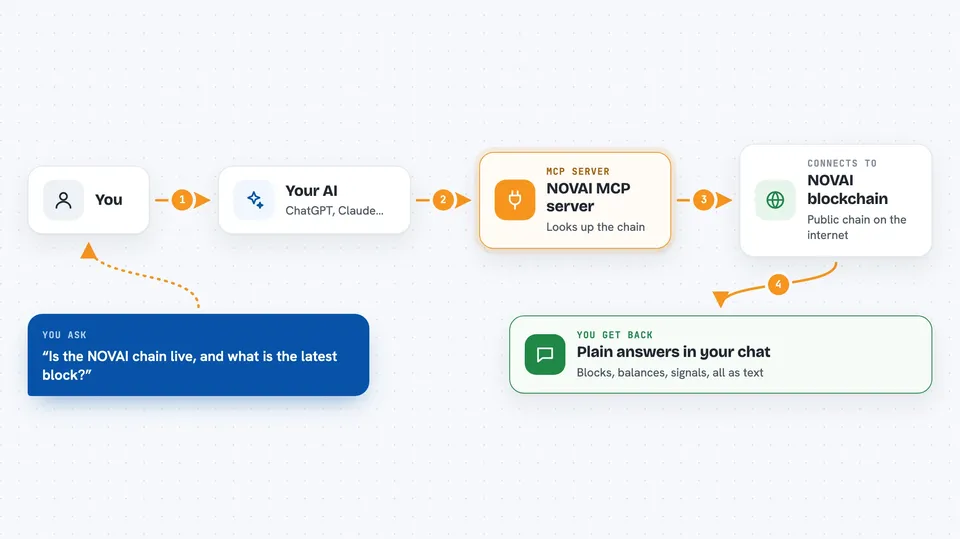
On its own, your AI can only chat with you using what it already knows. An MCP server is a small helper program that gives your AI a new skill or a connection to an outside service. This one connects your AI to the NOVAI blockchain, so when you ask about a block or an address, the AI can actually go and read the live chain instead of guessing. You do not install anything complicated; your AI client just needs to be pointed at this helper.
What this MCP server does
You ask your AI a question about the NOVAI chain, like whether it is running or what a certain transaction did. The AI passes that request to this helper. The helper sends a simple read request to the public NOVAI address on the internet and gets the answer back. It hands the result to your AI, which explains it to you in the chat. Everything is read-only, so nothing on the chain is ever changed.
 Click to zoom
What you can do with it
- Check whether the NOVAI chain is live and see its latest block
- Look up a specific block by its height or its hash
- Look up a transaction and see whether it was confirmed
- Check the balance and nonce of any address
- Read the record of an AI entity (an agent) on the chain
- List signals recorded at a certain height or from a certain issuer
- Fetch oracle anchors and on-chain memory objects for an entity
Try asking your AI
- “Is the NOVAI chain live right now, and what is the latest block height?”
- “Show me the transaction with this id and tell me if it was confirmed”
- “What is the balance of this address on NOVAI?”
- “List the signals issued by this entity between block 1000 and 2000”
What it gives back to you
You get back plain answers in the chat: a block summary, a transaction record, a balance as a number, or a list of signals, oracle anchors or memory objects. If something is not found, the AI will tell you it came back empty rather than making something up. Everything is shown as text you can read, not as code.
Before you start
What you need
- Node.js 18 or newer installed on your computer
- An AI app that supports MCP servers, like the Claude desktop app
- Nothing else: the public NOVAI endpoint is open and needs no password
Good to know
This server is read-only and never touches private keys, so it cannot move or change anything on the chain.
Install it with your AI
Add NOVAI MCP server to your AI, no technical skills needed
You don't install anything by hand. You copy one prompt, paste it into an AI that can work on your computer, and it checks, installs and connects the server for you, asking you when it needs something.
Sign in to get the install prompt
Members get a ready-made prompt that lets the Claude desktop app check NOVAI MCP server, install it and connect it for them, step by step. You don't need any technical skills: you copy, paste and answer a few questions. Your connected AI can also find and install any of the 4,609 MCP servers here for you.
Who it's for
People who follow crypto or AI agent projects and want quick, plain answers about the NOVAI chain without opening a block explorer.



