
MCP server · Security
Cybersec Toolkit MCP server
by 26zl
Lets your AI find and run security tools for CTF, pentesting, bug bounty and DFIR work, under rules you set.
This is a security toolkit that installs over 670 security tools on Linux, and then lets your AI helper use them for you. You ask your AI a question like "triage this file" or "scan my lab network", and it picks the right tools and runs them. It is handy for people doing CTF challenges, penetration testing practice, bug bounty work, or digital forensics.
What is an MCP server? The 30-second version
On its own, your AI can only chat. It cannot actually run a security tool on your computer. An MCP server is a small helper program that gives your AI a new skill or a connection to something. This one connects your AI to a big collection of security tools, so when you ask it to scan something or look at a file, it can actually do it instead of just talking about it.
What this MCP server does
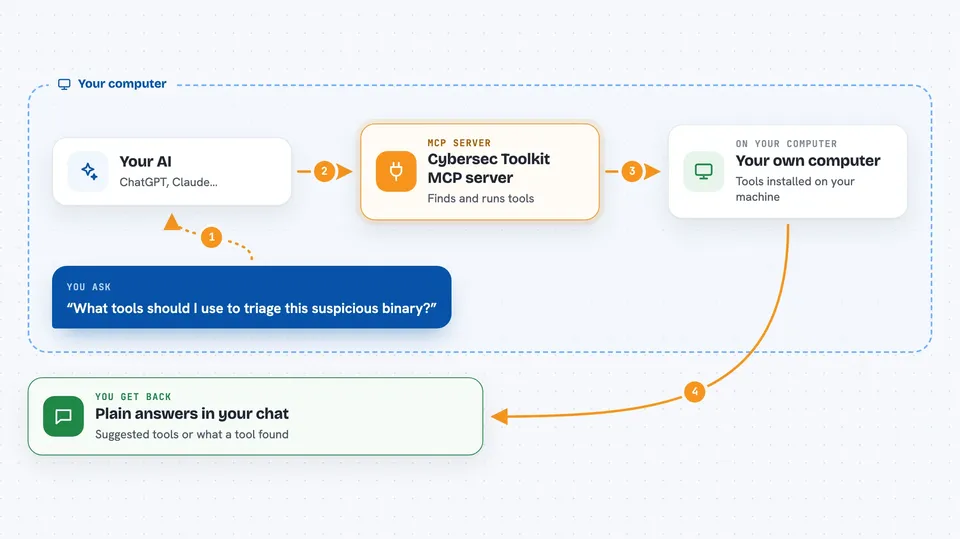
You install the toolkit once, which puts hundreds of security tools on your machine. Then you connect your AI client to the MCP server that comes with it. When you ask your AI something like "what tools should I use for this challenge", the AI asks this helper, and the helper looks through its list of tools and suggests some. If you ask it to run a tool, the helper checks the request against a set of safety rules first, then runs it and sends the result back to your AI. By default, tools run inside a throwaway virtual machine, and anything that touches the internet or runs custom scripts is turned off unless you allow it.
 Click to zoom
What you can do with it
- Find security tools by what you are trying to do
- Get advice on which tools fit a CTF, pentest, bug bounty or forensics task
- Run an allowed tool on a file or a target you control
- Chain several tools together into a small workflow
- Scan a private or lab network range you own
- Look up details about a tool before you use it
Try asking your AI
- “What tools should I use to triage this suspicious binary?”
- “Help me map the attack surface of my lab at 10.10.0.0/24”
- “Which tools fit a beginner CTF web challenge?”
- “Run a basic port scan on my test machine and summarize what you find”
What it gives back to you
You get back plain answers in your chat: a list of suggested tools, a short explanation of what each one does, or the output of a tool you asked it to run. Long output is trimmed so it stays readable. If it ran something, it tells you what it ran and what came back. It does not dump raw terminal noise at you.
Before you start
What you need
- A Linux computer or Termux on Android (it does not run on macOS or Windows directly)
- The toolkit installed with its install script, which takes 15 to 45 minutes for a full install
- An AI client that supports MCP, like Claude Code, Codex, Gemini CLI or OpenCode
- For the default sandbox mode: Docker 23 or newer with a Kata runtime, Node.js 22 or newer, and a Linux machine with KVM
Good to know
This toolkit installs real security tools that can scan, probe and change systems, so only point it at machines and networks you own or have written permission to test.
Install it with your AI
Add Cybersec Toolkit MCP server to your AI, no technical skills needed
You don't install anything by hand. You copy one prompt, paste it into an AI that can work on your computer, and it checks, installs and connects the server for you, asking you when it needs something.
Sign in to get the install prompt
Members get a ready-made prompt that lets the Claude desktop app check Cybersec Toolkit MCP server, install it and connect it for them, step by step. You don't need any technical skills: you copy, paste and answer a few questions. Your connected AI can also find and install any of the 4,609 MCP servers here for you.
Who it's for
People learning or working in security: CTF players, pentesters, bug bounty hunters, and digital forensics or blue-team analysts.



