MCP server · Security · official
Kakunin MCP server
by kakunin-ai · official
Lets your AI check if it is allowed to act, see its own risk score, and write events to a tamper-proof log.
This is a small helper that connects your AI assistant to Kakunin, a service that keeps track of what AI agents are allowed to do. It is made for teams that let AI agents take real actions, like placing trades or moving money, and need a record of it. If your AI just writes text for you, you probably do not need this.
What is an MCP server? The 30-second version
On its own, your AI can only chat with you. An MCP server is a small helper program that gives your AI a new skill or a connection to another service. This one connects your AI to Kakunin, so it can ask Kakunin questions and send Kakunin updates while you talk to it. You do not install anything complicated; you add a few lines to a settings file and your AI picks up the new ability.
What this MCP server does
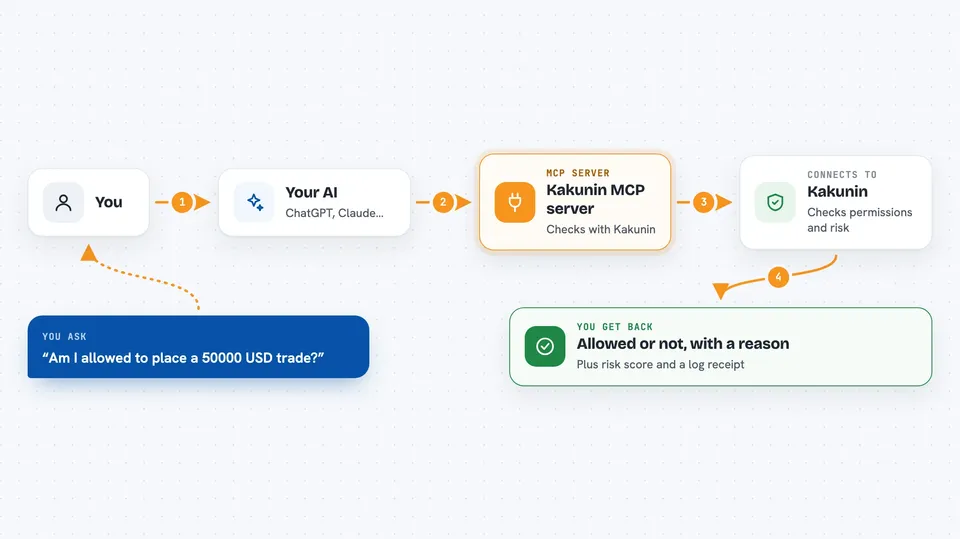
You ask your AI to do something, like check whether it is allowed to place a trade. The AI passes that request to this helper, and the helper talks to Kakunin over the internet. Kakunin looks at the agent's certificate, its allowed actions, its spending limits, and whether it has been revoked, then sends an answer back. The helper hands that answer to your AI, and your AI tells you yes or no, with a short reason. You can also ask for the agent's risk score, or ask the AI to write an event into the audit log.
 Click to zoom
What you can do with it
- Check whether the agent is allowed to do a specific action before it happens
- See the agent's rolling 30-day risk score and whether it is low, medium, or high
- Look at whether the agent's behaviour is drifting over time
- Append a behavioural event to the agent's audit log
- Get a transaction ID back after logging an event
- Trigger a certificate revocation check automatically when an event scores high risk
Try asking your AI
- “Am I allowed to initiate a EUR/USD trade on euronext for 50000 USD?”
- “What is my current risk score and band?”
- “Log that I started a transaction of 50000 USD on NYSE.”
- “Has my risk been drifting over the last month?”
What it gives back to you
You get short, clear answers in the chat. A scope check comes back as allowed or not allowed, with a reason, the certificate status, and the list of permitted actions. A risk check comes back as a number, a band like low or medium, a drift trend, and some guidance. When you log an event, you get the updated risk score and a transaction ID.
Before you start
What you need
- Node.js version 18 or newer
- A Kakunin API key from kakunin.ai/dashboard (a kind of password for apps; the dashboard gives you one)
- A Kakunin Agent ID from the same dashboard
- The Claude desktop app, or another AI app that supports MCP servers
Good to know
This server can write to an audit log and can trigger certificate revocation checks, so treat the API key like a password and use a test key while you are learning.
Install it with your AI
Add Kakunin MCP server to your AI, no technical skills needed
You don't install anything by hand. You copy one prompt, paste it into an AI that can work on your computer, and it checks, installs and connects the server for you, asking you when it needs something.
Sign in to get the install prompt
Members get a ready-made prompt that lets the Claude desktop app check Kakunin MCP server, install it and connect it for them, step by step. You don't need any technical skills: you copy, paste and answer a few questions. Your connected AI can also find and install any of the 4,361 MCP servers here for you.
Who it's for
Teams and developers who run AI agents that take real actions, especially in finance or compliance, and need permissions and an audit trail.