
MCP server · Finance and crypto
Eastmoney A-share MCP server
by 27dream
Ask your AI for China A-share quotes, capital flows, sector rankings and K-line history.
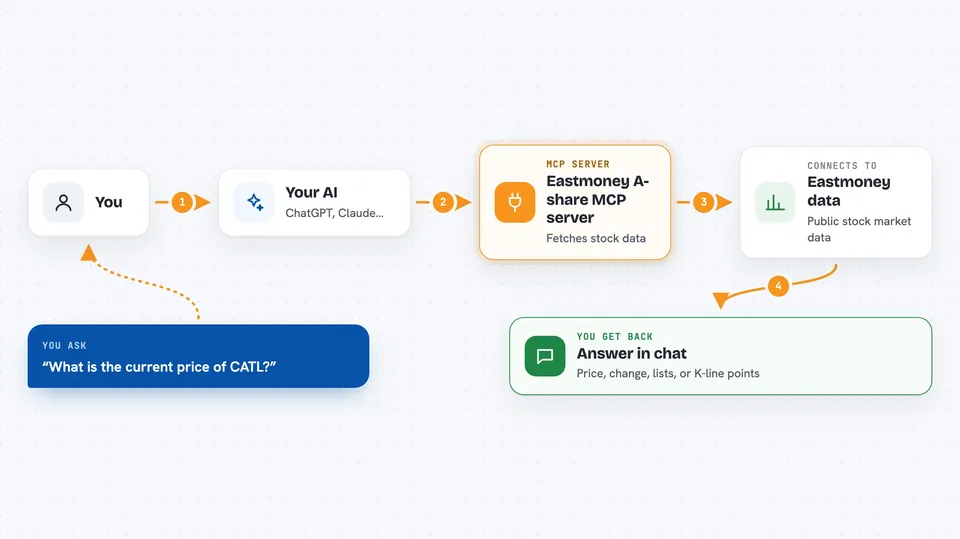
This is a small helper that lets your AI assistant look up China A-share market data from Eastmoney. You ask in plain words, and the AI fetches quotes, money flow rankings, sector flows or past price history for you. It is handy if you follow Chinese stocks and want quick answers without opening a finance site.
What is an MCP server? The 30-second version
On its own, your AI can only chat with you using what it already knows. An MCP server is a small helper program that gives your AI a new skill or a connection to an outside service. This one connects your AI to Eastmoney, a Chinese finance site, so the AI can look up live-ish stock data there when you ask. You do not need to be technical to use it, you just need to set it up once.
What this MCP server does
You type a question about a Chinese stock or the market. Your AI reads the question and decides which of this helper's five tools fits best. The helper then talks to Eastmoney's public data service and brings back the numbers. Your AI turns those numbers into a short answer in the chat, often with a small table or list. Everything happens in a few seconds, and you never leave your chat window.
 Click to zoom
What you can do with it
- Look up the current price and daily change of a Chinese stock
- Search for a stock by name, pinyin or code
- See which stocks had the biggest main capital inflow today
- Check which industry or concept sectors got the most money
- Pull daily, weekly or monthly K-line history for a stock
- Compare turnover, PE and trading volume across stocks
Try asking your AI
- “What is the current price of CATL (300750) and how much did it move today?”
- “Show me the top 10 stocks by main capital inflow today.”
- “Which industry sectors had the biggest money inflow today?”
- “Give me the last 30 daily K-lines for Kweichow Moutai (600519).”
What it gives back to you
You get a short written answer in the chat, often with a small list or table of numbers. For a quote, that means price, change, volume, PE and turnover. For rankings, you get a numbered list of stocks or sectors with their inflow amounts. For K-lines, you get a series of daily, weekly or monthly price points.
Before you start
What you need
- An MCP client like Claude Desktop, Cursor, Cline or Continue
- uv (a small tool that runs Python programs; the README shows the one-line install)
- An internet connection
Good to know
The data comes from Eastmoney's delayed feed (about 15 minutes behind) and is for research only, not investment advice.
Install it with your AI
Add Eastmoney A-share MCP server to your AI, no technical skills needed
You don't install anything by hand. You copy one prompt, paste it into an AI that can work on your computer, and it checks, installs and connects the server for you, asking you when it needs something.
Sign in to get the install prompt
Members get a ready-made prompt that lets the Claude desktop app check Eastmoney A-share MCP server, install it and connect it for them, step by step. You don't need any technical skills: you copy, paste and answer a few questions. Your connected AI can also find and install any of the 4,361 MCP servers here for you.
Who it's for
People who follow China A-share stocks and want quick data answers inside their AI chat, without opening a finance website.





