MCP server · Finance and crypto
ReNoUn MCP server
by 98lukehall
Lets your AI check whether a crypto market looks calm, active, or unstable before you trade.
ReNoUn is a helper that looks at crypto market structure and tells you if conditions are calm, active, or unstable. It also guesses how long the current calm or choppy phase might last. It is handy for people who run trading bots or just want a second opinion before placing a trade.
What is an MCP server? The 30-second version
On its own, your AI can only chat with you. An MCP server is a small helper program that gives your AI a new skill or a connection to an outside service. This one connects your AI to ReNoUn, a service that watches crypto markets. Once connected, your AI can ask ReNoUn about a coin and bring the answer back to you.
What this MCP server does
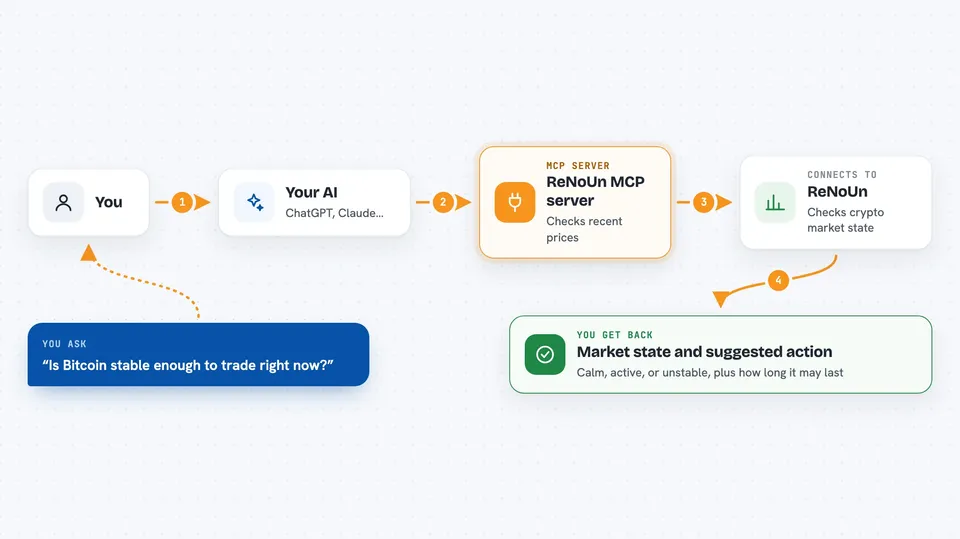
You ask your AI something like whether Bitcoin looks stable right now. Your AI sends that question to the ReNoUn helper. The helper talks to the ReNoUn service, which looks at recent price candles and sorts the market into one of three states: bounded (calm), active (moving), or unstable (messy). ReNoUn also estimates how many minutes the current state is likely to last. Your AI then tells you the state and what it suggests you do.
 Click to zoom
What you can do with it
- Check the current market state for a coin like BTCUSDT or ETHUSDT
- See how many minutes the current calm or choppy phase might last
- Get a suggested action: proceed, reduce your position, or avoid
- Check several coins at once and see a combined risk picture
- Ask your AI to compare two coins side by side
- Register a webhook so you get pinged when the state changes
Try asking your AI
- “Is Bitcoin stable enough to trade right now?”
- “Check the market state for ETHUSDT and tell me if I should reduce my position.”
- “How long is the current calm phase on SOLUSDT likely to last?”
- “Compare BTCUSDT and ETHUSDT and tell me which looks safer.”
What it gives back to you
You get back a short answer in the chat: the state (bounded, active, or unstable), a suggested action, and a stability estimate in minutes. If you asked about several coins, you also get a combined risk note. The AI may also show you the raw numbers, like the stability score and urgency level.
Before you start
What you need
- A ReNoUn API key (you can get one free by sending your email; it looks like rn_agent_...)
- The Claude desktop app or Claude Code if you want to add it as an MCP server
- Python 3 if you plan to run the server yourself
Good to know
ReNoUn does not predict whether prices go up or down; it only describes market structure, so do not treat it as a buy or sell signal.
Install it with your AI
Add ReNoUn MCP server to your AI, no technical skills needed
You don't install anything by hand. You copy one prompt, paste it into an AI that can work on your computer, and it checks, installs and connects the server for you, asking you when it needs something.
Sign in to get the install prompt
Members get a ready-made prompt that lets the Claude desktop app check ReNoUn MCP server, install it and connect it for them, step by step. You don't need any technical skills: you copy, paste and answer a few questions. Your connected AI can also find and install any of the 4,361 MCP servers here for you.
Who it's for
People who run crypto trading bots or make their own crypto trades and want a quick risk check before acting.