MCP server · Analytics
Approximate Filters MCP server
by chohyerinn
Compare Bloom, Counting Bloom, Cuckoo and SuRF filters for keyword lookups from your AI chat.
This is a small set of helper programs that let your AI test different ways of checking whether a word is in a list. It is made for people who want to see how Bloom filters, Cuckoo filters and similar tools behave, without writing code themselves. If you have ever wondered how search boxes or blocked-word lists stay fast, this is a hands-on way to look.
What is an MCP server? The 30-second version
On its own, your AI can only chat. An MCP server is a small helper program that gives your AI a new skill or a connection to something outside the chat. Here, the helper connects your AI to a set of filter data structures, so it can build a filter, add words, check if a word is inside, and report things like memory use. You just ask in plain words, and the AI picks the right helper behind the scenes.
What this MCP server does
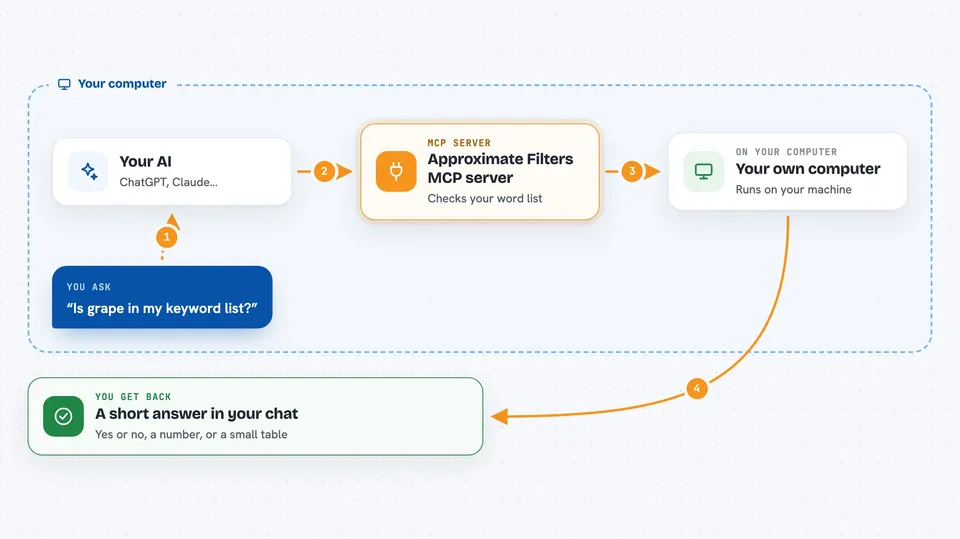
You ask your AI something like whether a word is in a keyword list. The AI sends that request to this helper program. The helper picks one of the filter structures, such as Bloom or Cuckoo, and runs the check on the data you gave it. The result comes back into the chat as a simple answer, a number, or a small table. You can also ask it to compare filters side by side on the same word list.
 Click to zoom
What you can do with it
- Build a filter from a list of words you paste in
- Check whether a word is inside a filter
- Add a new word to a filter
- Delete a word from filters that support deletion
- Ask for a prefix or range query on filters that support it
- See the estimated memory each filter uses
- Measure the false positive rate of a filter
Try asking your AI
- “Build a Bloom filter from these keywords: apple, banana, cherry, date”
- “Is the word grape in the Cuckoo filter”
- “Compare memory usage of Bloom, Counting Bloom and Cuckoo on the same list”
- “What is the false positive rate of the SuRF filter on this dataset”
What it gives back to you
You get short answers in the chat: yes or no for membership checks, a number for memory usage, a percentage for false positive rate, and small lists or tables when you ask for comparisons. If you build a filter, it stays available for follow-up questions in the same session. Nothing is written to your files unless you ask for it.
Before you start
What you need
- Python installed on your computer
- The Claude desktop app or another AI app that supports MCP servers
- The project files from the GitHub page downloaded to your computer
Good to know
Approximate filters can say yes for a word that is not really in the list, so do not treat a yes as proof unless you use the exact baseline filter.
Install it with your AI
Add Approximate Filters MCP server to your AI, no technical skills needed
You don't install anything by hand. You copy one prompt, paste it into an AI that can work on your computer, and it checks, installs and connects the server for you, asking you when it needs something.
Sign in to get the install prompt
Members get a ready-made prompt that lets the Claude desktop app check Approximate Filters MCP server, install it and connect it for them, step by step. You don't need any technical skills: you copy, paste and answer a few questions. Your connected AI can also find and install any of the 4,361 MCP servers here for you.
Who it's for
Students, teachers and data-curious office workers who want to see how approximate filters behave without writing code.