MCP server · Analytics · official
Optuna MCP server
by optuna · official
Let your AI run optimization experiments and show you the results as charts.
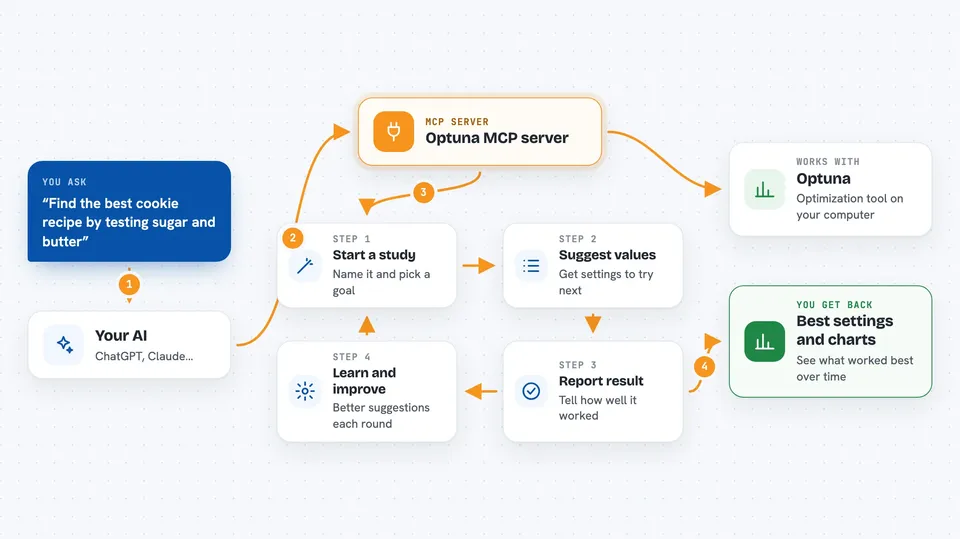
This is a small helper program that connects your AI assistant to Optuna, a free tool for finding the best settings for a task. It is handy for anyone who wants to try many combinations of values and see which one works best, without writing code. You just chat with your AI, and it runs the experiments for you.
What is an MCP server? The 30-second version
On its own, your AI can only chat. An MCP server is a small helper program that gives your AI a new skill or a connection to another tool. This one connects your AI to Optuna, a tool for optimization. Once it is set up, your AI can create experiments, suggest values, record results, and draw charts for you.
What this MCP server does
You ask your AI to start an optimization study, for example to find the best settings for a recipe or a video encoder. The AI uses this helper to create the study in Optuna. Then the AI suggests a set of values to try, you or the AI measure the result, and the AI records it. This repeats, and Optuna learns from each round to suggest better values. At the end, you can ask for charts or a dashboard to see what worked best.
 Click to zoom
What you can do with it
- Start a new optimization study with a name and a goal (minimize or maximize)
- Ask for suggested values to try next
- Report the result of each try
- See the best result so far
- Get a chart of how the results improved over time
- See which settings matter most
- Open a web dashboard to explore the results
Try asking your AI
- “Create an Optuna study called Find-Best-Cookie for maximizing taste.”
- “Suggest two values for sugar and butter between 0 and 200 grams.”
- “Report the taste score 8.5 for that trial.”
- “Show me the optimization history plot.”
What it gives back to you
You get answers in the chat: lists of suggested values, the best result found so far, and tables of past tries. When you ask for a chart, it appears as an image right in the conversation. If you launch the dashboard, you get a link to a web page where you can click around and see the same charts.
Before you start
What you need
- The uv tool from Astral (a free program that runs Python tools)
- The Claude desktop app or another app that supports MCP servers
Good to know
It can start a web dashboard on your computer and, if you set a storage file, it will save data there.
Install it with your AI
Add Optuna MCP server to your AI, no technical skills needed
You don't install anything by hand. You copy one prompt, paste it into an AI that can work on your computer, and it checks, installs and connects the server for you, asking you when it needs something.
Sign in to get the install prompt
Members get a ready-made prompt that lets the Claude desktop app check Optuna MCP server, install it and connect it for them, step by step. You don't need any technical skills: you copy, paste and answer a few questions. Your connected AI can also find and install any of the 4,361 MCP servers here for you.
Who it's for
Anyone who wants to find the best settings for something by trying many combinations, like data scientists, engineers, or curious tinkerers.