MCP server · API
Blink Camera MCP server
Let your AI aim your Blink pan/tilt camera, check where it points, and take a snapshot.
This is a small helper that connects your AI assistant to your Amazon Blink camera, including the pan and tilt mount. It lets the AI see where the camera is pointing, turn it to a new angle, send it back home, and grab a still picture. It is handy if you have a Blink camera with a moving mount and want to steer it by just asking in plain words.
What is an MCP server? The 30-second version
On its own, your AI can only chat. An MCP server is a small helper program that gives your AI a new skill or a connection to an app or service. This one connects your AI to your Blink camera and its pan/tilt mount, so the AI can look up the camera's position or move it when you ask. You do not need to know how it works inside; you just talk to your AI like usual.
What this MCP server does
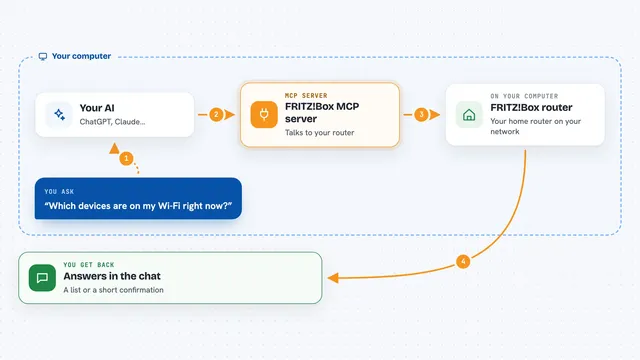
You ask your AI something like "point the front door camera a bit to the left." The AI passes that request to this helper. The helper logs into your Blink account, opens a live session with the camera, and sends the movement command to the mount. It waits until the hardware itself confirms the new angle, then tells the AI the result. For a snapshot, it grabs one frame from the live stream and hands it back as an image.
What you can do with it
- Check where the camera is pointing and how far it can travel
- Aim the camera at a specific angle
- Nudge the camera a few degrees left, right, up, or down
- Stop the motors while the camera is moving
- Send the camera back to its saved home position
- Save the current angle as the new home
- Take a snapshot of whatever the camera is looking at
Try asking your AI
- “Where is the front door camera pointing right now?”
- “Turn the front door camera 10 degrees to the left.”
- “Send the camera back to its home position.”
- “Take a snapshot from the front door camera.”
What it gives back to you
You get short answers in the chat, like the current pan and tilt angles, whether the move finished, and how long it took. If you ask for a snapshot, you get an image right in the conversation. If the camera cannot confirm a move, the helper says it failed instead of guessing. Nothing is captured unless you ask for it.
Before you start
What you need
- A Blink account with your email and password
- Python 3.10 or newer
- ffmpeg installed on your computer (needed for snapshots)
- A file path where you can drop a 2FA code if your Blink account uses two-step verification
Good to know
This helper moves a real camera, so a wrong request will physically turn it, and snapshots show whatever the camera is pointed at, so only use it when you mean to.
Install it with your AI
Add Blink Camera MCP server to your AI, no technical skills needed
You don't install anything by hand. You copy one prompt, paste it into an AI that can work on your computer, and it checks, installs and connects the server for you, asking you when it needs something.
Sign in to get the install prompt
Members get a ready-made prompt that lets the Claude desktop app check Blink Camera MCP server, install it and connect it for them, step by step. You don't need any technical skills: you copy, paste and answer a few questions. Your connected AI can also find and install any of the 4,361 MCP servers here for you.
Who it's for
People who own a Blink camera with a pan/tilt mount and want to control it by chatting with their AI, without learning any camera software.