MCP server · No-code
HomeMatic CCU MCP server
by claymore666
Ask your AI to read sensors, switch lights, set heating and check your HomeMatic smart home.
This is a small helper that lets your AI assistant talk to your HomeMatic smart home. It connects to the box that runs your home automation (called the CCU) over your own home network. It is handy if you already have HomeMatic devices and want to ask questions or make changes in plain language instead of clicking through the web interface.
What is an MCP server? The 30-second version
On its own, your AI can only chat. An MCP server is a small helper program that gives your AI a new skill or a connection to another app. This one connects your AI to your HomeMatic CCU, the little box that controls your smart home devices. Once it is connected, your AI can look up readings and make changes there when you ask.
What this MCP server does
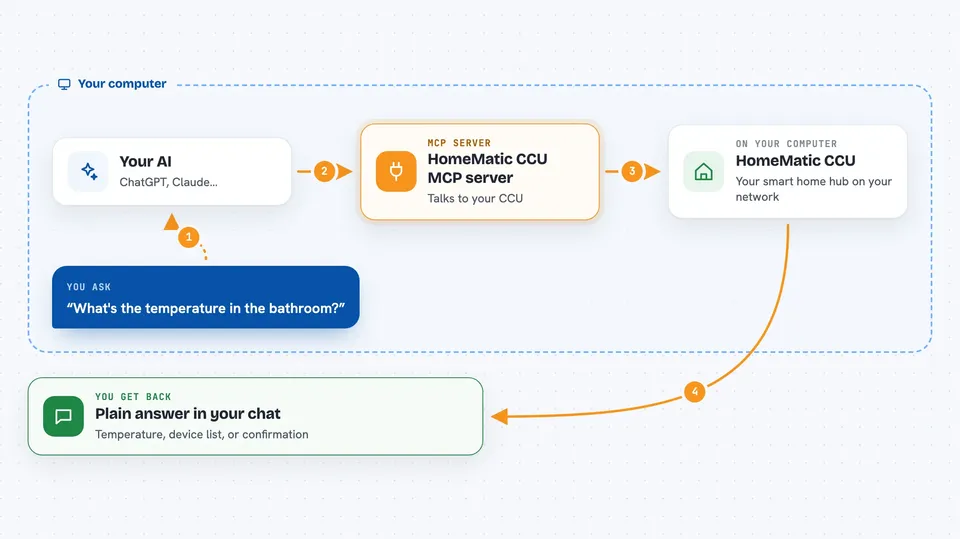
You type a request in plain words, like asking about a room or a device. Your AI passes that request to this helper program running on your computer. The helper then talks to your CCU over your local network and asks it for the information or the change you wanted. The CCU answers, and the helper hands the result back to your AI. Your AI then shows you the answer in the chat, in normal language.
 Click to zoom
What you can do with it
- Read the temperature, humidity or other sensor values in any room
- Switch lights and other actuators on or off
- Dim lights to a level you choose
- Set the heating to a temperature you want
- List all devices with a low battery
- Check which windows or doors are open
- Run your existing home automation programs and read system variables
Try asking your AI
- “What's the temperature in the bathroom?”
- “Are any windows open right now?”
- “Set the living room heating to 21 degrees”
- “Show me all devices with a low battery”
What it gives back to you
You get answers in plain language in your chat, like a temperature, a list of devices, or a short summary of what it found. If you asked for a change, it tells you whether the change was made. Lists come back as simple bullet points, not tables of raw numbers. Everything is written the way you would say it out loud.
Before you start
What you need
- A running HomeMatic CCU (debmatic, CCU3 or OpenCCU) reachable on your home network
- The admin username and password you use to log into the CCU web interface
- Node.js 24 or newer, or Docker, to run the helper program
Good to know
This helper can change real things in your home, like switching devices, dimming lights and changing heating, so check with your AI before letting it make changes you did not mean.
Install it with your AI
Add HomeMatic CCU MCP server to your AI, no technical skills needed
You don't install anything by hand. You copy one prompt, paste it into an AI that can work on your computer, and it checks, installs and connects the server for you, asking you when it needs something.
Sign in to get the install prompt
Members get a ready-made prompt that lets the Claude desktop app check HomeMatic CCU MCP server, install it and connect it for them, step by step. You don't need any technical skills: you copy, paste and answer a few questions. Your connected AI can also find and install any of the 4,361 MCP servers here for you.
Who it's for
People who already run a HomeMatic smart home and want to check or adjust it by simply asking their AI.