MCP server · Analytics
AC Infinity MCP server
by ober37
Check your grow tent's temperature, humidity and VPD, and adjust fans or ports, just by asking your AI.

This is a small helper that connects your AI assistant to your AC Infinity grow controllers. Instead of opening the AC Infinity app and tapping through screens, you just type a question or an instruction in plain words. It is handy if you run a grow tent or room and want quick answers about what your environment is doing.
What is an MCP server? The 30-second version
On its own, your AI can only chat with you. An MCP server is a small helper program that gives your AI a new skill or a connection to an app or service. This one connects your AI to your AC Infinity controllers, so it can look up your sensor readings or change a port setting when you ask. You set it up once, and after that your AI can reach your equipment for you.
What this MCP server does
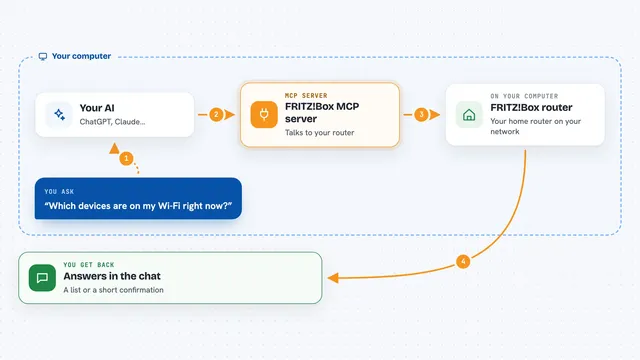
You ask your AI something like what your VPD has been doing this week. Your AI passes that request to this helper program. The helper logs into your AC Infinity account and asks the AC Infinity cloud for the data. Then it hands the answer back to your AI, which explains it to you in the chat. For changes, like turning a port off, it shows you exactly what it would send first, and only does it when you say go ahead.
 Click to zoom
What you can do with it
- List all your controllers and the ports on each one
- Read live temperature, humidity, VPD and port states
- Pull historical readings for a chosen time range
- Check whether your VPD is on target for your grow stage
- Get a simple environment health score from A to F
- See which ports have been running the most this week
- Turn a port on or off, or set a fan speed
- Set up VPD, temperature or humidity automation on a port
Try asking your AI
- “What's the VPD trend in my tent over the last 7 days?”
- “Is my environment in the right range for late flower?”
- “Turn off port 3 on my 69 Pro controller, dry run first.”
- “Show me which ports have been running the most this week.”
- “My VPD is too high, what should I adjust?”
What it gives back to you
You get answers written out in the chat, like a short summary of your VPD trend or a health grade with a score out of 100. It can also give you lists, such as all your devices and ports, or per-port activity with hours and peak times. When you ask for a change, it first shows you the exact settings it would send, so you can read them before anything happens. Once you confirm, it tells you what it changed.
Before you start
What you need
- An AC Infinity account with at least one compatible controller
- Your AC Infinity account email and password
- Python 3.11 or newer if you install it yourself, or Docker if you prefer that route
- An AI app that supports MCP servers, such as the Claude desktop app
Good to know
It can change your equipment settings and it signs in with your AC Infinity email and password, and the AC Infinity cloud connection is not encrypted, so avoid using it on networks you do not trust.
Install it with your AI
Add AC Infinity MCP server to your AI, no technical skills needed
You don't install anything by hand. You copy one prompt, paste it into an AI that can work on your computer, and it checks, installs and connects the server for you, asking you when it needs something.
Sign in to get the install prompt
Members get a ready-made prompt that lets the Claude desktop app check AC Infinity MCP server, install it and connect it for them, step by step. You don't need any technical skills: you copy, paste and answer a few questions. Your connected AI can also find and install any of the 4,361 MCP servers here for you.
Who it's for
Home growers and small grow-room operators who use AC Infinity controllers and want fast answers and easy adjustments without opening the app.