MCP server · Security
FRITZ!Box MCP server
by kambriso
Let your AI check and change your FRITZ!Box router: devices, Wi-Fi, network settings and parental controls.
This is a small helper that connects your AI assistant to your AVM FRITZ!Box router. Once it is set up, you can ask your AI in normal words to look at your home network or change a setting, instead of clicking through the router's web page. It is handy for anyone who runs a FRITZ!Box at home and wants less fiddling with menus.
What is an MCP server? The 30-second version
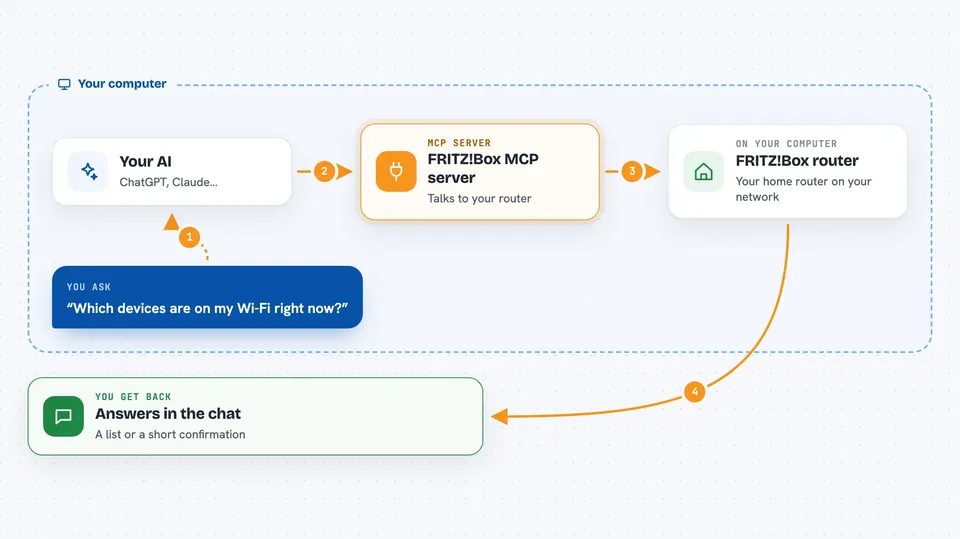
On its own, your AI can only chat. It cannot see your router or touch your home network. An MCP server is a small helper program that gives your AI one new skill, and here that skill is talking to your FRITZ!Box. You run this helper on your own computer, and when you ask a question about your network, your AI passes the request to it and it talks to the router for you.
What this MCP server does
You ask your AI something about your FRITZ!Box in plain words. Your AI sends that request to this helper program running on your computer. The helper then talks to your router over your home network. The router answers, and the helper sends the result back to your AI. Your AI then explains it to you in the chat, or makes the change you asked for.
 Click to zoom
What you can do with it
- List the devices connected to your FRITZ!Box
- Check and change your Wi-Fi settings
- Look at and adjust network settings
- Set up or change parental controls
- Schedule a router action to happen later
Try asking your AI
- “Which devices are connected to my FRITZ!Box right now?”
- “Turn off the guest Wi-Fi on my router.”
- “Show me the parental control rules for my kids' devices.”
- “Schedule the Wi-Fi to turn off tonight at 11pm.”
What it gives back to you
You get answers in the chat, in normal sentences. For example, a list of connected devices with their names, or a short confirmation that a setting was changed. If you asked about parental controls or schedules, it tells you what is currently set. It does not give you files, just text answers and the changes it made.
Before you start
What you need
- A FRITZ!Box router on your home network
- The login details for your router (the same ones you use for the FRITZ!Box web page)
- A computer to run the helper program on, on the same network as the router
Good to know
It can change your router settings, including Wi-Fi and parental controls, so be careful with requests that turn things off or change access for other people in your home.
Install it with your AI
Add FRITZ!Box MCP server to your AI, no technical skills needed
You don't install anything by hand. You copy one prompt, paste it into an AI that can work on your computer, and it checks, installs and connects the server for you, asking you when it needs something.
Sign in to get the install prompt
Members get a ready-made prompt that lets the Claude desktop app check FRITZ!Box MCP server, install it and connect it for them, step by step. You don't need any technical skills: you copy, paste and answer a few questions. Your connected AI can also find and install any of the 4,361 MCP servers here for you.
Who it's for
People who have a FRITZ!Box at home and want to check or change their network with plain questions instead of the router menus.